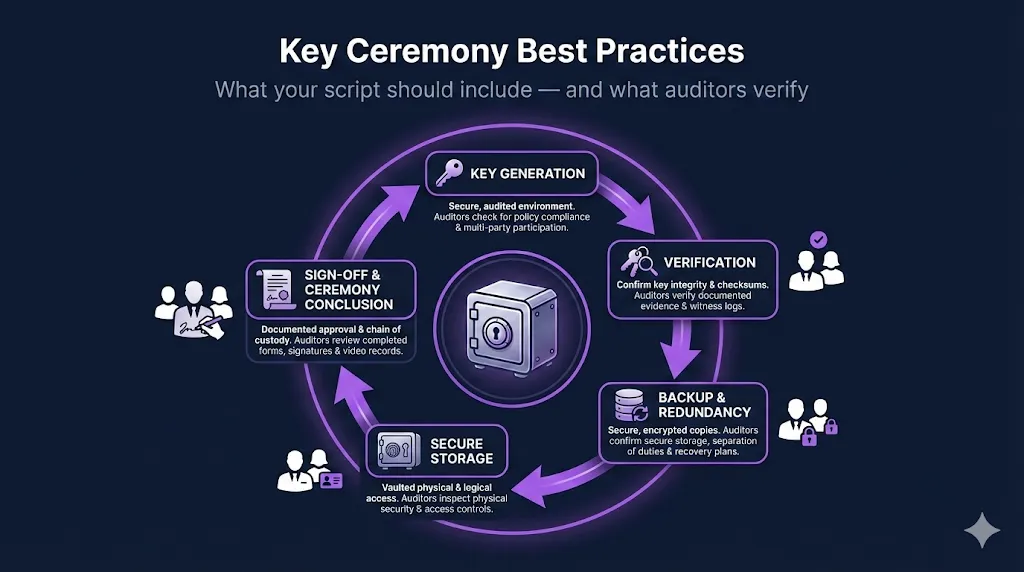
Key Ceremony Best Practices: What Your Script Should Include
You've been told you need a key ceremony. You Google it. You find a three-page academic description of what a key ceremony is, but nothing telling you what your script should actually say.
Maybe you find a vendor's Quick Start guide that shows you which buttons to click on their HSM, but skips over the governance layer entirely — no roles, no witness requirements, no sign-off sheets, no explanation of what happens when the auditor asks "show me the evidence."
A key ceremony is one of the few PKI events that auditors will scrutinize line by line. It's also the event most likely to be done once, documented poorly, and then questioned years later when nobody remembers the details. The people who were in the room have moved on. The HSM firmware has been updated twice. And the only record is a half-completed Word document in someone's OneDrive.
Here's what your key ceremony script needs to include — based on what actually happens in production and what auditors actually look for.
What Is a Key Ceremony (And Why Does It Need a Script)?
A key ceremony is the formal, witnessed process of generating cryptographic keys for a Certificate Authority. It's the foundational act of trust in your PKI — the moment your root CA's key pair comes into existence. Everything your PKI issues, validates, and protects traces back to this event.
The ceremony needs a script for three reasons: auditability, reproducibility, and compliance evidence. An auditor doesn't want to hear what you think happened. They want to see a documented, step-by-step record that proves what did happen.
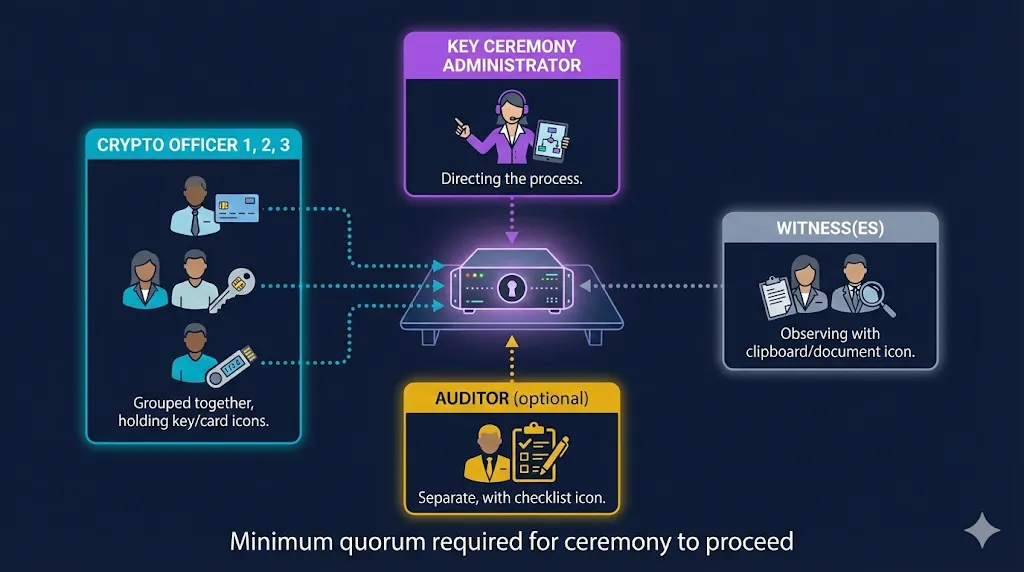
The people in the room typically include a Key Ceremony Administrator (who runs the script), Crypto Officers (who hold key shares or smart cards), Witnesses (who observe and attest), and optionally an Auditor (who validates the process in real time).
The script is the audit evidence. If it's not in the script, it didn't happen. If a step was performed but not documented, you have a gap. Auditors treat undocumented steps the same as skipped steps.
Pre-Ceremony Checklist
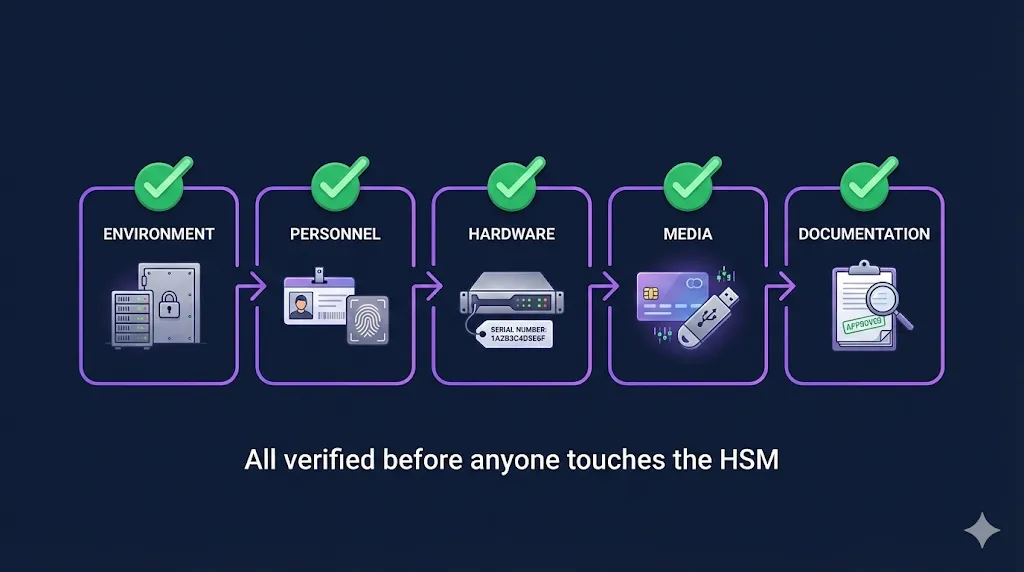
Before anyone touches the HSM, a series of verifications need to be completed and documented. Skipping this phase is one of the most common mistakes — teams jump straight to key generation and realize mid-ceremony that they forgot to check something critical.
Environment Verification
Confirm the ceremony environment meets your security requirements. For root CAs, this typically means an air-gapped or isolated workstation in a physically secured room. Document the room number, building, and any access controls (badge readers, cameras, locked doors). If you're using a network-connected HSM for a subordinate CA, document the network isolation and firewall rules.
Personnel Verification
Every person in the room should be identified by name and assigned a role. Check government-issued IDs if your policy requires it. Confirm that quorum requirements are met — if your key splitting scheme requires 3-of-5 crypto officers, make sure all five are present (or at least the minimum three). Record who arrived, when, and in what capacity.
Hardware Verification
Document the HSM model, serial number, and firmware version. This is the detail most teams forget, and it matters. When you need to perform another ceremony three to five years later — possibly on different hardware — knowing what firmware version you ran last time is invaluable. Check and record tamper-evident seal serial numbers. If the seals are broken or missing, stop. That's a finding before you even start.
Media and Documentation Preparation
Smart cards, USB tokens, or key share media should be prepared and labeled before the ceremony starts. Have blank ceremony logs, sign-off sheets, and tamper-evident bags ready. If your policy requires video recording, confirm the equipment is set up and working. Nothing derails a ceremony faster than realizing mid-step that you don't have the right media or that the camera battery is dead.
The Ceremony Script Structure
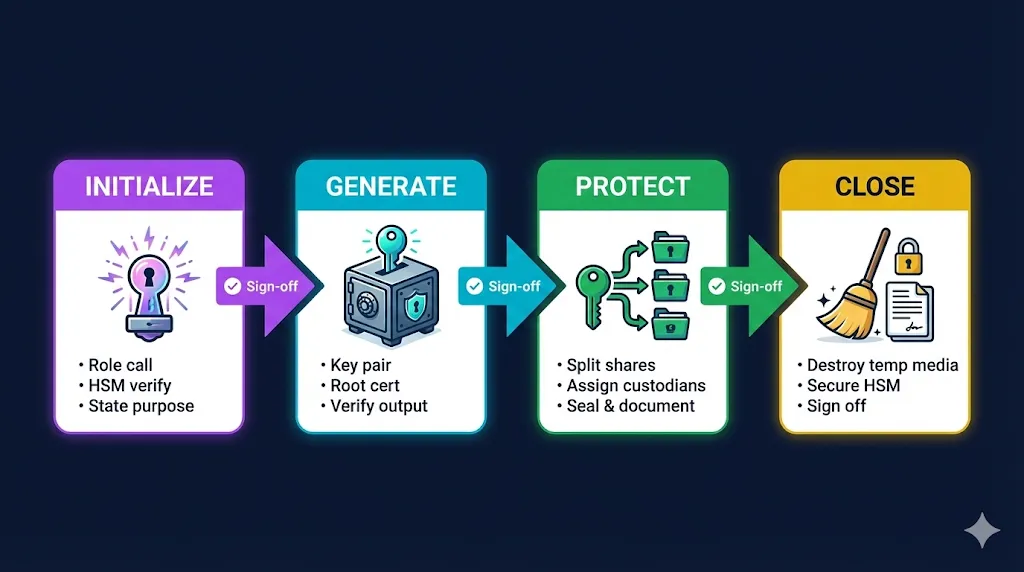
A well-structured ceremony script follows a predictable flow: initialize, generate, verify, back up, and shut down. Each phase has specific documentation requirements.
Initialization and Role Call
The script opens by establishing the official record. Document the date, time (including time zone), and physical location. Record every participant by full name and assigned role. State the purpose explicitly:
"This ceremony will generate the Root CA key pair for [ORGANIZATION] using [HSM MODEL], serial number [SERIAL]. The generated root certificate will have a validity period of [X] years."
Confirm quorum requirements are met and have all participants sign the attendance record before proceeding. This seems bureaucratic until an auditor asks you to prove who was in the room — then it's the most important page in the document.
HSM Operations
This is the technical core of the ceremony. Each step should include the exact command or action performed and space for the operator to record the result:
- Initialize the HSM (or verify the existing partition for subordinate CA ceremonies)
- Generate the key pair — document the algorithm (RSA or ECDSA), key length (4096-bit, P-384, etc.), and the key label assigned in the HSM
- Generate the self-signed root certificate — document the full Subject DN, validity period, key usage extensions, and any other certificate extensions
- Export the public key and certificate — document the export format and destination media
- Verify the generated certificate — independently check the subject, extensions, key usage, and validity period against what was specified. This step is non-negotiable.
The Subject DN you choose during the ceremony will live in your infrastructure for the life of the root — often 20 or more years. Get the naming convention right before you start. Changing it later means reissuing everything.
Key Backup and Secret Sharing
After key generation, the activation data (PINs, passphrases, or key shares) needs to be split across multiple custodians. For each share:
- Document which share number was assigned to which custodian (by name)
- Seal each share in a tamper-evident bag and record the bag's serial number
- Document the storage location for each share — not "stored securely" but "Safe A, Building 3, Room 412, Custodian: Jane Smith"
- Have each custodian sign an acknowledgment that they received their share and understand their responsibilities
The separation of shares is a critical control. If two shares end up in the same safe, you've defeated the purpose of splitting them. Auditors will verify that shares are stored in physically separate locations with different access controls.
Shutdown and Cleanup
The ceremony isn't over when the key is generated. The script should include explicit cleanup steps:
- Securely destroy any temporary media (scratch paper, USB drives used during the ceremony)
- Return the HSM to its operational or secured state
- Confirm that no sensitive material remains on the workstation — if the workstation is air-gapped, document how it was wiped
- Collect all sign-off sheets and attach them to the ceremony record
- Seal the completed ceremony log and store it according to your retention policy
What Auditors Actually Look For
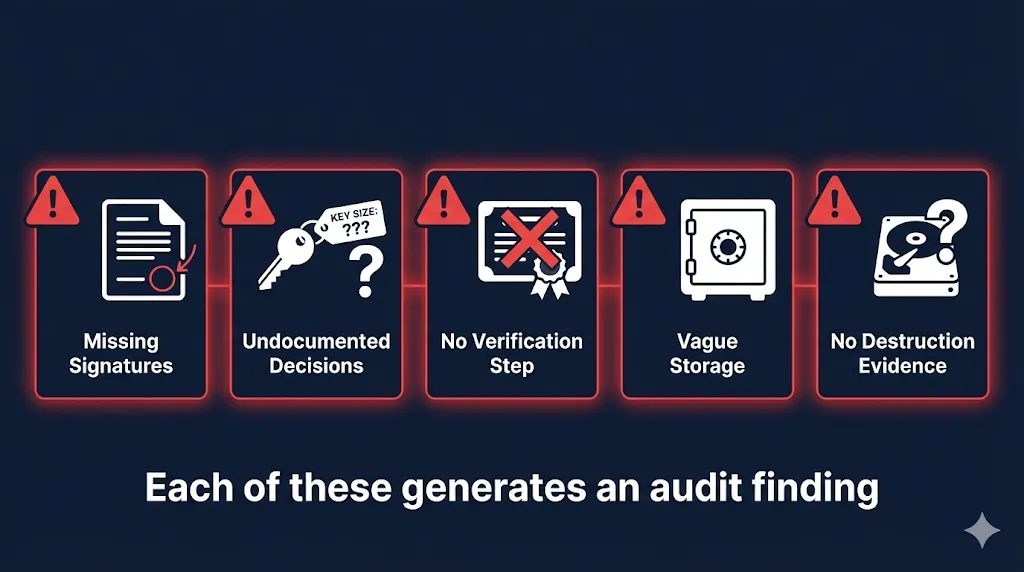
Based on real audit experience, these are the issues that generate findings most often. They're rarely about the cryptography — they're almost always about the documentation.
Missing signatures. Every step in the script should have a sign-off line. If a witness left the room during a step — even to use the restroom — that's a gap in attestation. The script should note when witnesses leave and return, and those steps may need to be re-witnessed.
Undocumented decisions. "We chose RSA-4096" is fine, but "We chose RSA-4096 because our compliance framework requires a minimum of 3072-bit keys and our HSM supports 4096-bit operations without performance degradation" is what auditors actually want. Document the rationale, not just the choice.
No verification step. Generating the key isn't enough. The script must include an explicit step where someone independently verifies the generated certificate against the specification. Subject DN correct? Key usage extensions correct? Validity period correct? If the script doesn't include verification, auditors will ask why.
Vague storage documentation. "Keys stored securely" means nothing to an auditor. "Share 1 stored in Safe A, Building 3, Room 412, controlled by Facilities Manager John Doe" means everything. Specificity is the difference between a clean audit and a finding.
No destruction evidence. If you used a temporary workstation or scratch media during the ceremony, how was it wiped? "We wiped the drive" is insufficient. "Drive serial number [X] wiped using [method], confirmed by [witness name]" is what closes the loop.
Common Mistakes That Create Problems Later
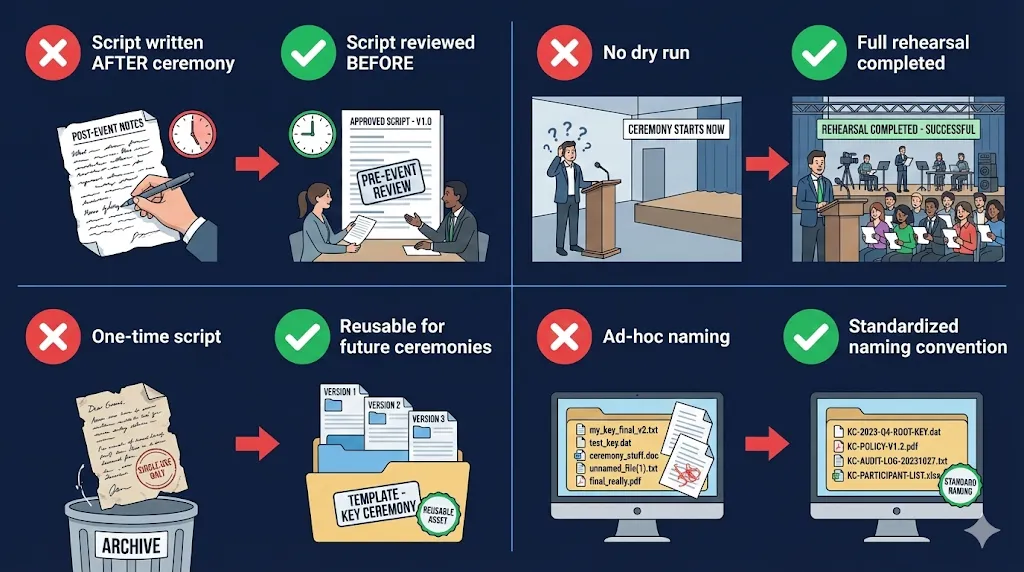
Writing the script after the ceremony. This happens more often than anyone admits. The team generates the key, then writes up what they think happened. That's reconstruction, not documentation. The script should be written, reviewed, and approved before the ceremony. The ceremony is the act of executing the pre-approved script.
Not rehearsing. A dry run catches problems that paper reviews miss. Your HSM commands might have typos. Your quorum might not all be available on the scheduled date. The air-gapped workstation might not have the right software version. A one-hour rehearsal can save you from a failed four-hour ceremony with six people in the room.
Forgetting about the next ceremony. Your script should be reusable. When you need to generate a subordinate CA, perform a key rollover, or re-key after a compromise, the script should work with minimal modification. Write it as a template, not a one-time document. With shorter certificate lifetimes driving more frequent subordinate CA operations, a reusable script saves significant effort.
Ignoring the naming convention. The Subject DN and key labels you choose during the ceremony will live in your infrastructure for 20+ years. A root CA named "CN=Root CA" tells you nothing when you have three of them. Use a consistent, descriptive naming convention that includes the organization, purpose, and generation — and decide on it before the ceremony starts.
Putting It All Together
A good key ceremony script is 8 to 15 pages. It reads like a recipe — specific enough that someone could follow it step by step and produce the same result every time. It includes sign-off lines for every critical step, space for recording serial numbers and checksums, and a clear chain of custody for every key share and piece of media.
The goal isn't to create bureaucracy. The goal is to create a record that answers every question an auditor will ask, three years from now, when nobody in the room remembers the details. The script is how you prove your PKI was born with integrity.
Building a key ceremony script from scratch is doable but time-consuming. If you want a head start, the Key Ceremony Script template in Compliance-in-a-Box includes role assignments, HSM command placeholders, witness sign-off sheets, and the pre-ceremony checklist covered above — with practitioner guidance boxes explaining what auditors expect at each step.
Frequently Asked Questions
How long should a key ceremony take?
Plan for 2–4 hours for a root CA ceremony, including setup and documentation. Subordinate CA ceremonies are typically shorter (1–2 hours) since the HSM is already initialized.
Do I need a key ceremony for every CA?
Best practice is yes — at minimum for root CAs and offline subordinate CAs. Online issuing CAs that use HSMs should also have documented key generation procedures, though they may be less formal.
Can I do a key ceremony remotely?
For root CAs, most compliance frameworks expect a physically witnessed ceremony. For subordinate CAs, some organizations accept remote witnessed ceremonies with video recording and screen sharing, though this should be documented and approved by your security team.
What HSM commands should be in the script?
The specific commands depend on your HSM vendor (Thales Luna, Entrust nShield, AWS CloudHSM, etc.). Your script should include the exact commands as placeholders that get filled in during ceremony preparation. Generic examples are less useful than vendor-specific scripts.
Related FixMyCert Resources
Compliance-in-a-Box
Audit-ready CP/CPS template with a complete key ceremony script, naming convention guide, and quick-start guide.
Explore GuideCertificate Name Generator
Generate consistent, standards-compliant certificate naming conventions for your PKI hierarchy.
Explore Guide47-Day Certificate Timeline
The complete timeline for shorter certificate lifetimes — and why it means more frequent key ceremonies for subordinate CAs.
Explore