Your $250K Email Security Suite Just Got Beaten by a Hotmail Address
A company spends a quarter million dollars on an email security product. It has "Military-Grade AI." It has "Quantum-Ready Encryption." It analyzes emails in 14 dimensions. The marketing brochure alone weighs three pounds.
Then it gets completely owned by a phishing email from microsft-suport-desk-real@hotmail.com with the subject line "URGENT: Your password expires today! Click here to reset immediately."
Someone in accounts payable clicked it. Because they were trying to be helpful. Because that's what good employees do — they respond to urgent requests quickly.
Here's the uncomfortable truth: you cannot buy a software patch for human curiosity. Technology is the seatbelt — but you still need to teach people how to drive. And more importantly, you need to actually deploy the seatbelts that already exist.
Email Was Never Designed to Be Trusted
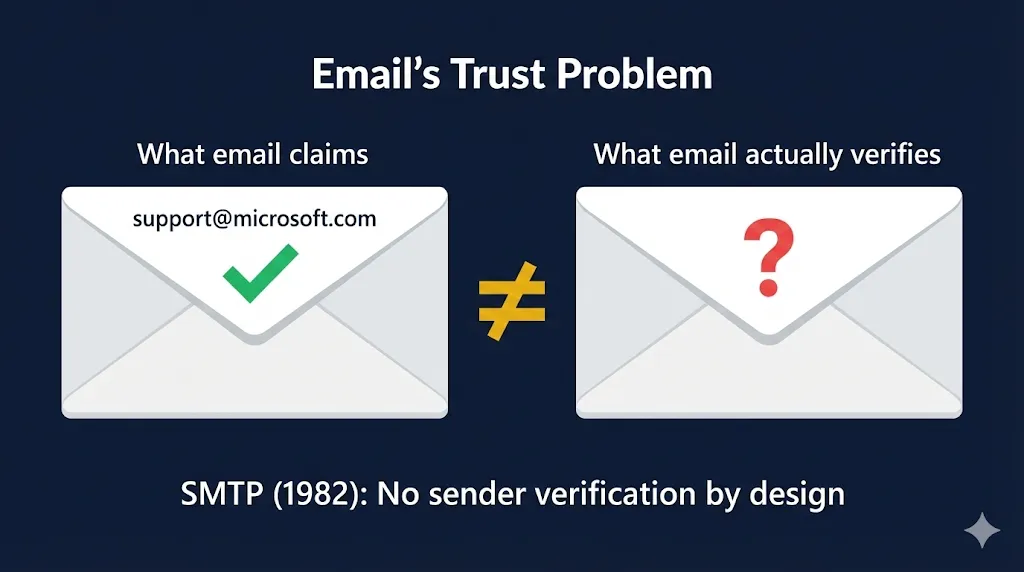
SMTP — the protocol that delivers your email — was created in the early 1980s. It was designed for a world where everyone on the network was a trusted academic researcher. There was no concept of sender verification. Anyone could (and still can) send an email claiming to be from anyone.
Think about that for a moment. The system that carries your wire transfer approvals, your board communications, and your HR notifications has the same trust model as a postal system where anyone can write any return address on the envelope.
This isn't a bug that got missed. It's the original architecture. Every email security product on the market today is essentially trying to retrofit identity verification onto a system that was never designed for it. Some do it well. Most do it expensively. None of them can fix the fundamental problem without implementing the standards we're about to discuss.
The PKI Solutions That Already Exist (And Almost Nobody Uses)
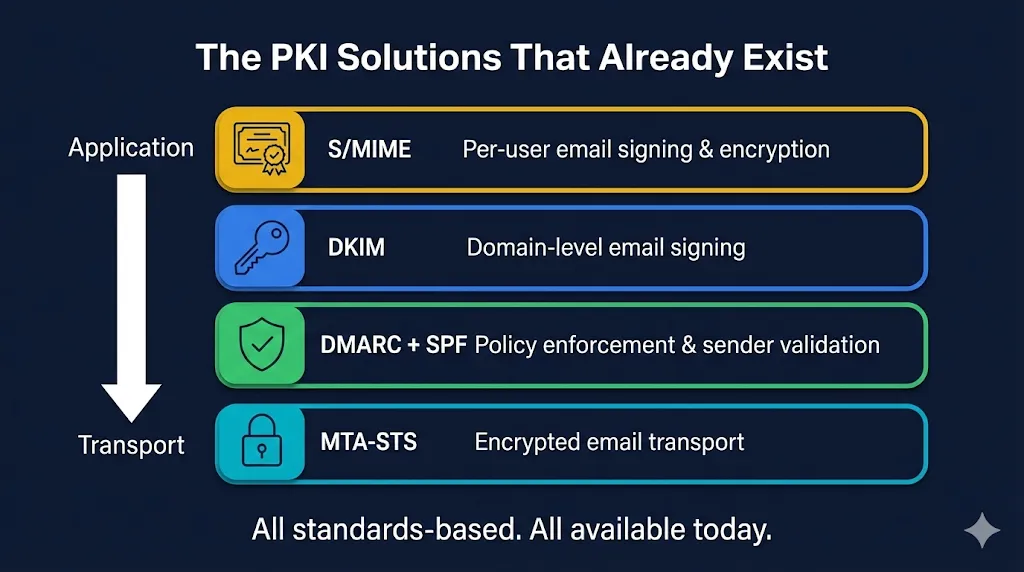
Here's where it gets frustrating. The cryptographic tools to solve email authentication aren't experimental. They aren't bleeding edge. Some of them have been standardized for decades. Four technologies stand out:
1. S/MIME — Signing Emails Like Signing a Contract
S/MIME (Secure/Multipurpose Internet Mail Extensions) lets senders cryptographically sign their emails so recipients can verify exactly who sent them. It also enables end-to-end encryption — meaning even your email provider can't read the contents.
Here's how it works: the sender has a digital certificate issued by a trusted Certificate Authority, containing their public key. When they send an email, their mail client signs it with their private key. The recipient's client verifies the signature against the certificate. If the signature checks out, you know two things: the email genuinely came from that sender, and it hasn't been tampered with in transit.
Why this matters for phishing: If an organization required signed emails from external partners, that hotmail phishing email would immediately be flagged — it has no valid S/MIME signature. Organizations can set policies to visually warn users or quarantine unsigned external emails. Instead of relying on AI to guess whether an email is suspicious, you have cryptographic proof of identity.
The adoption problem: S/MIME has been around since the 1990s. Most enterprise email clients — Outlook, Apple Mail, Thunderbird — support it natively. But certificate management at scale is painful. Issuing, renewing, and distributing certs to every employee is operationally complex. This is a solvable problem (certificate lifecycle management tools exist), but most organizations never get past the "sounds complicated" phase.
See how S/MIME works in our interactive demo →
2. DKIM — Domain-Level Email Signatures
DKIM (DomainKeys Identified Mail) takes a different approach from S/MIME. Instead of signing emails per-user, it signs them at the domain level. Your mail server signs outgoing emails using a private key. The recipient's mail server retrieves your public key from DNS (published as a TXT record) and verifies the signature.
This proves two things: the email actually came from that domain's mail server, and it wasn't tampered with in transit. It's public key cryptography applied to email transport — the same fundamental concept as certificate-based authentication.
The limitation: DKIM alone doesn't tell the recipient what to do if verification fails. An email might fail DKIM and still land in your inbox. That's where DMARC comes in.
3. DMARC — The Policy Layer Nobody Actually Enforces
DMARC (Domain-based Message Authentication, Reporting & Conformance) ties DKIM and SPF together with a policy that tells receiving mail servers what to do when authentication fails. The options are: do nothing (p=none), quarantine the email, or reject it outright.
The problem? Most organizations that implement DMARC set their policy to p=none — monitor only. They're collecting data about spoofed emails but not actually blocking them. It's like installing a security camera but never watching the footage.
According to industry reports, a significant percentage of Fortune 500 companies still don't have DMARC set to p=reject. Their domains can still be spoofed with no consequences. That means an attacker can send emails that appear to come from their domain, and receiving mail servers will dutifully deliver them.
When set to p=reject, receiving mail servers are instructed to drop any email that fails DKIM/SPF verification. If microsft-suport-desk-real@hotmail.com tried to spoof a domain with DMARC reject, the email would never reach the inbox. Full stop.
4. MTA-STS — Encrypting Email in Transit (For Real This Time)
MTA-STS (Mail Transfer Agent Strict Transport Security) addresses a different angle of the email security problem. It lets domains publish a policy requiring TLS encryption for all inbound email, preventing downgrade attacks where an attacker forces mail servers to communicate in plaintext.
Without MTA-STS, TLS for email is "opportunistic" — mail servers try to use encryption but silently fall back to plaintext if it fails. An attacker performing a man-in-the-middle attack can strip the TLS negotiation, and the email goes through in the clear. No warning. No error. Just your sensitive data traveling across the internet unencrypted.
MTA-STS fixes this by publishing a policy file via HTTPS (which itself requires a valid TLS certificate) and a DNS TXT record. Sending mail servers check this policy and refuse to deliver over unencrypted connections. It's certificates protecting email transport — the exact infrastructure FixMyCert teaches.
Adoption? Minimal. Most organizations don't even know this exists.
Bonus: Client Certificate Authentication
For internal email systems and sensitive distribution lists — like accounts payable, the exact target in our phishing scenario — organizations can require client certificates to authenticate before allowing email delivery. This creates a cryptographic gatekeeper: no valid cert, no email delivered to that inbox. It's the nuclear option, and for high-value targets, it's exactly the right call.
Why Nobody Uses These
If these solutions are so effective, why aren't they everywhere? The reasons are predictable — and mostly wrong.
"It's too complex." Certificate management at enterprise scale IS complex. But it's a solved problem. Certificate lifecycle management platforms exist specifically for this. The complexity argument was valid in 2005. It's not valid in 2026.
"It's too expensive." DMARC, SPF, and DKIM are free to implement — they're DNS records and server configuration. S/MIME certificates cost money but far less than a $250K email security suite. MTA-STS requires a web server and TLS cert, which you should already have. The "too expensive" argument falls apart under even basic scrutiny.
"Our email security product handles this." Does it though? If your $250K solution can't catch microsft-suport-desk-real@hotmail.com, then maybe the product isn't the problem. Maybe you haven't implemented the foundational standards it's supposed to build on. These products work best when DMARC, DKIM, and SPF are already in place — they're meant to augment standards, not replace them.
"Our users won't understand." Users don't need to understand the cryptography. They need to see a visual indicator: ✅ Verified Sender vs. ⚠️ Unverified — just like the padlock in your browser. The UI work is on email clients, not end users.
What You Can Actually Do Monday Morning
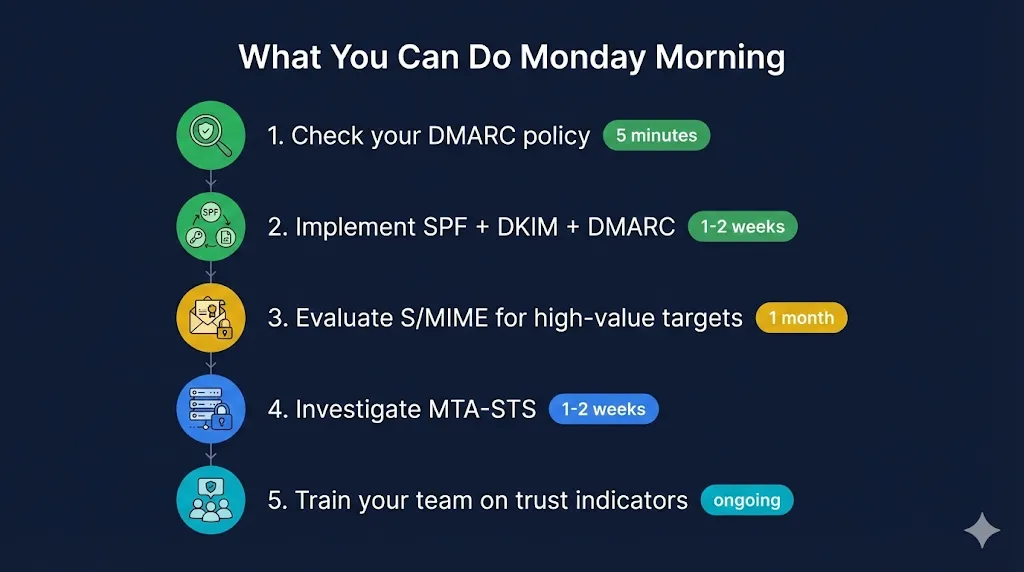
Enough theory. Here's what to do, ranked by effort and impact:
1. Check your DMARC policy today (5 minutes)
Run your domain through a DMARC checker. If it says p=none or no record found, you know where to start. This is a five-minute task that tells you exactly how exposed you are.
2. Implement SPF + DKIM + DMARC (1–2 weeks)
These are DNS records and mail server settings. Start with p=none to monitor, then move to p=quarantine, then p=reject once you're confident legitimate mail passes. This is the single highest-impact change you can make.
3. Evaluate S/MIME for high-value targets (1 month)
Start with executives and finance teams — the people phishing attacks actually target. Pilot with 20–50 users before rolling out organization-wide. Our S/MIME demo walks through exactly how this works.
4. Investigate MTA-STS (1–2 weeks)
If you already have a web server with a valid TLS cert (you do, right?), publishing an MTA-STS policy is straightforward. It closes a gap most organizations don't even know they have.
5. Educate your team on the signals (ongoing)
When S/MIME shows a signed email, what should users look for? When DMARC fails, what happens? Train people on the indicators, not the cryptography. They don't need to understand RSA — they need to know what a green checkmark means.
The Technology Already Exists
The frustrating truth is that the cryptographic tools to dramatically reduce email phishing have existed for years — in some cases, decades. S/MIME, DKIM, DMARC, and MTA-STS aren't experimental. They're mature, standardized, and supported by major email platforms.
The problem isn't technology. It's implementation. It's the gap between knowing these standards exist and actually deploying them. It's the IT team that keeps meaning to move DMARC from p=none to p=reject but never quite gets around to it. It's the security architect who knows S/MIME would help but can't get budget for certificate management tooling because the org already spent $250K on an AI-powered email scanner.
That's exactly the gap FixMyCert exists to close. We don't sell email security products. We help you understand the PKI fundamentals that make ALL of these solutions work — so you can evaluate them, implement them, and stop relying on a $250K magic box to do what open standards already handle.
The seatbelts exist. They've been tested. They work. It's time to actually buckle up.
Related FixMyCert Resources
S/MIME Email Security
See how S/MIME uses certificates to sign and encrypt emails, preventing spoofing and tampering.
Explore DemoDigital Signatures
Understand how digital signatures prove sender identity and message integrity.
Explore DemoHow TLS Works
Learn how TLS secures communication channels between email servers.
Explore DemoEncryption Basics
The cryptographic foundations that make email security possible.
Explore