ACME Client Selection Checklist
A structured decision framework for engineers choosing or re-evaluating their ACME client. ARI support is now a primary selection criterion — not a nice-to-have — after the mass revocation events of March–April 2026.
When to Use
- • Choosing an ACME client for a new deployment
- • Re-evaluating your current ACME client after a mass revocation event
- • Comparing ARI support across ACME clients
- • Planning certificate automation for mixed environments (Linux + Windows + Kubernetes)
- • Assessing 47-day certificate readiness from the ACME client perspective
Do NOT Use For
- • General certificate lifecycle management (use [PKI Compliance Checklist](/checklists/pki-compliance-checklist))
- • Full 47-day readiness assessment beyond client selection (use [47-Day Readiness Audit](/checklists/47-day-readiness-audit))
- • ACME protocol fundamentals (use [ACME Protocol Guide](/guides/acme-protocol))
- • Emergency certificate replacement (use [Emergency Runbook](/checklists/emergency-certificate-replacement))
Quick Reference (TL;DR)
- ARI support is now a baseline requirement for production ACME deployments — the March–April 2026 revocation events proved it
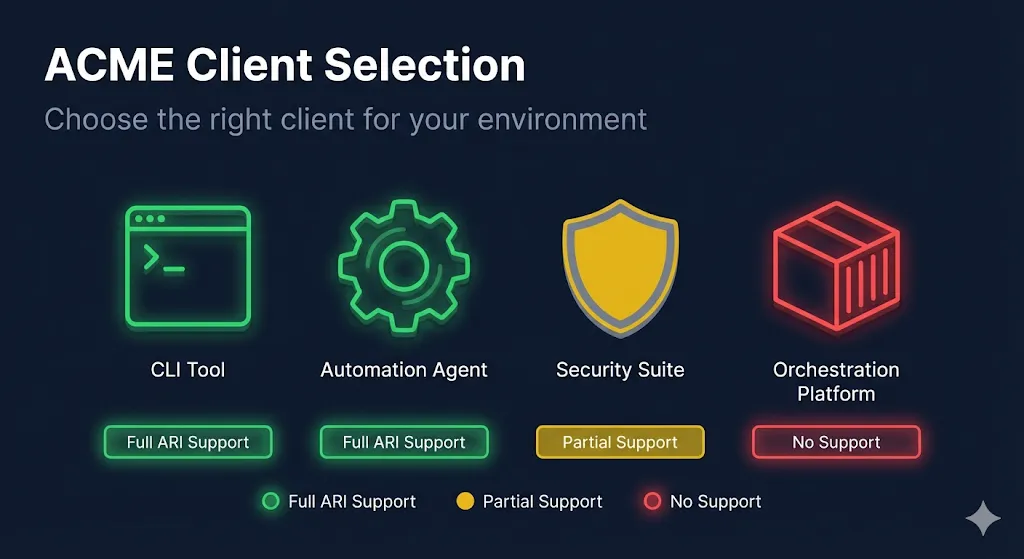
- Caddy, Lego, win-acme, and Certify The Web have full ARI support including the replaces field. Certbot has partial ARI (v4.1.0+). acme.sh and cert-manager have none
- No single ACME client spans Linux + Windows + Kubernetes + cloud — mixed environments need multiple clients with a CLM overlay
- For Certbot users: upgrade to v4.1.0+ and increase systemd timer to every 6 hours. This is the single highest-impact change most teams can make today
1Why Client Selection Matters Now
Objective: Understand why ACME client choice is no longer interchangeable — ARI and shorter lifetimes changed the game
💡 Before 2026, any ACME client that completed challenges and installed certs was fine. Two things changed: (1) ARI makes the client responsible for responding to CA signals; (2) shorter lifetimes mean the client runs more frequently and failures compound faster.
💡 The SSL.com revocation event and Let's Encrypt's ARI drill proved that clients without ARI support leave operators scrambling during mass revocation events.
2ACME Client Comparison Matrix
Objective: Evaluate all 7 major ACME clients across key criteria including ARI support, platform compatibility, and mass revocation response
💡 **Full ARI support** means the client polls the CA's ARI endpoint and automatically renews when the CA signals a suggested renewal window — including emergency re-issuance during mass revocation events.
💡 **The replaces field** (RFC 9440) tells the CA which certificate is being replaced, enabling the CA to revoke the old cert after successful issuance. Clients without this create certificate accumulation.
💡 **Mass revocation response** is the critical differentiator. Clients with automatic response (Caddy, Certify The Web) handle revocation events without operator intervention. Cron-based clients depend entirely on their schedule frequency.
3Decision Framework: Which Client For Your Environment
Objective: Match your environment to the right ACME client based on OS, web server, orchestration, and operational requirements
💡 The "best" ACME client depends entirely on your environment. There is no universal answer.
💡 For most teams, the highest-impact action is upgrading Certbot to v4.1.0+ and increasing the systemd timer frequency. This gets you partial ARI on the most widely deployed ACME client.
💡 Mixed environments are the norm in enterprise. The question isn't "which single client" but "which client per platform, and how do I get unified visibility."
4ARI as a Selection Criterion: The New Minimum
Objective: Establish ARI support as a baseline requirement for new ACME client deployments and build compensating controls for existing deployments without it
💡 Before 2026, ARI support was a forward-looking nice-to-have. After the SSL.com revocation and Let's Encrypt ARI drill, it's a baseline requirement for production deployments.
💡 Any new ACME client deployment should require ARI support unless there's a compelling reason otherwise (e.g., cert-manager is the only viable option on Kubernetes despite lacking ARI).
💡 For Certbot users: upgrading to v4.1.0+ and increasing timer frequency is the single highest-impact change most teams can make today.
5Related Resources & Next Steps
Objective: Connect this evaluation to the broader certificate automation and readiness landscape
💡 This checklist is a point-in-time evaluation. Re-run it when: (1) a new ACME client version adds ARI support, (2) your environment changes (new platforms, new web servers), or (3) after any mass revocation event.
Troubleshooting
Problem: We're using acme.sh in production and can't easily switch
Solution: Don't panic — acme.sh works fine for certificate issuance. The gap is ARI. Build compensating controls: increase cron frequency to every 4–6 hours, subscribe to your CA's status page and incident feeds, and document a manual renewal procedure for mass revocation events. Consider running Lego or Certbot in parallel for your most critical certificates.
Problem: cert-manager is our only option on Kubernetes and it lacks ARI
Solution: This is the most common ARI gap. Supplement cert-manager with: (1) monitoring for CA revocation announcements, (2) a documented kubectl cert-manager renew procedure, (3) alerting on certificate expiry that's tighter than default. Track issue #6010 for ARI support. The controller-based model means cert-manager already handles 47-day readiness well — it's specifically mass revocation response that's the gap.
Problem: We have a mixed environment and no single client works everywhere
Solution: This is normal for enterprise environments. The answer is multiple clients per platform with a Certificate Lifecycle Manager (CLM) for unified visibility: Certbot or Caddy on Linux, cert-manager on Kubernetes, win-acme or Certify The Web on Windows. The CLM (Venafi, Keyfactor, DigiCert TLM) provides the single pane of glass. See the [PKI Automation Gap](/guides/pki-automation-gap) guide for prioritization.
Problem: Our Certbot version is old and we can't easily upgrade
Solution: If you installed Certbot via distro packages (apt, yum), they're likely outdated. The snap package is the recommended installation method and stays current. Alternatively, pip install certbot gets you the latest. Version 4.1.0 added partial ARI support — any version before that has zero ARI capability. This upgrade is the single highest-ROI action for most teams.
Problem: We need to justify ACME client changes to management
Solution: Frame it as operational resilience, not a technology upgrade. "Our current ACME client cannot automatically respond to CA mass revocation events. The last event (March–April 2026) required manual intervention for every affected certificate. Upgrading to an ARI-capable client means the system handles it automatically." Use the [ARI Readiness Guide](/guides/ari-readiness) as technical evidence.