Code Signing Governance Checklist
A printable, auditor-ready checklist for proving that your code signing program is sound. Each control maps to the CA/Browser Forum Code Signing Baseline Requirements (CSBR), SOC 2 Trust Services Criteria, and ISO/IEC 27001 Annex A — so you can hand the same artifact to internal audit, your QSA, and your CSBR auditor without rewriting it three times.
When to Use
- • Preparing for a CSBR conformance review or public CA code signing certificate renewal
- • SOC 2 Type II audit covering the change management or production deployment system
- • ISO 27001 surveillance audit where code signing falls under cryptographic controls
- • Internal review after standing up Venafi CodeSign Protect, CyberArk Code Sign Manager, or a comparable platform
- • Post-incident review after a signing key compromise, mis-issuance, or unauthorized signature
Do NOT Use For
- • You are still selecting a code signing platform — read the Venafi CodeSign Protect guide first
- • You only sign open-source releases with a personal Sigstore identity (different control model)
- • Active key compromise — go to the Key Compromise Response Runbook
Quick Reference (TL;DR)
- Every signing key lives on a FIPS 140-2 Level 2 (or higher) HSM and is non-exportable — required by CSBR
- Every signature has a named human approver, captured in a tamper-evident audit row
- Audit logs are retained at least 2 years (CSBR) and ideally 7 years (SOC 2 / ISO 27001 alignment)
- Signing certificates rotate on a documented schedule, not when they expire by accident
- You can answer "who signed what, when, with which key, under which approval?" within 15 minutes
11. Identity & Access
Objective: Every actor in the signing flow — requester, approver, key custodian — is a named individual tied to the corporate identity provider, with least-privilege access enforced and reviewed.
💡 The single most common CSBR finding is that "approvers" are a shared service account or distribution list. Auditors want a named human on every approval row.
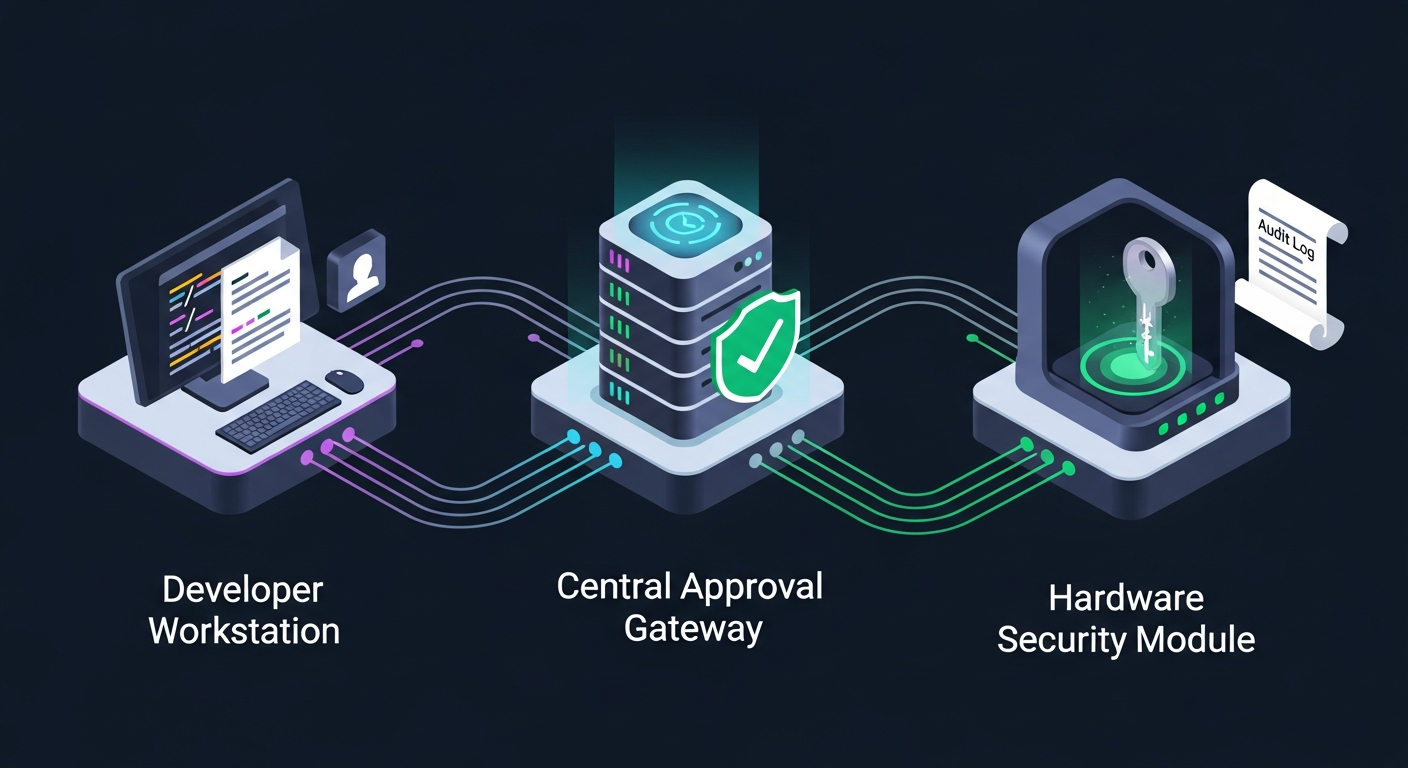
💡 See the Code Signing Governance demo for a worked example of the requester → approver → HSM flow.
22. Key Storage (HSM / FIPS Level)
Objective: Private signing keys are generated, stored, and used only inside a hardware security module that meets the certification level required by CSBR for the certificate type.
⚠️ As of the June 2023 CSBR update, all newly issued publicly trusted code signing certificates must have their private key generated and stored on a hardware crypto module. Software-only key stores are no longer compliant for any tier.
💡 Read the Venafi CodeSign Protect guide for how the platform enforces non-exportability against PKCS#11 / KSP / CSP clients.
33. Approval Workflow
Objective: Every signature is authorized by a documented workflow with named approvers, a defined scope (file type, hash, project), and a bounded time window.
💡 The Code Signing Governance demo shows a 6-step request → approve → HSM sign flow that maps directly to these controls.
44. Audit Logging & Retention
Objective: Every signing event produces a tamper-evident audit row that ties signature → file hash → approver → key → policy, retained long enough to satisfy every applicable framework.
💡 CSBR §5.4.3 sets a 2-year minimum, but most enterprise programs align retention with their SOC 2 / ISO 27001 evidence retention policy (often 7 years).
⚠️ A common gap: the signing platform retains logs internally for 90 days while the SIEM only ingests "successful" events. Ship denials and admin actions too.
55. Key Rotation
Objective: Signing certificates and the keys behind them rotate on a documented schedule that is tracked, scheduled, and rehearsed — not discovered at expiry.
66. Incident Response
Objective: Compromise, misuse, or unexplained signing activity has a documented detection, response, and revocation path that has been rehearsed.
💡 For the operational steps when a key is suspected compromised, follow the Key Compromise Response Runbook.
💡 Even revoked signatures stay trustworthy for binaries signed before the revocation date — provided you used a timestamp authority. See the Code Signing Governance demo for the timestamp behavior.
📦 Need the policy documents that back this checklist?
Compliance-in-a-Box includes ready-to-customize templates for code signing CP/CPS sections, signing template policies, key ceremony scripts, and audit log retention statements — everything an auditor will ask to see.
Learn More About Compliance-in-a-BoxTroubleshooting
Problem: Approvers are a shared mailbox or distribution list
Solution: CSBR and SOC 2 both require named individuals on every approval row. Migrate the approver group to specific named users in the IdP and disable group-based approval in the signing platform.
Problem: Signing keys are stored in a software KeyStore, JKS, or PFX file
Solution: For any publicly trusted code signing certificate this is non-compliant since June 2023. Generate a new key inside an HSM (or cloud HSM with a CMVP certificate), reissue the certificate against the new CSR, and destroy the old key material.
Problem: Audit logs only retain 90 days
Solution: Ship the signing platform audit log to your SIEM or a write-once object store with at least a 2-year retention policy. Confirm denials, admin actions, and template changes are included — not just successful signings.
Problem: No timestamp authority configured
Solution: Add a CSBR-compliant TSA URL to every signing template. Without a timestamp, all previously signed binaries become "expired" the moment the signing certificate expires or is revoked.
Problem: Cannot answer "who signed installer.exe v4.2.1 last March?"
Solution: You are missing the file-hash → audit-row index. Either enable hash-based search in your signing platform, or ship audit rows to a SIEM with the file SHA-256 as a searchable field.
Escalation
Internal: Escalate to the Code Signing Program owner and CISO if you discover unauthorized signatures, missing approval evidence, or signing keys outside an HSM. These are reportable incidents under CSBR §4.9.
CA Support: Contact your issuing CA within 24 hours if you suspect key compromise or mis-issuance — CSBR requires revocation within 24 hours of confirmed compromise.
After Hours: Treat suspected signing key compromise as a P1 incident. Engage incident response, the issuing CA, and legal/communications immediately to start the revocation and customer notification path.