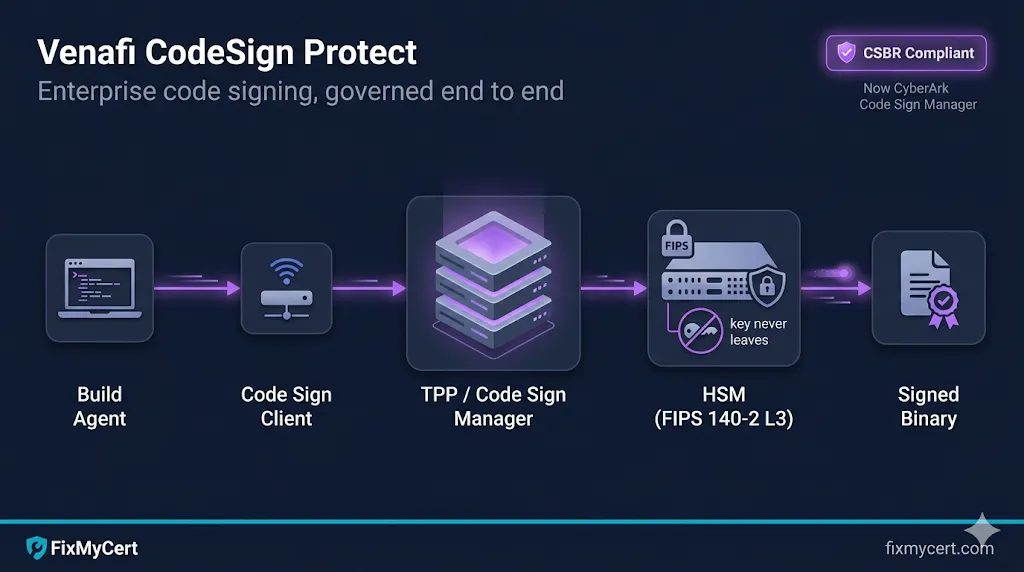
- • Venafi CodeSign Protect (now branded CyberArk Code Sign Manager) is a centralized platform for governing enterprise code signing — separate from TLS Protect, with its own architecture and operational model.
- • It exists because code signing keys are high-value, long-lived, and historically managed terribly. Compromise one, and your customers run malware that looks like you.
- • The platform sits on top of an HSM, fronts every signing operation through policy and approval workflows, and produces an audit trail that satisfies the CA/B Forum Code Signing Baseline Requirements (CSBR) and most internal audit programs.
- • You'll touch four primary objects: Environments, Projects, Code Sign Clients, and signing tools (signtool, jarsigner, cosign, etc.).
A note on the name change
CyberArk acquired Venafi in 2024. The product known for years as Venafi CodeSign Protect is now formally CyberArk Code Sign Manager (current version 25.3 as of late 2025). The technology, components, and operational model are the same. Job descriptions, internal docs, and most enterprise teams still say "Venafi CodeSign Protect" — so we use both names interchangeably here.
If you're searching internal wikis or vendor docs, both names point at the same thing. New documentation lives at docs.venafi.com under the Code Sign Manager - Self-Hosted path.
Why code signing needs its own platform
Most PKI conversations start with TLS — server certs, SAN entries, ACME automation. Code signing is the quieter, higher-stakes neighbor. The blast radius of a compromised TLS key is one site or one fleet of services. The blast radius of a compromised code signing key is every customer who runs your software.
That asymmetry drives every design decision in CodeSign Protect:
- • Keys must never leave hardware. Generation, storage, and signing all happen inside an HSM. Developers never touch raw key material.
- • Every signing operation is auditable. Who signed what, when, against which policy, on which build host.
- • Policy gates the signing flow, not just the key. Approvers, allowed signing tools, allowed file types, allowed times, allowed environments — all enforced server-side.
- • Build pipelines call signing as a service, not as a key checkout.
If you've operated Venafi TLS Protect (now CyberArk Certificate Manager), the mental model is similar but the object graph is different. Code signing has its own primary objects, its own client tooling, and its own compliance regime.
Where CodeSign Protect fits
CodeSign Protect runs on top of Venafi Trust Protection Platform (TPP) — now sometimes called Trust Protection Foundation in newer docs. TPP is the on-prem (or self-hosted in cloud) platform that also hosts TLS Protect, SSH Protect, and the policy engine.
Architecturally, CodeSign Protect adds three things to a TPP install:
- Code Signing module in the TPP web UI — where you configure environments, projects, and policy.
- Code Sign Clients — agents installed on signing workstations or build hosts that translate familiar signing tool calls into authenticated API calls back to TPP.
- Code Signing Time Stamp Service — a TPP-hosted timestamping endpoint (RFC 3161) so signatures remain verifiable after the signing certificate expires.
If your shop already has TPP, adding CodeSign Protect is a license + module enable + HSM provisioning exercise — not a separate platform build-out.
Architecture & components
A working deployment has five moving pieces:
Windows Server install, IIS-hosted web services, MSSQL backend. Sized like any enterprise PKI/CLM platform. Multi-server deployments use a shared SQL backend and load-balanced front-end.
Network-attached or PCIe. Common choices: Thales Luna, Entrust nShield, AWS CloudHSM, Azure Dedicated HSM, Utimaco, plus PKCS#11-compliant alternatives. CodeSign Protect connects via PKCS#11 or vendor-specific drivers. The CSBR requires keys be on FIPS 140-2 Level 2 or higher hardware — most production deployments use Level 3.
Installed on every workstation or build agent that signs code. CyberArk ships clients for:
- • Windows — Cryptographic Service Provider (CSP), Key Storage Provider (KSP), and PKCS#11 driver. These let
signtool.exe,Set-AuthenticodeSignature,jarsigner, and any other tool call CodeSign Protect transparently — the tool thinks it's using a local key, but the operation is brokered through TPP and executed on the HSM. - • macOS — universal installer; integrates with Keychain, GPG SmartCard, and PKCS#11. Lives at
/Library/Venafi/CodeSigning/binwith symlinks into/usr/local/bin. - • Linux — PKCS#11 driver in
/opt/venafi/codesign. Used forjarsigner,cosign(with PKCS#11 plugin),osslsigncode, and similar. - • GPG SmartCard daemon — for git tag signing, package signing, and other GPG-driven workflows.
CI/CD systems (Jenkins, Azure DevOps, GitHub Actions self-hosted runners, GitLab Runners) invoke the Code Sign Client installed on the agent. The client authenticates to TPP using a service account, certificate, or token — never a raw HSM PIN.
TPP integrates with Active Directory, LDAP, SAML, or OIDC for user authentication. Approver groups, project owners, and signing requesters all map to identity provider groups.
A useful way to picture it: TPP holds the policy and the audit log. The HSM holds the keys. The Code Sign Client is the bridge that lets your existing signing tools work without ever seeing a key.
Core concepts: Environments, Projects, Templates, Approvers
These four objects are the day-to-day vocabulary of the platform. Get these right and the rest follows.
A configured connection to a key source. Most commonly an HSM partition, but also Microsoft ADCS, an Entrust CA, or another CA TPP can talk to. Environments define where a key lives. Examples in a real deployment:
- •
prod-luna-codesign— production Thales partition - •
dev-softhsm-codesign— non-prod soft HSM for testing - •
test-cloudhsm-codesign— staging environment on AWS CloudHSM
A logical grouping of code signing keys, certificates, and policies for a specific application, team, or product line. Projects own:
- • One or more certificate environments (which Environment to use)
- • A list of signing templates (allowed file types, hash algorithms, signing tools)
- • An approver group (who must approve signing requests, if approval is required)
- • A policy block (when, where, how the keys can be used)
A typical bank or ISV will have dozens of Projects — one per application family, sometimes one per major release branch.
A pre-approved configuration for a specific signing operation. A template might say: "Authenticode SHA-256 signing of .exe and .dll files using the prod EV cert, only from build agents on the corporate network, only between 6am and 8pm." Templates are how you make signing safe-by-default for build pipelines while keeping rare operations (manual signing, after-hours hotfixes) gated.
Users or groups who must approve a signing request before the operation executes. Approval can be required per request, batched, or skipped entirely for fully automated build pipelines that pre-clear the policy. CSBR doesn't require per-request human approval — it requires the access to keys to be properly authenticated and logged. But internal SOX, NIST, or FedRAMP programs often layer human approval on top.
The signing flow
End-to-end, a signing operation looks like this:
  [Developer or build agent]
        │  signtool sign /n "ACME Code Signing" myapp.exe
        ▼
  [Code Sign Client]    ── authenticates to TPP using configured creds
        │
        ▼
  [TPP / Code Signing module]
        │  - Resolves the cert/key from the Project
        │  - Evaluates policy: tool allowed? file type allowed?
        │    requester allowed? time window? source IP?
        │  - Routes to approver workflow if required
        ▼
  [HSM]
        │  - Performs the cryptographic operation
        │  - Returns signed hash to TPP (key never leaves HSM)
        ▼
  [TPP]
        │  - Calls Time Stamp Service (RFC 3161)
        │  - Records signing event in audit log
        ▼
  [Code Sign Client]    ── returns signed binary to caller
        │
        ▼
  [signtool exits 0, signed file written]
Key thing to internalize: the developer's command line stays the same. signtool, jarsigner, cosign --key — all unchanged. The Code Sign Client makes CodeSign Protect look like a local key store. That's why teams adopt it: zero workflow disruption for developers, full governance for security.
Code Sign Clients & tool integration
Specifics matter here because integration is where teams most often get stuck.
Windows / Authenticode (signtool.exe, PowerShell). The Code Sign Client installs a CSP and KSP that expose CodeSign Protect-managed keys as if they were local. You select the cert by subject name or thumbprint:
signtool sign /sha1 <thumbprint> /tr http://tsa.example.com /td sha256 /fd sha256 myapp.exe
The thumbprint is for the cert object the Code Sign Client publishes locally — the actual private key lives in the HSM and never touches the box.
Java (jarsigner). Uses the PKCS#11 provider. Configuration is via java.security or a runtime config file pointing at the CodeSign Protect PKCS#11 library:
jarsigner -keystore NONE -storetype PKCS11 \
          -providerClass sun.security.pkcs11.SunPKCS11 \
          -providerArg /path/to/codesign-pkcs11.cfg \
          -tsa http://tsa.example.com \
          myapp.jar "code-signing-cert"
Container & artifact signing (cosign). Cosign supports PKCS#11 via its built-in plugin. Point at the PKCS#11 module and reference the key by URI.
macOS (codesign). The macOS Code Sign Client integrates with the system Keychain. Once installed, codesign --sign "Developer ID Application: ..." MyApp.app works as if the cert were a local Developer ID identity — the actual signing happens in TPP/HSM.
GPG. The GPG SmartCard daemon makes CodeSign Protect-managed GPG keys appear as a smartcard to GPG. git tag -s, gpg --sign, RPM/DEB signing — all unchanged from the user's perspective.
Microsoft signtool with EV. Per CSBR, EV code signing keys must be on attested hardware. CodeSign Protect-fronted HSMs satisfy this when paired with the right CA — the issuing CA validates the HSM attestation, and the cert is issued as an EV cert tied to that hardware.
HSM integration & FIPS levels
The HSM is the trust anchor of the whole system. Two practical points:
1. Pick the FIPS level deliberately. CSBR requires Level 2 minimum for code signing keys. Level 3 adds tamper-active protection and identity-based access — which is what most banks, large ISVs, and any org with a real key ceremony program will use. Level 3 is also what the CA/B Forum strongly prefers in audit reviews.
2. Plan partition strategy before you build. A single HSM appliance can host multiple partitions. A clean deployment isolates by environment (prod / non-prod) and often by sensitivity class (general signing keys / EV keys / internal-only keys). Each Environment in CodeSign Protect maps to one or more partitions.
If you're in the cloud, Azure Dedicated HSM (Thales Luna 7-based, single-tenant) and AWS CloudHSM are the standard CSBR-compliant options. Azure Key Vault Premium uses an HSM backend but the multi-tenant model historically has not satisfied EV code signing CA requirements — verify with your CA before designing around it.
Microsoft Trusted Signing (formerly Azure Code Signing) is the Microsoft-managed alternative — Azure Key Vault Managed HSM backend, SmartScreen-trusted, designed for the 460-day shift away from USB tokens. Different operational model than CodeSign Protect (managed service vs. self-hosted control plane), so most enterprises with TPP already in place will stay on CodeSign Protect; teams without that footprint may find Trusted Signing the simpler path.
See also: Azure Key Vault Certificates — covers the Key Vault model in depth, including where it does and doesn't satisfy code signing requirements.
CSBR compliance mapping
The CA/B Forum Code Signing Baseline Requirements (CSBR) set the floor for any publicly-trusted code signing certificate. The June 2023 update changed the game: keys now must be generated and stored on FIPS 140-2 Level 2 (or Common Criteria EAL 4+) hardware. No more soft tokens, no more file-based keystores.
Here's how CodeSign Protect maps to CSBR controls:
| CSBR control area | CodeSign Protect coverage | What you still own |
|---|---|---|
| Key generation on FIPS hardware | ✅ Native — keys generated in HSM via PKCS#11 | HSM provisioning, partition design |
| Private key never extractable | ✅ Enforced by HSM, brokered by TPP | HSM policy configuration |
| Subscriber authentication for signing | ✅ TPP authenticates every request | IdP integration, group hygiene |
| Audit logging of signing events | ✅ TPP audit log | Log retention, SIEM integration |
| Multi-factor for key access | ⚠️ Configurable — supported via IdP | MFA policy at the IdP layer |
| Annual audit attestation | ⚠️ Platform supports it, you produce it | Auditor engagement, evidence package |
| Subscriber agreement / CP/CPS alignment | ❌ Not platform's job | CP/CPS drafting, subscriber agreements |
The last row is where Compliance-in-a-Box comes in — CSBR compliance isn't just hardware and audit logs. You need a Certificate Policy and Certification Practice Statement that document how your code signing program operates, who's accountable, and how exceptions are handled. CodeSign Protect gives you the controls; the documentation is yours to write.
Compliance-in-a-Box ships an RFC 3647-structured CP/CPS template, key ceremony script, and naming convention guide — written so you can drop CodeSign Protect operational details into the right sections without rebuilding the framework.
CI/CD & build pipeline integration
Real-world patterns by platform:
Self-hosted agents on Windows, with the Code Sign Client installed and a service account configured against TPP. Pipeline tasks call signtool directly or use the Trusted Signing task. Service account auth uses certificate-based authentication to TPP — no PINs in pipeline variables.
Self-hosted runners — Microsoft-hosted runners can't reach an on-prem TPP. Use job-level concurrency and approval gates if your Project requires approver workflows; otherwise pre-clear the policy with build-agent-source-IP rules.
Same model — Jenkins agent has the Code Sign Client; job invokes signtool/jarsigner/cosign. Use Jenkins credentials store only for the TPP service account, not for any HSM PIN (which doesn't exist at this layer anyway).
Self-hosted runners, same as GitHub Actions.
The recurring pattern: the build agent has the Code Sign Client and a TPP-bound service identity. Pipeline YAML calls familiar signing tools. CodeSign Protect handles authorization and audit.
Anti-pattern to avoid: passing HSM PINs or PKCS#11 PINs through pipeline secrets. This shouldn't be necessary in a properly configured CodeSign Protect deployment — the Code Sign Client's TPP authentication is the access control, and the HSM PIN is configured once in TPP and never exposed to client systems.
Operations: audit, rotation, key ceremony, emergency revocation
Audit reports. TPP's built-in reporting covers signing events, approval decisions, policy violations, and access changes. Most teams export these to Splunk, Sentinel, or whatever SIEM is in place. The audit log is your primary evidence for CSBR audits and any SOX/PCI overlay.
Key rotation. Code signing certificates issued from March 1, 2026 onward are capped at 460 days (~15 months) for both OV and EV per CA/B Forum Ballot CSC-31. Pre-March-2026 certs were issued at up to 39 months and run out their full term, so you'll see both lifetimes coexisting in inventories for a while. CodeSign Protect tracks expiry and can renew automatically or generate replacement keys. The shorter validity puts more pressure on automated rotation — plan it before the cert expires, and overlap signing between old and new keys for the timestamping window so previously-signed software keeps verifying.
Key ceremony. Generating a new high-value code signing key — especially an EV or a long-lived internal root — is a key ceremony exercise. CodeSign Protect's role is to receive the key from the HSM ceremony and bind it to a Project. The ceremony itself follows your CP/CPS — multiple custodians, witnessed key generation, signed ceremony script.
Emergency revocation. If a key is suspected compromised: revoke the certificate at the issuing CA, rotate the project's signing key, and inspect the audit log for unauthorized signing events. CSBR requires CAs to revoke compromised code signing certs within 24 hours of confirmed compromise — your incident response plan should align.
Where this fits in your PKI program
CodeSign Protect doesn't stand alone. It's one of several lifecycle protections in a mature PKI program:
- • TLS Protect (now CyberArk Certificate Manager) — server and machine identity certs.
- • SSH Protect — SSH key lifecycle and policy.
- • CodeSign Protect (now Code Sign Manager) — code signing keys and policy.
If you're scoping a Venafi/CyberArk deployment, treat these as separate product modules with separate operational models — staffing, runbooks, and audit programs don't transfer 1:1 between them.
See also: What is Venafi? for platform basics, Venafi SSH Protect for the SSH counterpart, Code Signing for code signing fundamentals, the Code Signing demo for a visual walkthrough of the signing flow, and the Code Signing Governance demo to click through a request → approve → HSM sign → audit run.
Common pitfalls
A short list of things teams trip on, in rough order of frequency:
- Treating CodeSign Protect like TLS Protect. Different objects, different workflows. Onboard CodeSign Protect as its own deliverable, not a config tweak on an existing TPP.
- Putting prod and non-prod signing keys in the same HSM partition. Always separate. Always.
- Letting build agents share a TPP service account. Per-agent or per-pipeline service identities scale better and audit better.
- Forgetting the timestamping URL. Without a TSA, signatures stop verifying once the cert expires — the binary effectively rots.
- Not aligning CP/CPS with what CodeSign Protect actually does. Your audit will land on the gap. Compliance-in-a-Box exists for this.
- Skipping disaster recovery for signing keys. HSM cluster + offsite backup HSM with synced partition keys, or an explicit "we will not recover, we will reissue" policy in the CP/CPS. Pick one and document it.
- Trusting EV certs to Azure Key Vault Premium without verifying CA acceptance. Confirm with the issuing CA before designing a pipeline around it.
Quick reference: vocabulary cheat sheet
| Term | What it is |
|---|---|
| TPP / Trust Protection Foundation | The Venafi/CyberArk platform CodeSign Protect runs on |
| Environment | A configured connection to a key source (usually an HSM partition) |
| Project | A logical grouping of keys, certs, policy, and approvers for one app/team |
| Signing Template | A pre-approved signing configuration (tool, file types, hashes, time windows) |
| Approver | User or group who must authorize a signing request |
| Code Sign Client | The agent on signing workstations / build agents |
| CSBR | CA/B Forum Code Signing Baseline Requirements |
| CSP / KSP | Microsoft Cryptographic / Key Storage Providers — Windows signing tool integration |
| PKCS#11 | Cross-platform crypto API for HSMs and tokens |