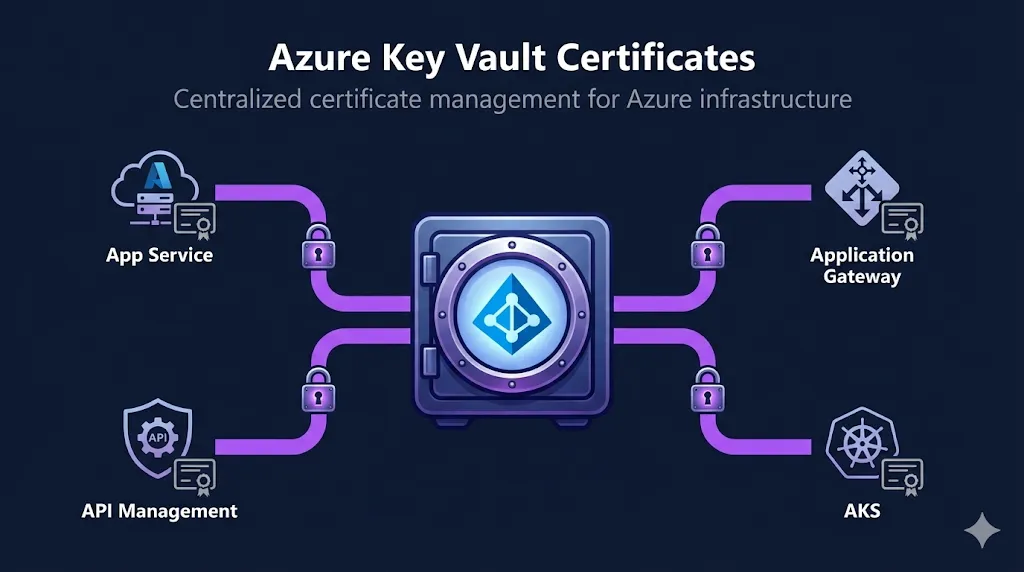
What Is Azure Key Vault
Azure Key Vault is Microsoft's cloud service for securely storing and managing secrets, keys, and certificates. When you store a certificate in Key Vault, it creates a composite object: the X.509 certificate, the private key, and a lifecycle policy—all managed together.
Certificate Object = Three Objects
- Certificate — X.509 metadata + lifecycle policy (expiry notifications, auto-renewal settings)
- Key — The asymmetric key pair (RSA or EC) used for cryptographic operations
- Secret — The full PFX or PEM bundle including the private key (this is what you export)
Name collision warning: Key Vault creates a key and secret with the same name as the certificate. If you try to create a certificate named "myapp" but a secret named "myapp" already exists, the operation will fail. Delete or rename the conflicting object first.
Key Facts
- • Key Vaults are regional resources — a vault lives in a single region, but can store certificates for any domain
- • FIPS 140-2 Level 2 validated (Standard tier) or Level 3 (Premium tier with HSM-backed keys)
- • Soft-delete is mandatory (since February 2025) with a configurable retention period of 7–90 days
Key Vault Defaults vs Recommended
| Setting | Default | Recommended |
|---|---|---|
| Key algorithm | RSA 2048 | RSA 3072+ for new deployments |
| Validity period | 12 months | 12 months or less (shorter = better) |
| Subject naming | CN only | SANs preferred; CN is deprecated for domain matching |
| Content type | PKCS#12 (PFX) | PKCS#12 for Azure services; PEM for Linux/containers |
| Key reuse on renewal | false | false (generate fresh key pair each renewal) |
EKU guidance: For TLS server authentication, ensure digitalSignature and keyEncipherment key usages plus the Server Authentication (1.3.6.1.5.5.7.3.1) EKU are present. Key Vault does not validate EKUs for you — misconfigured EKUs will only surface when the certificate is deployed to a service.
Azure Key Vault vs AWS ACM
| Feature | Azure Key Vault | AWS ACM |
|---|---|---|
| Certificate storage | Yes (with private key) | Yes (managed, no export by default) |
| Private key export | Yes (if policy allows) | Exportable public certs and certain Private CA-issued certs |
| Auto-renewal | DigiCert/GlobalSign only | All ACM-issued certs |
| Self-signed support | Yes (generate in vault) | No |
| CSR generation | Yes (in-vault) | No |
| Pricing | Per operation ($0.03/10K ops) | Free for ACM-issued |
| Integrated CAs | DigiCert, GlobalSign | Amazon CA |
Coming from AWS ACM? See our AWS Certificate Manager (ACM) Guide to understand how Key Vault differs in exportability, CA integration, and lifecycle management.
Creating a Key Vault
Azure CLI
# Create a resource group
az group create \
  --name rg-certificates \
  --location eastus

# Create a Key Vault with RBAC, soft-delete, and purge protection
az keyvault create \
  --name kv-myapp-certs \
  --resource-group rg-certificates \
  --location eastus \
  --enable-rbac-authorization true \
  --enable-soft-delete true \
  --enable-purge-protection true \
  --soft-delete-retention-days 90
PowerShell
# Create a resource group
New-AzResourceGroup -Name "rg-certificates" -Location "eastus"

# Create a Key Vault with RBAC and purge protection
New-AzKeyVault `
  -VaultName "kv-myapp-certs" `
  -ResourceGroupName "rg-certificates" `
  -Location "eastus" `
  -EnableRbacAuthorization `
  -EnablePurgeProtection `
  -SoftDeleteRetentionInDays 90
RBAC Roles for Certificates
| Role | Permissions | Use Case |
|---|---|---|
| Key Vault Administrator | Full control over vault and all objects | Vault owners, PKI admins |
| Key Vault Certificates Officer | Create, import, update, delete certificates | Certificate management automation |
| Key Vault Certificate User | Read certificate metadata and secrets | App Service, Application Gateway |
| Key Vault Reader | Read vault metadata only (no secrets) | Auditors, monitoring |
FixMyCert recommendation: Soft-delete is now mandatory for all new vaults. Always enable purge protection in production — it prevents permanent deletion of certificates during the retention period, protecting against accidental or malicious deletion.
Importing Certificates
Key Vault supports two import formats: PFX/PKCS#12 (binary, password-protected) and PEM (Base64-encoded, must include the private key).
Import PFX (Azure CLI)
# Import a PFX certificate with password
az keyvault certificate import \
  --vault-name kv-myapp-certs \
  --name myapp-tls \
  --file ./myapp.pfx \
  --password "YourPfxPassword"
Import PEM (Azure CLI)
# Import a PEM certificate (must include private key)
# Combine cert + key into single PEM file first:
# cat cert.pem key.pem > combined.pem
az keyvault certificate import \
  --vault-name kv-myapp-certs \
  --name myapp-tls \
  --file ./combined.pem
Import PFX (PowerShell)
$password = ConvertTo-SecureString -String "YourPfxPassword" -AsPlainText -Force
Import-AzKeyVaultCertificate `
  -VaultName "kv-myapp-certs" `
  -Name "myapp-tls" `
  -FilePath "./myapp.pfx" `
  -Password $password
Common Import Errors
| Error | Cause | Fix |
|---|---|---|
| Private key is not specified | PEM file missing private key | Concatenate cert + key into one PEM file |
| Unable to parse X5c chain | Malformed PEM or extra whitespace | Validate PEM format; remove trailing spaces |
| Certificate name already exists | Name collision with existing secret/key | Delete or rename conflicting object |
| Specified content type not valid | Wrong file format or extension | Use .pfx for PKCS#12, .pem for PEM |
| Subject name limited to 200 characters | CN/Subject exceeds 200 char limit | Shorten subject; use SANs instead |
| Insufficient permissions | Missing Certificates Officer role | Assign Key Vault Certificates Officer RBAC role |
| PEM parsing error (line separators) | Windows CRLF line endings in PEM | Convert to Unix LF: dos2unix combined.pem |
Format Conversion
# PEM to PFX (for Key Vault import)
openssl pkcs12 -export \
  -out certificate.pfx \
  -inkey private.key \
  -in certificate.crt \
  -certfile chain.crt \
  -password pass:YourPassword
# PFX to PEM (extract from PFX)
openssl pkcs12 -in certificate.pfx \
  -out combined.pem \
  -nodes \
  -password pass:YourPassword
Need help with formats? See our Certificate Formats Guide and OpenSSL Commands Reference.
Generating Certificates
Method A: Self-Signed Certificate
# Create a self-signed certificate with JSON policy
az keyvault certificate create \
  --vault-name kv-myapp-certs \
  --name myapp-internal \
  --policy '{
    "issuerParameters": { "name": "Self" },
    "keyProperties": {
      "keyType": "RSA",
      "keySize": 2048,
      "exportable": true,
      "reuseKey": false
    },
    "secretProperties": { "contentType": "application/x-pkcs12" },
    "x509CertificateProperties": {
      "subject": "CN=myapp.internal.example.com",
      "validityInMonths": 12,
      "subjectAlternativeNames": {
        "dnsNames": ["myapp.internal.example.com", "myapp.dev.example.com"]
      }
    }
  }'
FixMyCert warning: Do not use Key Vault self-signed certificates beyond lab and non-production environments. They create an isolated trust silo — nothing trusts them by default, and distributing a custom root CA to browsers and devices creates operational overhead that defeats the purpose. For production, always use a CA-signed certificate (public CA for external services, enterprise CA for internal).
Method B: CSR-Based (Any CA)
Use this workflow to get a certificate from any CA while keeping the private key in Key Vault.
4-Step Workflow
- 1. Create certificate with "Unknown" issuer (generates CSR + key pair)
- 2. Download the CSR from Key Vault
- 3. Submit CSR to your CA and get the signed certificate
- 4. Merge the signed certificate back into Key Vault
# Step 1: Create certificate request (generates CSR in vault)
az keyvault certificate create \
  --vault-name kv-myapp-certs \
  --name myapp-public \
  --policy '{
    "issuerParameters": { "name": "Unknown" },
    "keyProperties": { "keyType": "RSA", "keySize": 2048, "exportable": true },
    "x509CertificateProperties": {
      "subject": "CN=myapp.example.com",
      "validityInMonths": 12,
      "subjectAlternativeNames": {
        "dnsNames": ["myapp.example.com", "www.myapp.example.com"]
      }
    }
  }'

# Step 2: Download the CSR
az keyvault certificate pending show \
  --vault-name kv-myapp-certs \
  --name myapp-public \
  --query csr -o tsv > myapp.csr

# Step 3: Submit CSR to your CA (external step)
# Your CA returns a signed certificate (e.g., signed-cert.crt)

# Step 4: Merge the signed certificate
az keyvault certificate pending merge \
  --vault-name kv-myapp-certs \
  --name myapp-public \
  --file signed-cert.crt
Validate your CSR before submitting: Use our CSR Checker tool to verify the CSR contents match your requirements. For format conversion help, see the Certificate Formats and OpenSSL essentials guides.
Method C: Integrated CA (DigiCert/GlobalSign)
# Configure the CA issuer (one-time setup)
az keyvault certificate issuer create \
  --vault-name kv-myapp-certs \
  --issuer-name DigiCertIssuer \
  --provider-name DigiCert \
  --account-id "YOUR_DIGICERT_ACCOUNT_ID" \
  --password "YOUR_DIGICERT_API_KEY"

# Create a certificate using the integrated CA
az keyvault certificate create \
  --vault-name kv-myapp-certs \
  --name myapp-production \
  --policy '{
    "issuerParameters": { "name": "DigiCertIssuer" },
    "keyProperties": { "keyType": "RSA", "keySize": 2048, "exportable": true },  // set false if policy disallows export
    "x509CertificateProperties": {
      "subject": "CN=myapp.example.com",
      "validityInMonths": 12,
      "subjectAlternativeNames": {
        "dnsNames": ["myapp.example.com", "www.myapp.example.com"]
      }
    },
    "lifetimeActions": [
      { "action": { "actionType": "AutoRenew" }, "trigger": { "daysBeforeExpiry": 30 } }
    ]
  }'
Note: Only DigiCert and GlobalSign are integrated CAs in Key Vault. For all other CAs (Let's Encrypt, Sectigo, etc.), use the CSR-based workflow (Method B) or import certificates manually.
Renewal & Auto-Rotation
Auto-Renewal with Integrated CAs
Certificates issued through DigiCert or GlobalSign can auto-renew. Configure the lifetimeAction in the certificate policy:
# Update certificate policy with auto-renewal
az keyvault certificate set-attributes \
  --vault-name kv-myapp-certs \
  --name myapp-production \
  --policy '{
    "lifetimeActions": [
      {
        "action": { "actionType": "AutoRenew" },
        "trigger": { "daysBeforeExpiry": 30 }
      }
    ]
  }'
Email Notifications (Non-Integrated CAs)
For certificates from non-integrated CAs, configure email notifications to alert you before expiry:
# Set up email notification before expiry
az keyvault certificate set-attributes \
  --vault-name kv-myapp-certs \
  --name myapp-tls \
  --policy '{
    "lifetimeActions": [
      {
        "action": { "actionType": "EmailContacts" },
        "trigger": { "daysBeforeExpiry": 30 }
      }
    ]
  }'

# Add certificate contacts for notifications
az keyvault certificate contact add \
  --vault-name kv-myapp-certs \
  --email "pki-team@example.com" \
  --name "PKI Team" \
  --phone "555-0100"
Event Grid Integration
Use Azure Event Grid to trigger automation (Azure Functions, Logic Apps) on certificate events:
# Create an Event Grid subscription for certificate events
az eventgrid event-subscription create \
  --name cert-expiry-alert \
  --source-resource-id $(az keyvault show --name kv-myapp-certs --query id -o tsv) \
  --endpoint https://myapp.azurewebsites.net/api/cert-webhook \
  --included-event-types \
    Microsoft.KeyVault.CertificateNearExpiry \
    Microsoft.KeyVault.CertificateExpired \
    Microsoft.KeyVault.CertificateNewVersionCreated
FixMyCert recommendation: Don't rely on email alone. Combine email contacts with Event Grid subscriptions for a robust monitoring strategy. Use Event Grid to trigger automated renewal pipelines for non-integrated CAs.
47-day certificates are coming. The CA/Browser Forum is moving toward 47-day certificate lifetimes. Build automation now — manual renewal at this frequency is unsustainable. See our 47-Day Certificate Timeline Guide.
Automation Patterns for DevOps
Pattern 1: ACME → Key Vault
Run certbot or acme.sh in a scheduled runner (Azure DevOps pipeline, GitHub Action, or cron job). After obtaining the certificate, convert to PFX and import into Key Vault. App Gateway and App Service consume the updated cert via managed identity — no manual steps.
# Example: certbot renewal → Key Vault import pipeline
certbot renew --deploy-hook '
  openssl pkcs12 -export -out /tmp/cert.pfx \
    -inkey /etc/letsencrypt/live/myapp/privkey.pem \
    -in /etc/letsencrypt/live/myapp/fullchain.pem \
    -passout pass:AutoGenPassword
  az keyvault certificate import \
    --vault-name kv-myapp-certs --name myapp-tls \
    --file /tmp/cert.pfx --password AutoGenPassword
  rm /tmp/cert.pfx
'
Pattern 2: Corporate CA → Key Vault
For enterprise CAs (ADCS, Venafi, EJBCA): enroll via SCEP/EST or offline CSR, export the signed certificate as PFX, then script az keyvault certificate import into your CI/CD pipeline. For ADCS environments, autoenrollment can populate Key Vault via a bridge script that monitors the Windows certificate store and pushes new certs to the vault.
Pattern 3: Event-Driven Renewal
Subscribe to CertificateNearExpiry events via Event Grid. Route events to an Azure Function or Logic App that either (a) triggers your ACME renewal pipeline, (b) calls your CA's API to reissue, or (c) creates a ServiceNow/Jira ticket for manual renewal. This turns Key Vault into the single source of truth for certificate lifecycle state.
Using with Azure Services
Application Gateway
Application Gateway can reference Key Vault certificates using a managed identity. Use versionless URIs so the gateway picks up renewed certificates automatically.
# Create a user-assigned managed identity
az identity create \
  --name appgw-identity \
  --resource-group rg-certificates

# Get the identity's principal ID
IDENTITY_ID=$(az identity show \
  --name appgw-identity \
  --resource-group rg-certificates \
  --query principalId -o tsv)

# Assign Key Vault Certificate User role
az role assignment create \
  --assignee $IDENTITY_ID \
  --role "Key Vault Certificate User" \
  --scope $(az keyvault show --name kv-myapp-certs --query id -o tsv)

# Reference certificate in App Gateway (versionless URI)
# Use the SECRET URI, not the certificate URI:
# https://kv-myapp-certs.vault.azure.net/secrets/myapp-tls
CRITICAL GOTCHA
Application Gateway uses the /secrets/ URI, NOT the /certificates/ URI
✓ Correct: https://kv-myapp-certs.vault.azure.net/secrets/myapp-tls
✗ Wrong: https://kv-myapp-certs.vault.azure.net/certificates/myapp-tls
The /secrets/ URI returns the full PFX including the private key. The /certificates/ URI only returns the public certificate without the private key—useless for TLS termination.
Common App Gateway + Key Vault Errors
| Error | Cause | Fix |
|---|---|---|
| UserAssignedIdentityDoesNotHaveGetPermission | Managed identity missing RBAC role | Assign Key Vault Certificate User role |
| SecretNotFound | Using /certificates/ URI instead of /secrets/ | Change to /secrets/ URI |
| KeyVaultAccessDenied | Firewall blocking App Gateway | Allow trusted Microsoft services or add App Gateway subnet |
| CertificateNotYetValid | Certificate notBefore is in the future | Check certificate validity dates |
| Old cert still served after renewal | App Gateway polling delay (up to 4 hours) | Wait for next poll or restart App Gateway |
App Service
# Import Key Vault certificate to App Service
az webapp config ssl import \
  --resource-group rg-myapp \
  --name myapp-webapp \
  --key-vault kv-myapp-certs \
  --key-vault-certificate-name myapp-tls
App Service provider registration: App Service uses the Microsoft.Azure.App Service resource provider to access Key Vault. The service principal app ID varies by cloud (Public: abfa0a7c-a6b6-4736-8310-5855508787cd). Ensure this principal has Key Vault Certificate User or equivalent access.
AKS (Azure Kubernetes Service)
# Enable the Secrets Store CSI Driver addon on AKS
az aks enable-addons \
  --resource-group rg-myapp \
  --name myapp-aks \
  --addons azure-keyvault-secrets-provider
Then create a SecretProviderClass to mount certificates as files in your pods:
apiVersion: secrets-store.csi.x-k8s.io/v1
kind: SecretProviderClass
metadata:
  name: kv-tls-cert
spec:
  provider: azure
  parameters:
    clientID: "<workload-identity-client-id>"   # Workload identity (recommended)
    keyvaultName: "kv-myapp-certs"
    tenantId: "<your-tenant-id>"
    objects: |
      array:
        - |
          objectName: myapp-tls
          objectType: secret
  secretObjects:                                 # Sync to a k8s Secret for TLS ingress
    - secretName: myapp-tls-secret
      type: kubernetes.io/tls
      data:
        - objectName: myapp-tls
          key: tls.key
        - objectName: myapp-tls
key: tls.crt# Mount in your pod spec (volumes + volumeMounts)
spec:
serviceAccountName: myapp-sa # SA annotated with workload identity
containers:
- name: myapp
volumeMounts:
- name: tls-cert
mountPath: "/mnt/certs"
readOnly: true
volumes:
- name: tls-cert
csi:
driver: secrets-store.csi.k8s.io
readOnly: true
volumeAttributes:
secretProviderClass: kv-tls-certFor full Kubernetes certificate automation: See our cert-manager for Kubernetes Guide for ACME-based certificate management with Let's Encrypt on AKS.
API Management
Azure API Management can reference Key Vault certificates for custom domains and client certificate validation. Use a system-assigned managed identity, grant it Key Vault Certificate User, then reference the secret URI in the custom domain blade — APIM pulls the PFX from Key Vault the same way Application Gateway does.
# Enable system-assigned managed identity on APIM (via Azure Resource Manager)
az resource update --ids $(az apim show --name myapp-apim \
  --resource-group rg-myapp --query id -o tsv) \
  --set identity.type=SystemAssigned

# Get APIM's principal ID
APIM_PRINCIPAL=$(az apim show --name myapp-apim --resource-group rg-myapp \
  --query identity.principalId -o tsv)

# Grant Key Vault access
az role assignment create --assignee $APIM_PRINCIPAL \
  --role "Key Vault Certificate User" \
  --scope $(az keyvault show --name kv-myapp-certs --query id -o tsv)

# In the portal: APIM → Custom domains → Add → select Key Vault certificate
# Reference: https://kv-myapp-certs.vault.azure.net/secrets/myapp-tls
Retrieving & Exporting
Download Public Certificate Only
# Download the public certificate (no private key)
az keyvault certificate download \
  --vault-name kv-myapp-certs \
  --name myapp-tls \
  --file myapp-public.pem \
  --encoding PEM
Get Certificate with Private Key (via Secret)
# Get the full certificate + private key via the secret object
az keyvault secret download \
  --vault-name kv-myapp-certs \
  --name myapp-tls \
  --file myapp-full.pfx \
  --encoding base64
PowerShell: Full Export with Private Key
# Export certificate with private key (PowerShell)
$secret = Get-AzKeyVaultSecret -VaultName "kv-myapp-certs" -Name "myapp-tls"
$secretBytes = [Convert]::FromBase64String($secret.SecretValueText)
[IO.File]::WriteAllBytes("myapp-export.pfx", $secretBytes)

# Convert to PEM if needed
openssl pkcs12 -in myapp-export.pfx -out myapp-export.pem -nodes
Key insight: To get the private key, you must read the secret object, not the certificate object. The certificate object only returns the public X.509 certificate. The secret object contains the full PFX/PEM bundle with the private key.
Troubleshooting
Decision Tree: Certificate Import Failing?
Certificate import failing?
├─ "Private key is not specified"
│  └─ PEM file is missing the private key block
│     → Concatenate: cat cert.pem key.pem > combined.pem
├─ "Unable to parse X5c chain"
│  └─ Malformed PEM (extra whitespace, Windows line endings)
│     → Run: dos2unix combined.pem && openssl x509 -in cert.pem -noout
├─ "Certificate name already exists"
│  └─ A secret or key with the same name exists
│     → Delete conflicting object or use a different name
├─ "Specified content type not valid"
│  └─ File format doesn't match extension
│     → Verify: file certificate.pfx (should show PKCS#12)
└─ Certificate expired
   └─ Key Vault rejects expired certificates
      → Obtain a renewed certificate first
CLI Quick Checks
# Verify PFX is valid
openssl pkcs12 -info -in certificate.pfx -noout

# Check PEM has private key
grep -c "PRIVATE KEY" combined.pem  # Should return 1

# List soft-deleted certs (name collision check)
az keyvault certificate list-deleted --vault-name kv-myapp-certs -o table

# Verify your RBAC role
az role assignment list --assignee $(az ad signed-in-user show --query id -o tsv) \
  --scope $(az keyvault show --name kv-myapp-certs --query id -o tsv) -o table
Decision Tree: Certificate Stuck "In Progress"?
Certificate stuck "In Progress"?
├─ Using integrated CA (DigiCert/GlobalSign)?
│  └─ Check issuer credentials and account status
│     → az keyvault certificate issuer show --vault-name <vault> --issuer-name <issuer>
├─ Using CSR workflow (Unknown issuer)?
│  └─ Waiting for you to merge the signed certificate
│     → Download CSR, submit to CA, then merge signed cert
└─ DNS validation pending?
   └─ CA is waiting for domain validation
      → Check your DNS records and CA dashboard
Decision Tree: App Gateway Not Picking Up New Cert?
Application Gateway not picking up new cert?
├─ Using versioned URI?
│  └─ Versioned URIs point to a specific version forever
│     → Switch to versionless URI (remove version segment)
├─ Using /certificates/ URI instead of /secrets/?
│  └─ App Gateway needs /secrets/ for the private key
│     → Change to: https://<vault>.vault.azure.net/secrets/<name>
├─ Managed identity permissions changed?
│  └─ Identity lost Key Vault access
│     → Re-assign Key Vault Certificate User role
├─ Key Vault firewall blocking?
│  └─ Firewall rules exclude App Gateway
│     → Allow trusted Microsoft services or add App Gateway subnet
└─ Polling delay (up to 4 hours)?
   └─ App Gateway checks Key Vault every 4 hours
      → Wait for next poll cycle or restart the App Gateway
CLI Quick Checks
# Check the secret content type (should be application/x-pkcs12)
az keyvault secret show --vault-name kv-myapp-certs --name myapp-tls \
  --query contentType -o tsv

# Compare Key Vault cert version vs what App Gateway is using
az keyvault certificate show --vault-name kv-myapp-certs --name myapp-tls \
  --query sid -o tsv  # Shows the linked secret URI with version

# Verify managed identity has access
az role assignment list --assignee <appgw-identity-principal-id> \
  --scope $(az keyvault show --name kv-myapp-certs --query id -o tsv) -o table

# Check if Key Vault firewall allows App Gateway
az keyvault network-rule list --name kv-myapp-certs -o table
Verify Certificate with OpenSSL
# Verify the exported certificate
openssl x509 -in myapp-public.pem -text -noout

# Check certificate chain
openssl verify -CAfile chain.pem myapp-public.pem

# Test TLS connection to your endpoint
openssl s_client -connect myapp.example.com:443 -servername myapp.example.com
More debugging tools: OpenSSL s_client Guide • Chain Builder Demo • Certificate Formats Guide
Best Practices
1.Use RBAC over Access Policies
RBAC provides granular, Azure-native permission management. Access Policies are legacy and harder to audit. New vaults should always use RBAC authorization.
2.Enable purge protection
Purge protection prevents permanent deletion of certificates during the soft-delete retention period. This protects against accidental deletion and insider threats.
3.Use versionless URIs
Always reference certificates without a version in the URI (e.g., /secrets/myapp-tls instead of /secrets/myapp-tls/abc123). This ensures services automatically pick up renewed certificates.
4.Separate vaults by environment
Use distinct vaults for dev, staging, and production. This limits blast radius, simplifies RBAC, and prevents accidental cross-environment certificate usage.
5.Monitor with Event Grid
Subscribe to CertificateNearExpiry and CertificateExpired events via Event Grid. Trigger automated renewal pipelines or PagerDuty/Slack alerts.
6.Audit with Azure Monitor
Enable diagnostic settings on Key Vault and send logs to Log Analytics. Monitor for unauthorized access attempts, failed operations, and certificate lifecycle events.
7.Plan for 47-day certificates
The CA/Browser Forum is shortening certificate lifetimes. Ensure your renewal automation can handle certificates that expire every 47 days without manual intervention.
8.Tag certificates
Use Azure tags (environment, team, application, expiry-owner) on certificates for cost tracking, ownership clarity, and automated inventory reporting.