Which DCV Method Should You Automate?
By March 2028, 11 domain validation methods will be eliminated. Only 4 survive—and they all require automation. This guide gives you a decision framework to pick the right DCV method for your infrastructure.
Watch: DCV Automation Explained
The Short Answer
| If you need... | Use this method |
|---|---|
| Wildcard certificates (*.example.com) | DNS-01 (only option) |
| Simple setup, port 80 available | HTTP-01 (easiest) |
| Port 443 only, no port 80 | TLS-ALPN-01 |
| No public ports available | DNS-01 (universal fallback) |
Keep reading for the full decision tree and implementation details.
Deciding which DCV method to automate first? The PKI Priority Planner can help you figure out where automation fits in your overall PKI roadmap.
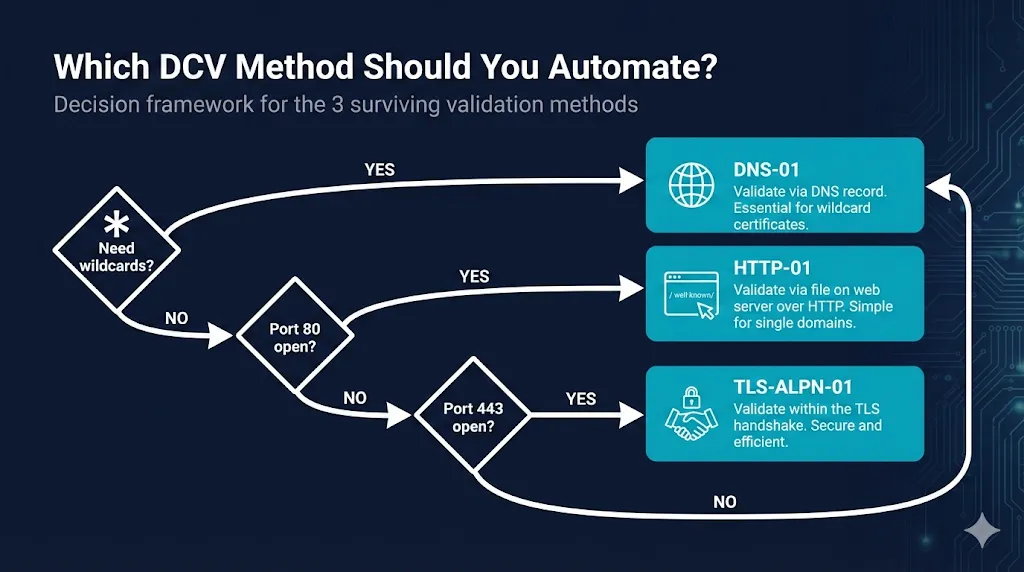
Assess Your PrioritiesThe Decision Flowchart
Need wildcard certificates?
*.example.com, *.api.example.com
(only option)
Can you receive traffic on port 80?
From the public internet
(simplest)
Can you receive traffic on port 443?
With ALPN passthrough
(fallback)
The Decision Algorithm
- If you need wildcard certificates (
*.example.com), then use DNS-01. Stop here—it's the only option. - Else if your server can receive inbound traffic on port 80, then use HTTP-01. Simplest setup—just place a file.
- Else if your server can receive inbound traffic on port 443 with ALPN passthrough, then use TLS-ALPN-01. Validates during the TLS handshake.
- Else, use DNS-01. Universal fallback—no inbound ports needed.
Key insight: If you answer "no" to both port 80 and port 443, you are forced to DNS-01 regardless of preference. Many enterprises choose DNS-01 as their primary method and only use HTTP-01/TLS-ALPN-01 where DNS APIs aren't available yet.
Method Comparison Matrix
| Factor | DNS-01 | HTTP-01 | TLS-ALPN-01 |
|---|---|---|---|
| Supports wildcards | Yes | No | No |
| Inbound port required | None | 80 | 443 |
| What you need access to | DNS provider API | Web server filesystem | TLS termination point |
| Works behind CDN/proxy | Yes | Only with cache/WAF bypass rules | Only if CDN/LB supports ALPN passthrough |
| Propagation delay | DNS TTL (secs-mins) | Instant | Instant |
| Setup complexity | Medium | Low | Medium |
| Best for | Cloud, wildcards, internal servers | Simple web servers, VPS | Load balancers, K8s ingress |
DNS-01 Deep Dive
How it works
- You request a certificate from the CA (e.g., Let's Encrypt).
- The CA gives you a token.
- You create a TXT record:
_acme-challenge.yourdomain.com→"<token>" - The CA queries DNS, finds the token, and validates that you control the domain.
- The certificate is issued.
Why choose DNS-01
- Only option for wildcards — HTTP-01 and TLS-ALPN-01 cannot validate *.example.com
- No inbound ports needed — Works for internal servers, servers behind NAT, air-gapped networks
- Works behind CDNs — Cloudflare, AWS CloudFront, Fastly don't interfere
- One validation, multiple servers — Validate once, deploy cert anywhere
The tradeoff
You need programmatic access to your DNS provider. This means:
- API credentials for Cloudflare, Route53, Azure DNS, Google Cloud DNS, etc.
- Or a DNS provider that supports RFC 2136 dynamic updates
- Or delegation via CNAME to a DNS provider you do control
When DNS-01 breaks
- DNS propagation delays (especially with high TTLs)
- API rate limits on DNS provider
- Credentials rotated without updating ACME client
- Split-horizon DNS where external resolvers see different records
HTTP-01 Deep Dive
How it works
- You request a certificate from the CA.
- The CA gives you a token and a thumbprint.
- You place a file at:
http://yourdomain.com/.well-known/acme-challenge/<token> - File contents:
<token>.<thumbprint>(your ACME client builds this for you). - The CA makes an HTTP request to port 80, retrieves the file, and validates the response.
- The certificate is issued.
Why choose HTTP-01
- Simplest setup — Just needs write access to web server document root
- No DNS access required — Works even if someone else manages your DNS
- Instant validation — No propagation delay
- Built into most ACME clients — Certbot, acme.sh handle it automatically
When HTTP-01 breaks
- Port 80 blocked by firewall or ISP
- CDN or reverse proxy intercepts requests before reaching origin
- Web server misconfigured to redirect all HTTP to HTTPS (before challenge file is served)
- Load balancer routing challenge to wrong backend server
.well-knownpath blocked by security rules
TLS-ALPN-01 Deep Dive
How it works
- You request a certificate from the CA
- CA gives you a token
- Your server presents a self-signed certificate on port 443 with:
- A special ALPN protocol:
acme-tls/1 - The token embedded in a certificate extension
- A special ALPN protocol:
- CA connects to port 443, negotiates ALPN, reads the token from the cert
- Certificate issued
Why choose TLS-ALPN-01
- No file placement — Validation happens in the TLS handshake itself
- Works when port 80 is blocked — Common in corporate environments
- CDN-friendly — Can work with CDNs that support ALPN passthrough
- Elegant for load balancers — No need to route challenge files to backends
When TLS-ALPN-01 breaks
- Load balancer terminates TLS without ALPN passthrough
- Server doesn't support custom ALPN protocols
- CDN intercepts TLS before reaching origin
- Port 443 firewalled
Common Scenarios
"I'm running Kubernetes"
Recommended: cert-manager with DNS-01 (most flexible) or HTTP-01 (simpler for ingress)
cert-manager is the de facto standard for Kubernetes certificate automation. HTTP-01 is easiest to start with (works with nginx-ingress, traefik), but DNS-01 is what you'll want once you need wildcards or multiple clusters.
Common pattern: HTTP-01 via Ingress for simple services, DNS-01 via ClusterIssuer using cloud-native DNS APIs for wildcards and multi-cluster deployments.
"I'm behind Cloudflare / AWS CloudFront / Fastly"
Recommended: DNS-01
CDNs cache and intercept HTTP traffic, which breaks HTTP-01. The challenge request goes to the CDN edge, not your origin. Use DNS-01, or configure CDN to bypass cache for /.well-known/acme-challenge/*.
HTTP-01 bypass rules are brittle—DDoS protection or WAF rule changes can silently break certificate renewals. DNS-01 avoids this fragility.
"I have a simple VPS with Nginx or Apache"
Recommended: HTTP-01 with certbot
This is the "5-minute setup" scenario. Certbot can automatically configure Nginx or Apache:
# Nginx
sudo certbot --nginx -d example.com -d www.example.com

# Apache
sudo certbot --apache -d example.com -d www.example.com
"I need wildcard certificates for microservices"
Recommended: DNS-01 (only option)
Wildcard certificates require DNS-01. There's no workaround—HTTP-01 and TLS-ALPN-01 cannot validate wildcards. Set up DNS-01 automation with your DNS provider's API:
certbot certonly --dns-cloudflare -d "*.example.com" -d "example.com"
"My server has no public IP"
Recommended: DNS-01
If your server can't receive inbound connections from the internet, DNS-01 is your only option. The validation happens entirely via DNS queries—no connection to your server required.
Common examples: Internal ADCS replacements, internal web apps that need public-trust certs on reverse proxies, dev/staging environments, servers behind corporate NAT, air-gapped networks with outbound-only DNS.
Typical Enterprise Pattern
DNS-01 via central DNS team for all public zones (covers wildcards, internal servers, CDN-fronted sites). HTTP-01 as a fallback for legacy sites where DNS APIs aren't available yet. TLS-ALPN-01 only at global load balancers (F5, HAProxy, Envoy) that already terminate TLS.
You're choosing a portfolio of methods, not just one. Most enterprises standardize on DNS-01 and use the others as exceptions.
What About the Eliminated Methods?
The CA/Browser Forum is eliminating 11 DCV methods between 2025 and 2028:
| Method | Eliminated | Why |
|---|---|---|
| Email to domain contact | March 15, 2026 | Can't scale to 47-day certificates |
| Email to WHOIS contact | March 15, 2026 | WHOIS privacy broke this |
| Phone validation | March 15, 2027 | Manual, doesn't scale |
| Fax validation | March 15, 2027 | It's 2026. |
| ... and 7 others | March 15, 2028 | See full timeline → |
If you're still relying on manual validation methods, you have less than 24 months to migrate.
ACME Clients Compared
All three methods are implemented through ACME (Automatic Certificate Management Environment). Here are the main clients:
| Client | Best for | DNS-01 | HTTP-01 | TLS-ALPN |
|---|---|---|---|---|
| certbot | Linux servers, beginners | Yes (via DNS plugins) | Yes | Yes (with plugin/flags) |
| acme.sh | Scripting, CI/CD, DNS support | Yes (many DNS providers) | Yes | Yes |
| cert-manager | Kubernetes | Yes | Yes | Yes (via controller) |
| Caddy | Built-in, zero config | Yes (DNS modules) | Yes (default) | Yes (built-in) |
| Traefik | Built-in, Docker/K8s | Yes (providers) | Yes | Limited/varies by version |
| lego | Go applications, CLI | Yes | Yes | Yes |
| win-acme | Windows/IIS | Yes (DNS plugins/scripts) | Yes | Limited/none in most setups |
Making Your Decision
Quick decision checklist
- Do you need wildcard certificates?
Yes → DNS-01. Stop here. No → Continue. - Can your server receive traffic on port 80 from the internet?
Yes → HTTP-01 is your simplest option. No → Continue. - Can your server receive traffic on port 443 from the internet?
Yes → TLS-ALPN-01 works for you. No → DNS-01 is your only option. - Do you have API access to your DNS provider?
Yes → DNS-01 is ready to implement. No → Get API access, or switch to a DNS provider that offers it.
Still not sure?
Default to DNS-01. It's the most versatile: works for wildcards, works without public ports, works behind CDNs and load balancers. It's the universal fallback for any scenario.
The only downside is needing DNS API access—but if you're serious about automation, you need that anyway.
Ready to implement?
Once you've picked your primary method, you're ready for implementation:
Related Resources
DCV Methods Sunset Timeline
Complete timeline of methods being eliminated by 2028
47-Day Certificate Timeline
SC-081v3 certificate validity reduction timeline
ACME Protocol Guide
How automatic certificate management works
Caddy SSL Certificates
Zero-config HTTPS with built-in ACME
The PKI Automation Gap
Why nobody is ready for 47-day certificates