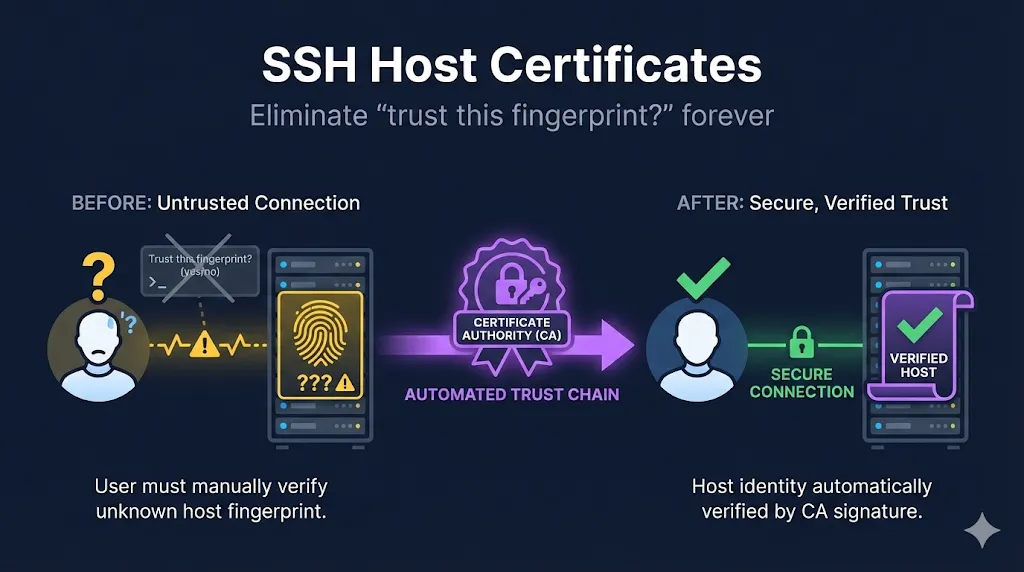
- • What they do: Let servers prove identity via CA signature—no more fingerprint prompts
- • Key benefit: Zero TOFU risk, zero known_hosts management, works with automation
- • Low risk: Deploy incrementally—servers offer certs, clients verify when configured
1. The TOFU Problem
Every SSH user has seen this:
The authenticity of host 'server01.example.com (10.0.1.50)' can't be established.
ED25519 key fingerprint is SHA256:xK3rV9mPqL2nB8wY5tH7jU4cF6gA1dS0zX9oN3iE2qM.
Are you sure you want to continue connecting (yes/no/[fingerprint])?
Be honest: When was the last time you actually verified that fingerprint?
This is TOFU - Trust On First Use. The security model is:
- First connection: blindly trust whatever server responds
- Future connections: warn if the key changes
The problems with TOFU:
If an attacker intercepts your first connection to a new server, you'll happily accept their key. You've now trusted the attacker.
Nobody calls the server admin to verify fingerprints. We've trained ourselves to bypass the security check.
Your ~/.ssh/known_hosts file grows with every server. New laptop? Start from scratch. Server rebuilt? "WARNING: REMOTE HOST IDENTIFICATION HAS CHANGED!" panic.
Scripts need StrictHostKeyChecking=no to work with new servers—effectively disabling the security check.
The irony: SSH's host key verification is solid security—if anyone actually used it properly. Host certificates make it automatic.
When host certificates might be overkill:
Very small, static environments (3-5 servers that rarely change) may not justify the CA setup overhead. If your team manually verifies fingerprints once and never rebuilds servers, traditional host keys work fine. But even modest growth or automation needs will tip the balance toward certificates.
2. How Host Certificates Work
The solution mirrors how TLS handles server identity:
┌─────────────┐     ┌─────────────┐     ┌─────────────┐
│   Client    │     │     CA      │     │   Server    │
│(trusts CA)  │     │  (signs)    │◀────│ (has cert)  │
└─────────────┘     └─────────────┘     └─────────────┘
       │                                       │
       │  1. Connect to server                 │
       │──────────────────────────────────────▶│
       │                                       │
       │  2. Server presents host certificate  │
       │◀──────────────────────────────────────│
       │                                       │
       │  3. Client verifies cert against CA   │
       │     ✓ Valid? Connect!                 │
       │     ✗ Invalid? Reject!                │
What's happening:
- Server's host key is signed by a CA → creates host certificate
- Client trusts the CA (configured once)
- On connection, client verifies the server's certificate
- Valid certificate from trusted CA = automatic trust
- No fingerprint prompt. No known_hosts entry needed.
Same concept as TLS: Your browser trusts certificate authorities, which vouch for websites. SSH host certificates work identically—your SSH client trusts a CA, which vouches for servers.
3. Anatomy of a Host Certificate
Host certificates contain fields that identify the server:
| Field | Purpose | Example |
|---|---|---|
| Key ID | Identifier for logs | server01.example.com-20250114 |
| Principals | Hostnames/IPs this cert is valid for | server01.example.com, server01, 10.0.1.50 |
| Valid After | Certificate start time | 2025-01-14T00:00:00 |
| Valid Before | Certificate expiration | 2025-07-14T00:00:00 |
| Type | Must be host certificate | host key |
Key difference from user certificates: The -h flag marks it as a host certificate. Principals are hostnames/IPs, not usernames.
→ See our SSH Certificate Anatomy demo to explore these fields interactively.
4. Signing a Host Certificate
Sign the server's existing host key:
ssh-keygen -s /path/to/host_ca \
  -I "server01.example.com-20250114" \
  -h \
  -n server01.example.com,server01,10.0.1.50 \
  -V +52w \
  /etc/ssh/ssh_host_ed25519_key.pub
Flag breakdown:
| Flag | Meaning | Notes |
|---|---|---|
| -s | CA private key | Your host CA (separate from user CA) |
| -I | Key ID | Appears in logs, include hostname + date |
| -h | Host certificate | Critical! Without this, it's a user cert |
| -n | Principals | All hostnames/IPs clients might use |
| -V | Validity | Longer is OK for hosts: weeks or months |
Output: Creates /etc/ssh/ssh_host_ed25519_key-cert.pub
- • FQDN:
server01.example.com - • Short name:
server01 - • IP address:
10.0.1.50 - • Any aliases or CNAMEs
If a client connects using a name not in the principals list, verification fails.
5. Server Configuration
Tell sshd to present the certificate:
# /etc/ssh/sshd_config

# Present this certificate to connecting clients
HostCertificate /etc/ssh/ssh_host_ed25519_key-cert.pub
Restart sshd:
systemctl restart sshd
That's it on the server side. The certificate file sits alongside the existing host key. The private key doesn't change.
Multiple key types? Add multiple HostCertificate lines:
HostCertificate /etc/ssh/ssh_host_ed25519_key-cert.pub
HostCertificate /etc/ssh/ssh_host_rsa_key-cert.pub
6. Client Configuration
Clients need to trust the CA. Two options:
Add to ~/.ssh/known_hosts:
@cert-authority *.example.com ssh-ed25519 AAAA...Add to /etc/ssh/ssh_known_hosts:
@cert-authority *.example.com ssh-ed25519 AAAA...This says: "Trust any host certificate signed by this CA for hosts matching *.example.com"
Pattern matching:
| Pattern | Matches |
|---|---|
| *.example.com | Any subdomain of example.com |
| *.prod.example.com | Only prod subdomain hosts |
| 10.0.1.* | IP range (fragile with DHCP or dynamic cloud IPs) |
| * | Everything (probably too broad) |
Best practice: Scope the pattern to your infrastructure. Don't use * unless you control the CA tightly.
7. The Complete Picture: User + Host Certificates
With both certificate types deployed:
┌──────────────┐                      ┌──────────────┐
│    Client    │                      │    Server    │
│              │                      │              │
│ Trusts:      │                      │ Trusts:      │
│ • Host CA    │◀────── TLS-like ────▶│ • User CA    │
│              │      mutual trust    │              │
│ Has:         │                      │ Has:         │
│ • User cert  │                      │ • Host cert  │
└──────────────┘                      └──────────────┘
"Is this host certificate signed by a CA I trust?"
"Is this user certificate signed by a CA I trust?"
Zero TOFU. Zero authorized_keys. Zero fingerprint prompts.
Both sides authenticate cryptographically through trusted CAs.
Compliance note
SSH host certificates align with requirements in common security frameworks (NIST 800-53, SOC 2, PCI DSS)—centralized key management, documented trust chains, and auditable access control. Auditors appreciate the clear CA hierarchy and the elimination of ad-hoc host key acceptance.
8. Use Cases
Host certificates shine in these environments:
Users from different teams connect through shared jump hosts. Host certs eliminate fingerprint prompts across all bastions without per-user known_hosts management.
Auto-scaling groups, spot instances, and Kubernetes nodes spin up/down constantly. Certificates signed at boot mean instant trust.
Deployment scripts SSH to targets without StrictHostKeyChecking=no. Real security instead of disabled security.
Rebuilding servers no longer triggers "HOST KEY HAS CHANGED" warnings. Same hostname + new cert from same CA = seamless trust.
9. Deployment Strategy
Rolling out host certificates is low-risk:
- • Sign existing host keys on all servers
- • Add
HostCertificateto sshd_config - • Servers now offer certificates, but clients don't require them
- • Zero impact—certificates are ignored if clients aren't configured
- • Add
@cert-authorityto known_hosts (user or system-wide) - • Clients now verify host certificates when available
- • Falls back to traditional host key for non-certified servers
- • Users stop seeing fingerprint prompts for certified hosts
- • Remove individual host entries from known_hosts
- • Only the CA line remains
- • Dramatically smaller known_hosts files
Timeline: Can be done in a day for small environments. Weeks for large enterprises with change management.
Who should own the host CA?
Typically SRE/platform teams own the host CA since they control server infrastructure. Keep the CA private key in a secure location (HSM, Vault, or air-gapped machine)—never on individual servers. This creates clear separation: platform team signs host certs, security team audits, app teams consume.
10. Validity Periods and Renewal
Host certificates can have longer validity than user certificates:
| Certificate Type | Typical Validity | Why |
|---|---|---|
| User certificates | Hours to days | Short-lived = no revocation needed |
| Host certificates | Weeks to months | Servers are stable, renewal is operationally harder |
Why short validity + automation beats revocation: SSH certificates don't have practical CRL/OCSP support like X.509. Rather than building complex revocation infrastructure, most organizations use shorter validity periods (weeks, not years) combined with automated renewal. If a host is compromised, the certificate expires naturally before manual revocation would propagate anyway.
Renewal approaches:
- • Calendar reminder before expiration
- • Re-sign and deploy new certificate
- • Fine for small environments
- • Cron job or configuration management
- • Server requests new cert periodically
- • Requires signing service (Vault, step-ca, Venafi)
Example: Renewal check script
#!/bin/bash
CERT="/etc/ssh/ssh_host_ed25519_key-cert.pub"
EXPIRY=$(ssh-keygen -L -f "$CERT" | grep "Valid:" | awk '{print $5}')
EXPIRY_EPOCH=$(date -d "$EXPIRY" +%s)
NOW_EPOCH=$(date +%s)
DAYS_LEFT=$(( (EXPIRY_EPOCH - NOW_EPOCH) / 86400 ))

if [ $DAYS_LEFT -lt 14 ]; then
    echo "Host certificate expires in $DAYS_LEFT days - renewal needed"
    # Trigger renewal process
fi
11. Troubleshooting
Common issues and solutions:
| Symptom | Likely Cause | Fix |
|---|---|---|
| Still getting fingerprint prompt | Client not configured to trust CA | Check @cert-authority in known_hosts |
| name is not a listed principal | Hostname not in -n list | Re-sign cert with all hostnames/IPs |
| Certificate invalid: expired | Past validity period | Re-sign with new validity |
| Cert not presented | sshd_config missing HostCertificate | Add directive and restart sshd |
| Works for some users, not others | Per-user vs system known_hosts | Check both locations |
Debug from client side:
ssh -vvv user@server 2>&1 | grep -i "host cert"
Look for:
Server host certificate: ...- Server is presenting certificateHost certificate: ... CA ...- Client is checking against CA
Verify certificate on server:
ssh-keygen -L -f /etc/ssh/ssh_host_ed25519_key-cert.pub
Check principals list and validity dates.
12. Host Certificates + Configuration Management
Deploying at scale with Ansible, Puppet, or similar:
Ansible example:
# Sign host key (run from CA machine)
- name: Sign host certificate
  command: >
    ssh-keygen -s /etc/ssh/host_ca
    -I "{{ inventory_hostname }}-{{ ansible_date_time.date }}"
    -h
    -n {{ inventory_hostname }},{{ ansible_hostname }},{{ ansible_default_ipv4.address }}
    -V +52w
    /etc/ssh/ssh_host_ed25519_key.pub
  delegate_to: ca_server

# Deploy certificate to host
- name: Deploy host certificate
  copy:
    src: "/etc/ssh/certs/{{ inventory_hostname }}-cert.pub"
    dest: /etc/ssh/ssh_host_ed25519_key-cert.pub
    mode: '0644'
  notify: restart sshd

# Configure sshd
- name: Add HostCertificate directive
  lineinfile:
    path: /etc/ssh/sshd_config
    line: "HostCertificate /etc/ssh/ssh_host_ed25519_key-cert.pub"
  notify: restart sshd
Key consideration: The CA private key should NOT be on every server. Either:
- • Sign certificates on a central CA machine
- • Use a signing service (Vault, Venafi) that servers request certs from
FAQ
Do I need to regenerate my server's host keys?
No. Host certificates sign your existing host public key. The private key stays exactly the same.
What happens if a server's certificate expires?
Clients configured to trust the CA will fall back to traditional host key verification—you'll see the fingerprint prompt again. Existing connections aren't affected.
Can I use the same CA for users and hosts?
Technically yes, but don't. Separate CAs mean: compromise of user CA doesn't let attackers create fake servers, compromise of host CA doesn't let attackers create user certificates, and clearer audit trail.
How do I handle servers with dynamic IPs?
Include the hostname in principals, not the IP. Or use broader patterns in your @cert-authority line. For truly ephemeral infrastructure, consider re-signing on boot.
What about jump hosts / bastion servers?
Jump hosts should have host certificates like any other server. The client verifies the jump host, then verifies the destination. Both use the same CA trust.
Does this work with ProxyJump?
Yes. Each hop is verified independently against the CA.
What about SSHFP DNS records?
SSHFP records publish host key fingerprints in DNS (protected by DNSSEC). They solve a similar problem but require DNSSEC deployment and DNS infrastructure changes. Host certificates are generally simpler operationally and don't depend on DNS security. Most organizations choose one approach; this guide focuses on certificates.
Related Guides
- What are SSH Certificates?Start here if new to the concept
- SSH User CertificatesAuthenticate users without authorized_keys
- SSH Certificate Authority SetupCreate your own CA with native OpenSSH
- Venafi SSH ProtectEnterprise automation at scale
- SSH Certificate AnatomyInteractive visual breakdown
- TLS HandshakeSimilar server verification in HTTPS
- Certificate ChainSame trust model concepts
- What is Venafi?Certificate management at scale
- Certificate DiscoveryFind all your certificates