Quick Answer: TLS 1.2 vs TLS 1.3
TLS 1.2 (2008)
- • 2 round-trip handshake
- • 300+ cipher suites (many weak)
- • Forward secrecy optional
- • RSA key exchange allowed
- • Legacy algorithms supported
TLS 1.3 (2018)
- • 1 round-trip handshake
- • 5 cipher suites (all strong)
- • Forward secrecy mandatory
- • RSA key exchange removed
- • Only modern crypto allowed
TLS 1.3 isn't just an incremental update—it's a fundamental redesign. It's faster, more secure, and eliminates the ability to accidentally configure weak security.
Handshake Speed Comparison
The TLS handshake is the process where client and server agree on encryption parameters before exchanging data. TLS 1.3 dramatically reduces this overhead.
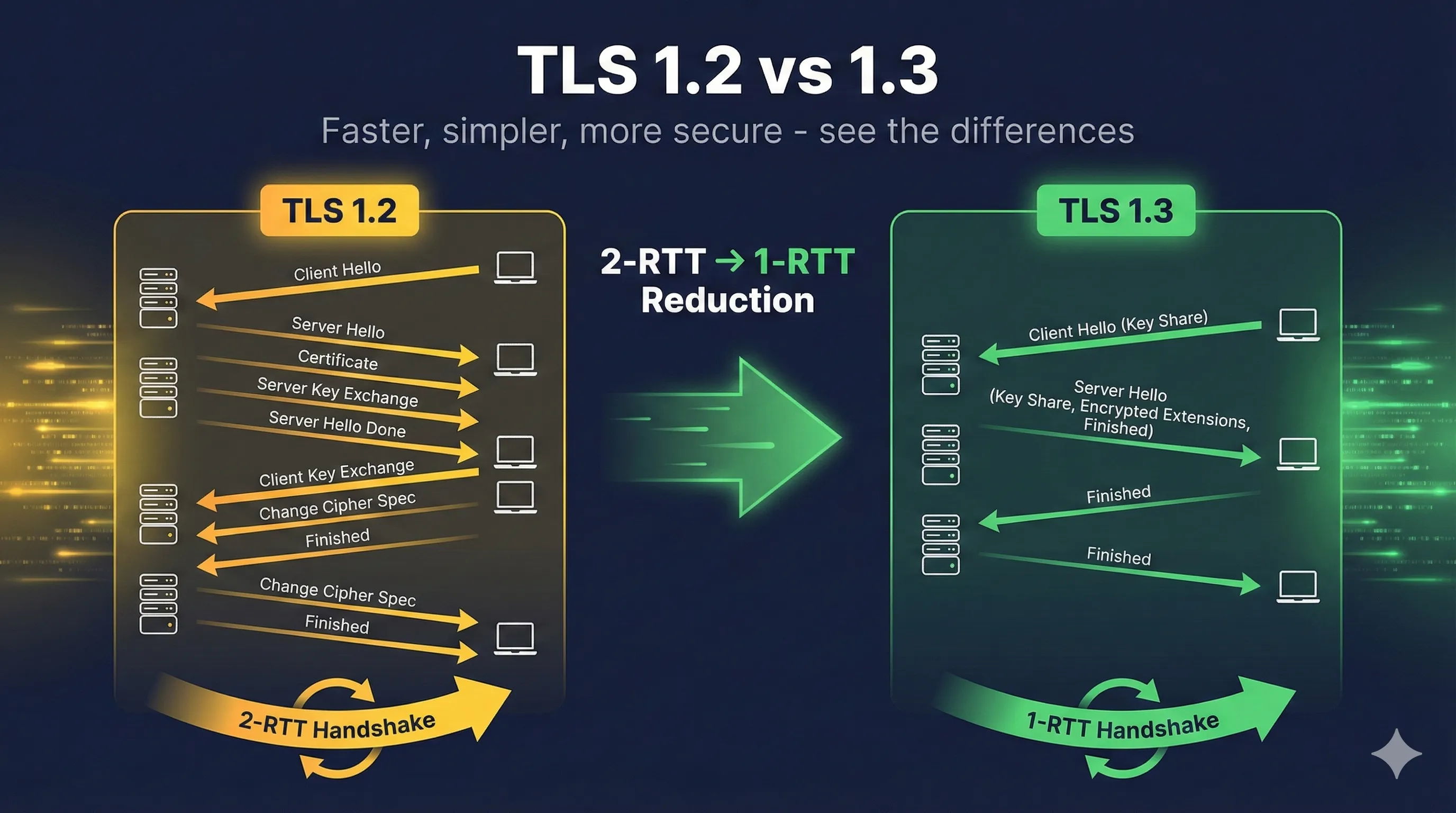
TLS 1.2 Handshake (2 Round Trips)
- 1. Client → Server: ClientHello (supported ciphers, random)
- 2. Server → Client: ServerHello, Certificate, KeyExchange, Done
- 3. Client → Server: ClientKeyExchange, ChangeCipherSpec, Finished
- 4. Server → Client: ChangeCipherSpec, Finished
- 5. Encrypted data can now flow
Total: 2 network round trips before any data
TLS 1.3 Handshake (1 Round Trip)
- 1. Client → Server: ClientHello + key_share (includes DH public key)
- 2. Server → Client: ServerHello + key_share, {Encrypted: Extensions, Cert, Finished}
- 3. Client → Server: {Encrypted: Finished}
- 4. Encrypted data flows immediately after step 2!
Total: 1 round trip — 50% faster!
Why Is TLS 1.3 Faster?
- ✓ Key share in ClientHello: Client guesses which key exchange the server will accept and sends its public key immediately
- ✓ Earlier encryption: Server's certificate and extensions are encrypted
- ✓ No renegotiation: Fewer messages needed
- ✓ Simplified state machine: Fewer possible message combinations
Real-World Impact
For a page loading 10 HTTPS resources across a 100ms latency connection:
- • TLS 1.2: ~2000ms overhead
- • TLS 1.3: ~1200ms overhead (-40%)
- • TLS 1.3 + 0-RTT: ~900ms overhead (-55%)
Understanding 0-RTT (Zero Round Trip Time)
0-RTT is a TLS 1.3 feature that allows clients to send encrypted data with their very first message when reconnecting to a server they've visited before.
How 0-RTT Works
- 1. After a full TLS 1.3 handshake, server sends a "session ticket"
- 2. Client stores the ticket along with derived keys
- 3. On reconnection, client includes early_data with encrypted request
- 4. Server can process request before handshake completes
0-RTT Security Warning: Replay Attacks
0-RTT data can be captured and replayed by an attacker. The server cannot distinguish a legitimate retry from a malicious replay.
- ✓ Safe: GET requests, idempotent operations
- ✗ Dangerous: POST requests, transactions, state changes
Best Practices for 0-RTT
- ✓ Only accept 0-RTT for safe, idempotent requests
- ✓ Implement application-level replay protection if needed
- ✓ Consider disabling 0-RTT for sensitive applications
- ✓ Use Anti-Replay mechanisms (strike registers, single-use tickets)
Removed Features in TLS 1.3
TLS 1.3 removed many features that were sources of vulnerabilities or complexity. This is a major security improvement.
| Removed Feature | Why Removed | Associated Attacks |
|---|---|---|
| RSA key exchange | No forward secrecy | Past traffic decryptable |
| Static DH | No forward secrecy | Same as RSA |
| RC4 | Broken cipher | Multiple practical attacks |
| 3DES | 64-bit block size | Sweet32 attack |
| MD5 | Broken hash | Collision attacks |
| SHA-1 | Weak hash | SHAttered collision |
| CBC mode | Complex, error-prone | BEAST, Lucky13, POODLE |
| Export ciphers | Intentionally weak | FREAK, Logjam |
| Compression | Side channel leaks | CRIME, BREACH |
| Renegotiation | Complex, buggy | Triple handshake attack |
By removing these features, TLS 1.3 cannot be misconfigured to use weak security. Every TLS 1.3 connection uses modern, proven cryptography.
Cipher Suite Changes
TLS 1.3 dramatically simplified cipher suites by separating authentication from encryption.
TLS 1.2 Cipher Suites (Hundreds of Options)
# Example TLS 1.2 cipher suites
TLS_ECDHE_RSA_WITH_AES_256_GCM_SHA384      # Good
TLS_ECDHE_ECDSA_WITH_AES_128_GCM_SHA256    # Good
TLS_RSA_WITH_AES_256_CBC_SHA256            # No forward secrecy!
TLS_DHE_RSA_WITH_AES_256_CBC_SHA           # CBC mode
TLS_RSA_WITH_3DES_EDE_CBC_SHA              # Weak cipher!
TLS_RSA_WITH_RC4_128_SHA                   # Broken!
TLS 1.3 Cipher Suites (Only 5 Options)
# ALL TLS 1.3 cipher suites (that's it!)
TLS_AES_256_GCM_SHA384          # AES-256, strongest
TLS_AES_128_GCM_SHA256          # AES-128, fast
TLS_CHACHA20_POLY1305_SHA256    # Great for mobile
TLS_AES_128_CCM_SHA256          # IoT/constrained
TLS_AES_128_CCM_8_SHA256        # IoT, truncated tag
Key Differences
| Aspect | TLS 1.2 | TLS 1.3 |
|---|---|---|
| Cipher suite specifies | Key exchange + auth + cipher + hash | Cipher + hash only |
| Key exchange | In cipher suite name | Negotiated separately |
| Authentication | In cipher suite name | From certificate |
| AEAD required | No (CBC allowed) | Yes (GCM, Poly1305, CCM) |
Security Improvements in TLS 1.3
1. Mandatory Forward Secrecy
All TLS 1.3 connections use ephemeral Diffie-Hellman (ECDHE or DHE). Even if your server's private key is compromised, past sessions remain encrypted.
2. Encrypted Handshake
In TLS 1.3, more of the handshake is encrypted. The server certificate and extensions are protected, hiding metadata from passive observers.
3. Simplified State Machine
Fewer valid message sequences means fewer opportunities for implementation bugs. TLS 1.2 had complex state transitions that led to vulnerabilities.
4. Digital Signature on Entire Handshake
The server signs a hash of the entire handshake transcript, preventing man-in-the-middle attacks that manipulate individual messages.
5. Downgrade Protection
Special values in server random detect attempts to force TLS 1.2 when both sides support TLS 1.3, preventing downgrade attacks.
Migration Guide: TLS 1.2 to TLS 1.3
Step 1: Check Server Support
Most modern web servers support TLS 1.3. Check your version:
# Check OpenSSL version (need 1.1.1+)
openssl version
# OpenSSL 1.1.1 or higher supports TLS 1.3

# Check nginx version (need 1.13+)
nginx -v

# Check Apache version (need 2.4.37+ with OpenSSL 1.1.1)
Step 2: Enable TLS 1.3 (Keep 1.2)
Initially, enable TLS 1.3 alongside TLS 1.2 for compatibility:
# nginx configuration
ssl_protocols TLSv1.2 TLSv1.3;
ssl_ciphers 'TLS_AES_256_GCM_SHA384:TLS_CHACHA20_POLY1305_SHA256:ECDHE-RSA-AES256-GCM-SHA384';
ssl_prefer_server_ciphers off;  # Let clients choose for TLS 1.3

# Apache configuration
SSLProtocol -all +TLSv1.2 +TLSv1.3
SSLCipherSuite TLS_AES_256_GCM_SHA384:TLS_CHACHA20_POLY1305_SHA256
SSLCipherSuite SSL ECDHE-RSA-AES256-GCM-SHA384
Step 3: Monitor and Test
# Test TLS 1.3 connection
openssl s_client -connect example.com:443 -tls1_3

# Check supported protocols
nmap --script ssl-enum-ciphers -p 443 example.com

# Online testing
# - SSL Labs: https://www.ssllabs.com/ssltest/
# - testssl.sh: https://testssl.sh/
Step 4: Disable TLS 1.2 (When Ready)
Only disable TLS 1.2 after confirming all clients support TLS 1.3. Check your analytics for older browsers/clients.
# nginx - TLS 1.3 only
ssl_protocols TLSv1.3;

# Apache - TLS 1.3 only
SSLProtocol -all +TLSv1.3
Checking TLS Version
Using OpenSSL
# Check what TLS version a server supports
openssl s_client -connect example.com:443 -tls1_3 2>/dev/null | grep "Protocol"
# Protocol  : TLSv1.3

# Check TLS 1.2 support
openssl s_client -connect example.com:443 -tls1_2 2>/dev/null | grep "Protocol"

# Get full connection details
echo | openssl s_client -connect example.com:443 2>/dev/null | grep -E "(Protocol|Cipher|Session-ID)"
In Your Browser
Most browsers show TLS information in the certificate/security panel:
- • Chrome: Click padlock → Connection → More information
- • Firefox: Click padlock → Connection secure → More information
- • Safari: Click padlock → Show Certificate
Related Resources
How TLS Works
Complete overview of the TLS protocol and handshake process.
Cipher Suite Decoder
Decode and understand cipher suite naming conventions.
Forward Secrecy
Why TLS 1.3 mandates forward-secret key exchange.
TLS Handshake
Compare handshake flows between TLS versions.
Hash Functions
Understand the cryptographic hashes used in TLS.
HSTS Guide
Enforce HTTPS connections alongside your TLS configuration.
Encrypted Client Hello (ECH)
TLS 1.3 encrypted the handshake but left SNI visible. ECH finishes the job.
Frequently Asked Questions
Should I disable TLS 1.2 entirely?
Not yet for most public websites. While TLS 1.3 is preferred, some older clients (IE 11, older Android, IoT devices) only support TLS 1.2. Monitor your traffic to see what versions clients use.
Is TLS 1.2 still secure?
Yes, when properly configured. Use only AEAD ciphers (GCM mode), enable forward secrecy (ECDHE), and disable weak algorithms. TLS 1.3 is better, but well-configured TLS 1.2 is still acceptable.
Why was there no TLS 1.4?
TLS 1.3 was such a major redesign that some suggested calling it TLS 2.0. The working group kept the 1.x naming but the changes are substantial enough to be considered a new protocol.
Can attackers detect if I'm using TLS 1.3?
Yes, the TLS version is visible in the ClientHello. However, TLS 1.3 encrypts more of the handshake (like the certificate), providing better privacy than TLS 1.2.
Should I enable 0-RTT?
It depends. 0-RTT is great for performance but has replay attack risks. Enable it for read-only, idempotent requests (like loading static content). Disable or add protection for state-changing operations.
Want to go deeper?
Understanding the differences between TLS versions is crucial for security. If you want to see these differences in Wireshark with real packet captures, I highly recommend Practical TLS by Ed Harmoush. It's the most comprehensive TLS course available—with real Wireshark captures, hands-on labs, and explanations that actually make sense.
Disclosure: I earn a commission if you purchase through this link, at no extra cost to you.
Continue Learning
See these differences in action with our interactive demo that visualizes the handshake process for both TLS 1.2 and TLS 1.3.