Quick Answer: What is a CA Hierarchy?
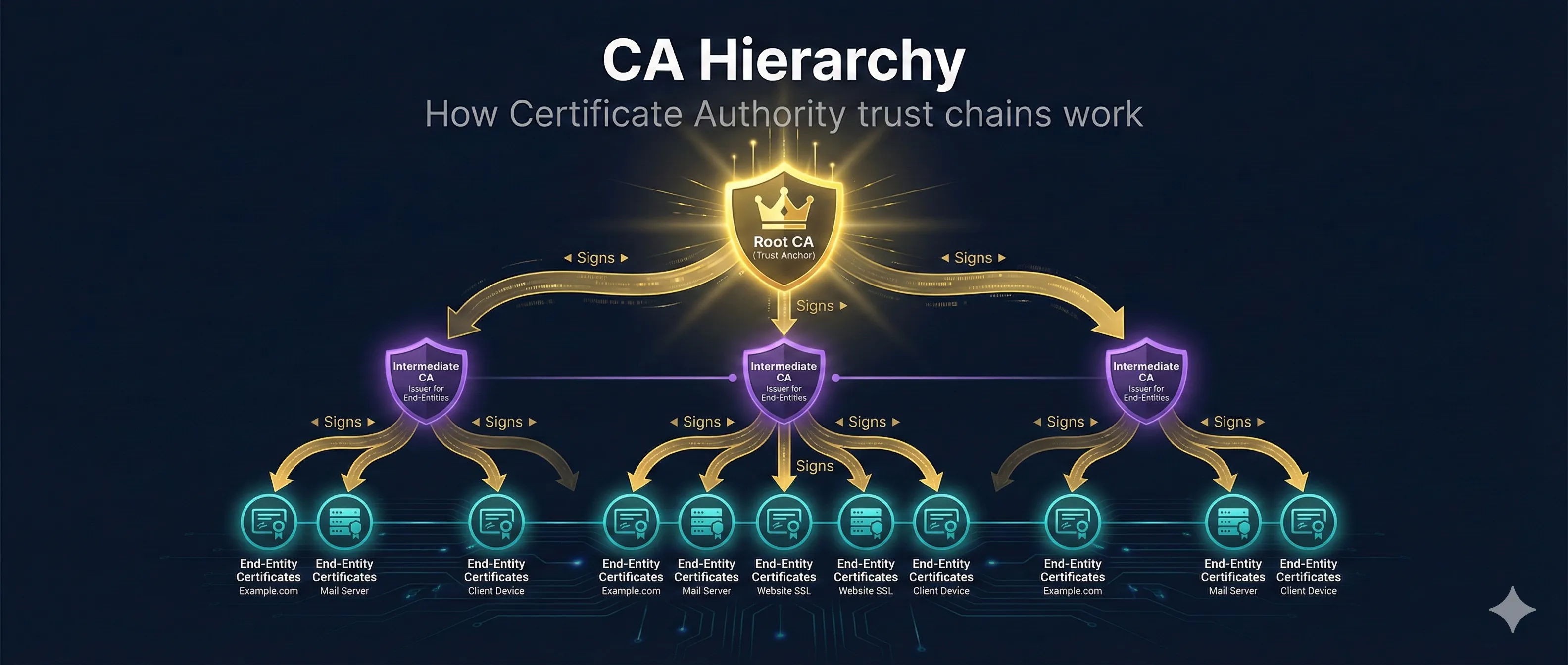
A Certificate Authority (CA) Hierarchy is a tree-like structure where trust flows from the top (Root CA) down through Intermediate CAs to your server's certificate.
Your browser trusts the Root CA, and through the chain of signatures, that trust extends to your website's certificate.
Certificate Authority Hierarchy
Self-signed, offline, maximum trust
Validity: 20-30 years
Signed by Root, issues certificates
Validity: 5-10 years
1 year
1 year
1 year
Leaf / End-Entity Certificates
Root Certificate Authorities
Root CAs are the trust anchors of the PKI system. They are self-signed certificates that are pre-installed in browsers, operating systems, and devices.
Key Characteristics
- • Self-signed: The certificate is signed by its own private key
- • Kept offline: The private key is generated during a formal key ceremony and stored in HSMs in secure facilities
- • Long validity: Typically 20-30 years
- • Pre-installed: Included in OS/browser trust stores
- • basicConstraints: CA:TRUE: Allowed to sign other certificates
Major Root CAs
| Root CA | Market Share | Notable For |
|---|---|---|
| DigiCert | ~25% | Enterprise, EV certificates |
| Let's Encrypt (ISRG) | ~50% | Free, automated DV certs |
| Sectigo | ~10% | Formerly Comodo |
| GlobalSign | ~5% | IoT, enterprise |
Why Root CAs Are Kept Offline
If a Root CA's private key is compromised, the entire PKI collapses. All certificates ever issued by that CA (and its intermediates) become untrustworthy. Recovery takes months to years. That's why Root CA private keys are kept in air-gapped HSMs in physically secured facilities.
Intermediate CAs (Why They Exist)
Intermediate CAs sit between the Root CA and end-entity certificates. They're the workhorses that actually issue certificates on a daily basis.
Why Not Issue Directly from Root?
1. Security Isolation
The Root CA stays offline and air-gapped. Only the Intermediate CA needs to be online to issue certificates. If the Intermediate is compromised, the Root is safe.
2. Damage Containment
If an Intermediate CA is compromised, only certificates issued by that specific Intermediate need to be revoked and reissued. The Root and other Intermediates continue operating.
3. Operational Flexibility
CAs can have multiple Intermediates for different purposes (DV, OV, EV), different regions, or different customers without exposing the Root.
4. Rotation Without Trust Store Updates
Intermediate CAs can be rotated more frequently without requiring updates to billions of devices' trust stores (which only contain Root CAs).
Intermediate CA Characteristics
- • Signed by Root CA: Creates the chain of trust
- • Stays online: Needs to issue certificates on demand
- • Shorter validity: Typically 5-10 years
- • basicConstraints: CA:TRUE: Can sign certificates
- • pathLenConstraint: May limit how many levels below it
Leaf (End-Entity) Certificates
Leaf certificates are the certificates installed on your actual servers, devices, or used for email signing. They're called "leaf" because they're at the end of the trust tree—they can't sign other certificates.
Leaf Certificate Characteristics
- • Signed by Intermediate CA: Part of the chain
- • Short validity: 90 days (Let's Encrypt) to 1 year (commercial)
- • basicConstraints: CA:FALSE: Cannot sign other certificates
- • Subject Alternative Names: Lists all valid domains
- • Key Usage: Digital Signature, Key Encipherment
Types of Leaf Certificates
| Type | Validation | Use Case |
|---|---|---|
| DV (Domain Validated) | Domain ownership only | Blogs, personal sites |
| OV (Organization Validated) | Organization verified | Business websites |
| EV (Extended Validation) | Extensive verification | Banks, financial sites |
The Chain of Trust
When your browser connects to a website, it validates the entire certificate chain from your server's certificate up to a trusted Root CA.
Chain of Trust Verification
Browser receives server certificate for example.com
Checks: Was this cert signed by a trusted Intermediate CA?
Validates signature using Intermediate's public key
Checks: Was the Intermediate signed by a trusted Root CA?
Validates signature using Root's public key
Root CA found in browser's trust store
Chain verified - connection trusted!
Validation Process
- 1. Server presents: Leaf certificate + Intermediate certificate(s)
- 2. Browser verifies leaf is signed by Intermediate (check signature)
- 3. Browser verifies Intermediate is signed by Root
- 4. Browser checks Root is in its trust store
- 5. Browser checks each cert is not expired
- 6. Browser checks revocation status (CRL/OCSP)
- 7. If all checks pass: Connection trusted!
Common Chain Problems
Missing Intermediate
Server only sends leaf certificate. Browser can't build chain to trusted Root. Fix: Configure server to send full chain.
Wrong Intermediate
Server sends an Intermediate that didn't sign the leaf. Signature verification fails. Fix: Ensure correct chain file is configured.
Expired Intermediate
The Intermediate CA certificate has expired. Chain validation fails even if leaf is valid. Fix: Get updated chain from CA.
View a Certificate Chain
# View full chain from a server
openssl s_client -connect example.com:443 -showcerts

# Parse the chain
echo | openssl s_client -connect example.com:443 2>/dev/null | \
  openssl x509 -noout -subject -issuer

# Check chain is valid
openssl verify -CAfile /path/to/root.pem \
  -untrusted /path/to/intermediate.pem \
  /path/to/leaf.pem
What Happens When CAs Are Compromised
The impact of a key compromise depends entirely on which level of the hierarchy is affected.
CA Compromise Impact
Root CA Compromised
- • Catastrophic - entire hierarchy affected
- • All certificates must be replaced
- • Root must be removed from trust stores
- • Recovery takes months/years
Intermediate CA Compromised
- • Contained damage - only that branch
- • Revoke intermediate certificate
- • Reissue affected leaf certificates
- • Root remains trusted
Why intermediates matter: They act as a security buffer. If compromised, only that intermediate is revoked - the Root CA stays safe and offline.
Leaf Private Key Compromised
Intermediate CA Compromised
Root CA Compromised
Historical Example: DigiNotar (2011)
DigiNotar, a Dutch CA, was compromised and used to issue fraudulent certificates for google.com and other high-profile domains. The CA was completely distrusted by all major browsers within weeks and went bankrupt. This is why Root CAs are kept offline with extreme security measures.
Cross-Signing Explained
Cross-signing is when one CA signs another CA's certificate, creating an alternative trust path. This is commonly used when new CAs need to establish trust before their own root is widely distributed.
Let's Encrypt Example
Let's Encrypt's root (ISRG Root X1) was cross-signed by IdenTrust's DST Root CA X3, allowing Let's Encrypt certificates to be trusted by older devices that didn't have ISRG Root X1 in their trust stores.
Benefits of Cross-Signing
- ✓ New CAs can gain instant trust via established CAs
- ✓ Enables graceful transition as new roots propagate
- ✓ Supports older devices that don't receive trust store updates
Viewing Certificate Chains
Using OpenSSL
# See full chain from a live server
openssl s_client -connect example.com:443 -showcerts 2>/dev/null

# Count certificates in chain
openssl s_client -connect example.com:443 2>/dev/null | \
  grep -c "BEGIN CERTIFICATE"

# View chain details
openssl s_client -connect example.com:443 2>/dev/null | \
  openssl x509 -noout -text | grep -E "(Subject:|Issuer:|Not After)"
In Your Browser
- • Chrome: Click padlock → Certificate → Certification Path tab
- • Firefox: Click padlock → Connection → More Information → View Certificate
- • Safari: Click padlock → Show Certificate → expand the chain
Related Resources
Root Stores
How browsers and operating systems manage trusted root CAs.
Certificate Transparency
Public logging to detect CA misbehavior and mis-issuance.
Certificate Anatomy
Understand X.509 certificate structure and extensions.
Chain Builder
Fix incomplete certificate chains and trust issues.
Self-Signed Certificates
When and how to use certificates outside the CA hierarchy.
Certificate Revocation
How CRLs and OCSP handle compromised certificates.
Frequently Asked Questions
How many levels can a CA hierarchy have?
Most hierarchies have 2-3 levels (Root → Intermediate → Leaf). Some enterprise PKIs have more levels, but each additional level adds complexity. The pathLenConstraint extension can limit depth.
Who decides which Root CAs to trust?
Browser vendors (Google, Mozilla, Apple, Microsoft) and OS vendors maintain their own root programs with strict requirements. CAs must pass audits (WebTrust, ETSI) and comply with CA/Browser Forum rules to be included.
Can I run my own Root CA?
Yes, for internal/private use. Your root would only be trusted by devices where you've manually installed it. It won't be trusted publicly unless you go through the years-long process of joining browser root programs.
Why do I need to send the Intermediate certificate?
Browsers only store Root CA certificates. The Intermediate certificate(s) must be sent by your server so the browser can build the complete chain from your leaf certificate to a trusted Root.
Continue Learning
See the CA hierarchy in action with our interactive demo that visualizes how trust flows through the certificate chain.
Try the Interactive Demo