The 30-Second Version
What: SSL profiles are collections of SSL/TLS settings that you attach to virtual servers.
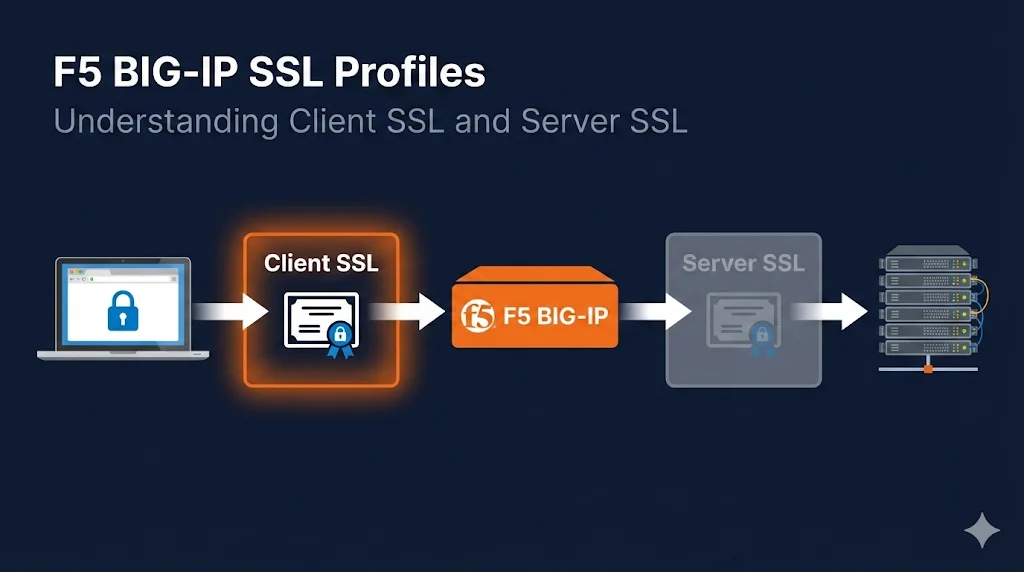
Two types: Client SSL (handles encryption FROM users) and Server SSL (handles encryption TO backends).
Key insight: The naming is from F5's perspective - "Client SSL" handles the client connection, not client certificates.
Most common mistake: Forgetting to add the certificate chain, causing "certificate not trusted" errors.
Watch the Video
F5 and SSL/TLS: What BIG-IP Is Actually Doing
Despite F5's long-standing use of the term "SSL," BIG-IP handles modern TLS — not SSL. SSL 2.0 and 3.0 are deprecated and disabled by default; TLS 1.2 is the current baseline, and TLS 1.3 is supported on BIG-IP 14.0 and later, where it is auto-negotiated once enabled in the profile options.
The naming "SSL profile" is historical. When you configure an F5 SSL/TLS profile today, you are controlling TLS exclusively. Keep this in mind when reading F5 documentation or ticket notes — "SSL profile" and "TLS profile" refer to the same object.
The decrypt/re-encrypt split
When a Client SSL profile and a Server SSL profile are both attached to a virtual server, BIG-IP performs a full terminate-and-re-originate of TLS:
- 1Client SSL profile terminates the inbound TLS connection from the user's browser or client. BIG-IP holds the private key and presents your certificate.
- 2Traffic is in plaintext inside BIG-IP at this point — enabling iRules, header insertion, URI routing, and payload inspection.
- 3Server SSL profile re-encrypts the outbound connection to pool members. BIG-IP acts as a TLS client toward your backend servers.
This split is what enables SSL/TLS offload, inspection, and selective re-encryption — the core value of F5 SSL/TLS termination.
TLS 1.3 on BIG-IP: Available from version 14.0+. Once you remove the no-tlsv1.3 option (or set the options list to allow it), TLS 1.3 is auto-negotiated with clients that support it. No separate profile type is required.
What is an SSL Profile?
An SSL profile is a reusable collection of SSL/TLS settings. Instead of configuring encryption settings directly on each virtual server, you create profiles and attach them. On F5 BIG-IP, this is the standard way to manage certificates, cipher suites, and TLS version policy across your entire deployment.
Why profiles exist:
One profile, many virtual servers
Same settings everywhere
Update once, apply everywhere
Child profiles inherit from parents
Analogy: Think of a profile like a template. You define how SSL should work once, then apply that template wherever you need it.
The Two Types of SSL Profiles
F5 has two types of SSL profiles, and the naming confuses everyone.
                        F5 BIG-IP
                     ┌─────────────────┐
                     │                 │
[Client/Browser] ────▶  Virtual Server  ────▶ [Backend Server]
                HTTPS │                 │ HTTP or HTTPS
                     │  ┌───────────┐  │
                     │  │Client SSL │  │  ◀── Decrypts INCOMING traffic
                     │  │ Profile   │  │      YOUR certificate goes here
                     │  └───────────┘  │
                     │                 │
                     │  ┌───────────┐  │
                     │  │Server SSL │  │  ◀── Encrypts OUTGOING traffic
                     │  │ Profile   │  │      Only needed for re-encryption
                     │  └───────────┘  │
                     │                 │
                     └─────────────────┘
Quick Reference Table
| Profile Type | Direction | What It Does | Your Cert Here? |
|---|---|---|---|
| Client SSL | Client → F5 | Decrypts incoming HTTPS | YES |
| Server SSL | F5 → Server | Encrypts to backend | Usually no* |
*Only if backend requires client certificate authentication (mTLS)
Why The Names Are Confusing
The naming is from F5's perspective, not yours.
"Client SSL" = Handles the connection where F5 acts as server to the client
"Server SSL" = Handles the connection where F5 acts as client to the server
Mental Model
Client SSL Profile: "How F5 looks to clients"
(F5 presents YOUR certificate)
Server SSL Profile: "How F5 looks to servers"
(F5 acts as a client connecting to your backend)
When You Need Each Profile
Scenario 1: SSL Offload (Most Common)
Profiles needed: Client SSL only
- • F5 terminates SSL
- • Backend receives plain HTTP
- • Simplest configuration
- • Best performance (backend doesn't do crypto)
Scenario 2: End-to-End Encryption (Re-encryption)
Profiles needed: Client SSL + Server SSL
- • F5 terminates and re-encrypts
- • Backend receives HTTPS
- • Required for compliance (PCI, etc.)
- • F5 can still inspect/modify traffic
Scenario 3: SSL Passthrough
(F5 doesn't decrypt)
Profiles needed: Neither
- • F5 just routes encrypted traffic
- • Cannot inspect or modify
- • Limited load balancing options
- • Use only when F5 can't have the certificate
Decision Flowchart
Does F5 need to see the traffic content?
│
├── YES (modify headers, route by URL, inspect payload)
│   │
│   └── Create Client SSL Profile with your certificate
│       │
│       └── Does backend need HTTPS?
│           │
│           ├── YES → Also create Server SSL Profile
│           │
│           └── NO → Client SSL only (SSL Offload)
│
└── NO (just route encrypted packets)
    │
    └── Use SSL Passthrough (no SSL profiles)
Anatomy of a Client SSL Profile
Location: Local Traffic → Profiles → SSL → Client
Key Settings Explained
| Setting | What It Does | Plain English |
|---|---|---|
| Certificate Key Chain | Your certificate + key + chain | The identity F5 shows to browsers |
| Certificate | Your server certificate | The cert users see (e.g., *.example.com) |
| Key | Private key for your cert | Proves F5 owns the certificate |
| Chain | Intermediate certificate(s) | Builds trust path to root CA |
| Ciphers | Allowed encryption algorithms | What crypto is permitted |
| Options | TLS versions, settings | TLS 1.2, 1.3, etc. |
| Client Authentication | mTLS settings | Require client certificates? |
The Certificate Key Chain - Where Most Mistakes Happen
Correct configuration:
- • Certificate: Your server cert (e.g., www.example.com.crt)
- • Key: Matching private key (e.g., www.example.com.key)
- • Chain: Intermediate CA cert(s) (e.g., DigiCertCA.crt)
Common mistakes:
- Forgetting the chain (causes "not trusted" on some clients)
- Wrong chain (F5 silently sends nothing)
- Key doesn't match certificate (import fails)
Anatomy of a Server SSL Profile
Location: Local Traffic → Profiles → SSL → Server
Key Settings Explained
| Setting | What It Does | When You Need It |
|---|---|---|
| Certificate Key Chain | Cert F5 presents to backend | Only if backend requires mTLS |
| Server Name | SNI hostname to send | When backend uses SNI |
| Trusted CAs | CAs to trust for backend cert | To validate backend identity |
| Ciphers | Allowed algorithms | Must match backend capabilities |
| Server Authentication | Verify backend? | Usually "Ignore" (trust by network) |
Most Common Server SSL Config
For simple re-encryption to internal servers:
Server Authentication: Ignore (don't verify backend cert)
Ciphers: Match your backend's supported ciphers
Options: TLS 1.2 minimum
You typically don't need to verify backend certificates when:
- • Backend is on your internal network
- • You control both F5 and backend
- • Network path is trusted
Common Mistakes
| Mistake | Symptom | Fix |
|---|---|---|
| No chain certificate | "Not trusted" on mobile/API clients | Add intermediate to Chain field |
| Wrong chain certificate | F5 sends no chain at all | Download correct chain from CA |
| Profile not assigned to VS | HTTPS doesn't work | Virtual Server → SSL Profile (Client) |
| Wrong profile type | Traffic doesn't flow | Client SSL for incoming, Server SSL for outgoing |
| Cipher mismatch | Handshake failures | Align ciphers in both profiles |
| TLS version mismatch | Connection reset | Check Options in both profiles |
Quick Reference Commands
# List all Client SSL profiles
tmsh list ltm profile client-ssl

# Show specific profile details
tmsh list ltm profile client-ssl my-profile all-properties

# List all certificates on the F5
tmsh list sys crypto cert

# Show certificate details
tmsh list sys crypto cert my-cert all-properties

# Check what ciphers a cipher string produces
tmm --clientciphers 'ECDHE+AES-GCM:ECDHE+AES'

# See all supported ciphers
tmm --clientciphers 'ALL'
Configuring TLS Versions and Ciphers on F5
Controlling which TLS versions and cipher suites BIG-IP accepts is done through the profile's Options list (for protocol versions) and the Cipher string or Cipher Group (for algorithms). Getting this right is critical for security compliance and interoperability.
Disable old TLS versions
Use the options field to explicitly disable legacy protocols. This forces clients to negotiate TLS 1.2 or higher:
tmsh modify ltm profile client-ssl <name> options { no-tlsv1 no-tlsv1.1 no-ssl-v3 }Cipher Groups and Cipher Rules (BIG-IP 13.0+)
The modern approach is to use Cipher Groups and Cipher Rules rather than a legacy cipher string. Cipher Groups give you named, auditable sets of algorithms that you can reference from multiple profiles:
# List existing cipher rules
tmsh list ltm cipher rule

# Assign a cipher group to a Client SSL profile
tmsh modify ltm profile client-ssl <name> cipher-group <group-name>
Verify your changes
After modifying protocol or cipher settings, confirm the running configuration and then verify the negotiation from outside the box. Check the profile itself first:
tmsh list ltm profile client-ssl <name>
Then test what the VIP actually negotiates from a client machine. Use our SSL checker for a quick browser-based scan, or run openssl s_client from the command line to inspect the full handshake:
Key notes on cipher and TLS version changes
- • TLS 1.3 auto-negotiates on BIG-IP 14.0+ once allowed — no separate profile type required.
- • Cipher Groups/Rules (13.0+) are preferred over legacy cipher strings — they're auditable, named, and reusable.
- • Always verify negotiation from outside after changes; tmsh shows configuration, not what clients actually negotiate.
Next Steps
Now that you understand SSL profiles:
Client SSL vs Server SSL Deep Dive
More detail on the differences between profile types.
Read NowF5 Certificate Installation
Step-by-step guide to installing certificates.
Read NowF5 Certificate Chain Configuration
Fix "not trusted" errors with proper chain setup.
Read NowF5 SSL Troubleshooting
Debug common SSL issues on BIG-IP.
Read NowFrequently Asked Questions
Related Resources
ERR_SSL_VERSION_OR_CIPHER_MISMATCH
Fix the browser error caused by cipher or TLS version settings in your SSL profile.
Client SSL vs Server SSL
Understand when to use each profile type and where certificates go.
F5 Certificate Installation
Step-by-step guide to installing SSL certificates on BIG-IP.
F5 Certificate Chain Configuration
Configure intermediate certificates for proper trust chains.
F5 SSL Troubleshooting
Debug common SSL issues symptom by symptom.
Cipher Suite Decoder
Understand cipher suites for profile configuration.
How TLS Works
Complete guide to TLS handshakes and certificate verification.