Quick Answer: What is a Digital Signature?
A digital signature is a cryptographic proof that a message came from a specific sender and hasn't been modified. It's the digital equivalent of a handwritten signature, but far more secure.
Only the owner of the private key can create a valid signature, but anyone with the public key can verify it.
How Digital Signing Works
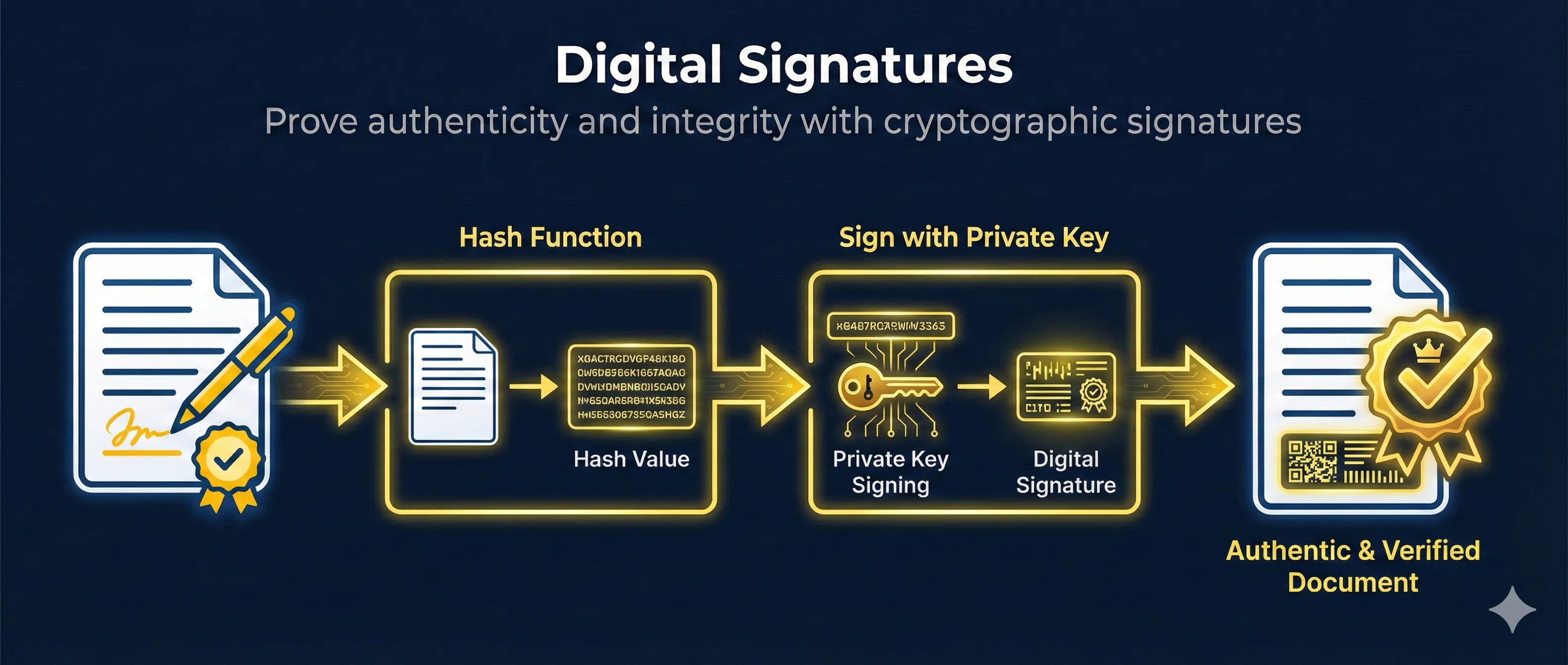
Digital signatures combine two cryptographic operations: hashing and asymmetric encryption. Here's the step-by-step process:
How Digital Signing Works
The signature = hash encrypted with sender's private key
Step 1: Create Message Hash
The sender runs the message through a cryptographic hash function (like SHA-256) to create a fixed-size digest. This digest uniquely represents the message content.
Step 2: Encrypt Hash with Private Key
The sender encrypts the hash using their private key. This encrypted hash IS the digital signature. Only the private key holder can create this specific signature.
Step 3: Send Message + Signature
The original message and the signature are sent together. The message is NOT encrypted— anyone can read it. The signature only proves who sent it and that it wasn't modified.
Step 4: Verify with Public Key
The receiver decrypts the signature using the sender's public key to get the original hash. They also hash the received message independently. If both hashes match, the signature is valid.
What Digital Signatures Prove
- ✓ Authenticity: The message came from the private key holder
- ✓ Integrity: The message wasn't modified in transit
- ✓ Non-repudiation: The sender can't deny sending it
The Role of Hashing
Hashing is essential to digital signatures. Instead of signing the entire message (which could be gigabytes), we sign a small, fixed-size representation of it.
Hash Function Properties
- • Deterministic: Same input always produces same hash
- • Fixed size: SHA-256 always outputs 256 bits regardless of input size
- • Avalanche effect: Tiny input change = completely different hash
- • One-way: Cannot reverse engineer the original message from hash
- • Collision resistant: Practically impossible to find two inputs with same hash
Common Hash Algorithms
| Algorithm | Output Size | Status |
|---|---|---|
| MD5 | 128 bits | Broken - Do not use |
| SHA-1 | 160 bits | Deprecated |
| SHA-256 | 256 bits | Recommended |
| SHA-384 | 384 bits | High security |
| SHA-512 | 512 bits | Maximum security |
# Calculate SHA-256 hash of a file
openssl dgst -sha256 document.pdf

# Output: SHA256(document.pdf)= 2cf24dba5fb0a30e26e83b2ac5b9e29e1b161e5c...

# Calculate hash of a string
echo -n "Hello World" | openssl dgst -sha256
Private Keys in Signing
The private key is what makes a digital signature unique to its owner. It's the secret component that proves identity.
Private Key
- • Kept secret, never shared
- • Used to CREATE signatures
- • Stored in secure locations (HSM, encrypted files)
- • Should be password protected
Public Key
- • Freely distributed to anyone
- • Used to VERIFY signatures
- • Embedded in certificates
- • Published in directories/websites
If Your Private Key is Compromised
Anyone with your private key can sign documents as you. Immediately revoke any associated certificates, generate a new key pair, and notify anyone who might verify your signatures.
Signature Verification
Verification is the reverse of signing. The receiver uses the sender's public key to check if the signature is authentic.
How Verification Works
Path 1: From Document
Path 2: From Signature
Verification Steps
- 1. Receive the message and the signature
- 2. Obtain the sender's public key (from certificate or key server)
- 3. Decrypt the signature using the public key → Original hash
- 4. Hash the received message independently → Calculated hash
- 5. Compare the two hashes
- 6. If hashes match: Signature is VALID
- 7. If hashes differ: Signature is INVALID
What Can Go Wrong
Hash Mismatch
The message was modified after signing. Even a single character change produces a completely different hash.
Wrong Public Key
The signature was created with a different private key than the public key you're using. Ensure you have the correct sender's key.
Corrupted Signature
The signature itself was damaged during transmission. The decryption will produce garbage.
Digital Signatures vs Encryption
Digital signatures and encryption are often confused, but they solve different problems and use keys in opposite ways.
Digital Signature vs Encryption
Digital Signature
Encryption
Key insight: Signing and encrypting use the keys in opposite directions
| Aspect | Digital Signature | Encryption |
|---|---|---|
| Goal | Prove authenticity & integrity | Hide content (confidentiality) |
| Who can read? | Anyone (message not hidden) | Only key holder |
| Sign/Encrypt with | Private key | Public key (recipient's) |
| Verify/Decrypt with | Public key | Private key |
| Who can verify? | Anyone with public key | N/A |
Pro tip: You can combine both! Sign-then-encrypt: First sign the message (proves sender), then encrypt the message+signature (hides content). This provides both authenticity AND confidentiality.
OpenSSL Examples
Generate a Key Pair
# Generate RSA private key (2048 bits)
openssl genrsa -out private_key.pem 2048

# Extract public key from private key
openssl rsa -in private_key.pem -pubout -out public_key.pem
Sign a File
# Create signature for a document
openssl dgst -sha256 -sign private_key.pem -out signature.bin document.pdf

# The signature.bin file contains the digital signature
Verify a Signature
# Verify signature using public key
openssl dgst -sha256 -verify public_key.pem -signature signature.bin document.pdf

# Output if valid:   Verified OK
# Output if invalid: Verification Failure
Sign with ECDSA (Modern)
# Generate ECDSA key pair
openssl ecparam -genkey -name prime256v1 -out ec_private.pem
openssl ec -in ec_private.pem -pubout -out ec_public.pem

# Sign with ECDSA
openssl dgst -sha256 -sign ec_private.pem -out ec_signature.bin document.pdf

# Verify ECDSA signature
openssl dgst -sha256 -verify ec_public.pem -signature ec_signature.bin document.pdf
Common Signature Algorithms
| Algorithm | Key Type | Use Case | Status |
|---|---|---|---|
| RSA-SHA256 | RSA 2048+ | General purpose, TLS | Widely used |
| ECDSA P-256 | EC 256-bit | Modern TLS, mobile | Recommended |
| Ed25519 | EdDSA | SSH keys, modern apps | Modern choice |
| RSA-SHA1 | RSA | Legacy systems | Deprecated |
| DSA | DSA 1024 | Old SSH, legacy | Avoid |
Related Resources
Code Signing
Learn how developers sign software to prove authenticity and prevent tampering.
Hash Functions
Understand cryptographic hashing - the foundation of digital signatures.
Encryption Basics
Compare digital signatures vs encryption and understand when to use each.
TLS Handshake
See how digital signatures are used in TLS to authenticate servers.
Certificate Anatomy
Explore X.509 certificate structure and where signatures are stored.
S/MIME Email Security
Apply digital signatures to email for authentication and non-repudiation.
Frequently Asked Questions
Can someone forge my signature if they have my public key?
No. The public key can only VERIFY signatures, not create them. Creating a valid signature requires the private key. This is the fundamental asymmetry that makes digital signatures secure.
Why hash the message instead of signing it directly?
RSA can only encrypt data smaller than the key size. A 2048-bit key can only sign ~256 bytes directly. Hashing reduces any size message to a fixed 32-64 bytes, making it practical to sign large files efficiently.
Is a digital signature legally binding?
In most countries, yes. The US ESIGN Act, EU eIDAS regulation, and similar laws recognize digital signatures as legally equivalent to handwritten signatures for most documents.
What's the difference between digital signature and electronic signature?
Electronic signature is a broad term for any electronic indication of agreement (typing your name, clicking "I agree"). Digital signature specifically uses cryptographic key pairs and provides mathematical proof of authenticity.
How do timestamps work with signatures?
A trusted timestamp authority (TSA) adds a cryptographically signed timestamp to prove when the document was signed. This is important for contracts and legal documents.
Ready to see it in action?
Watch the signing and verification process step-by-step in our interactive demo.
Try the Digital Signatures Demo