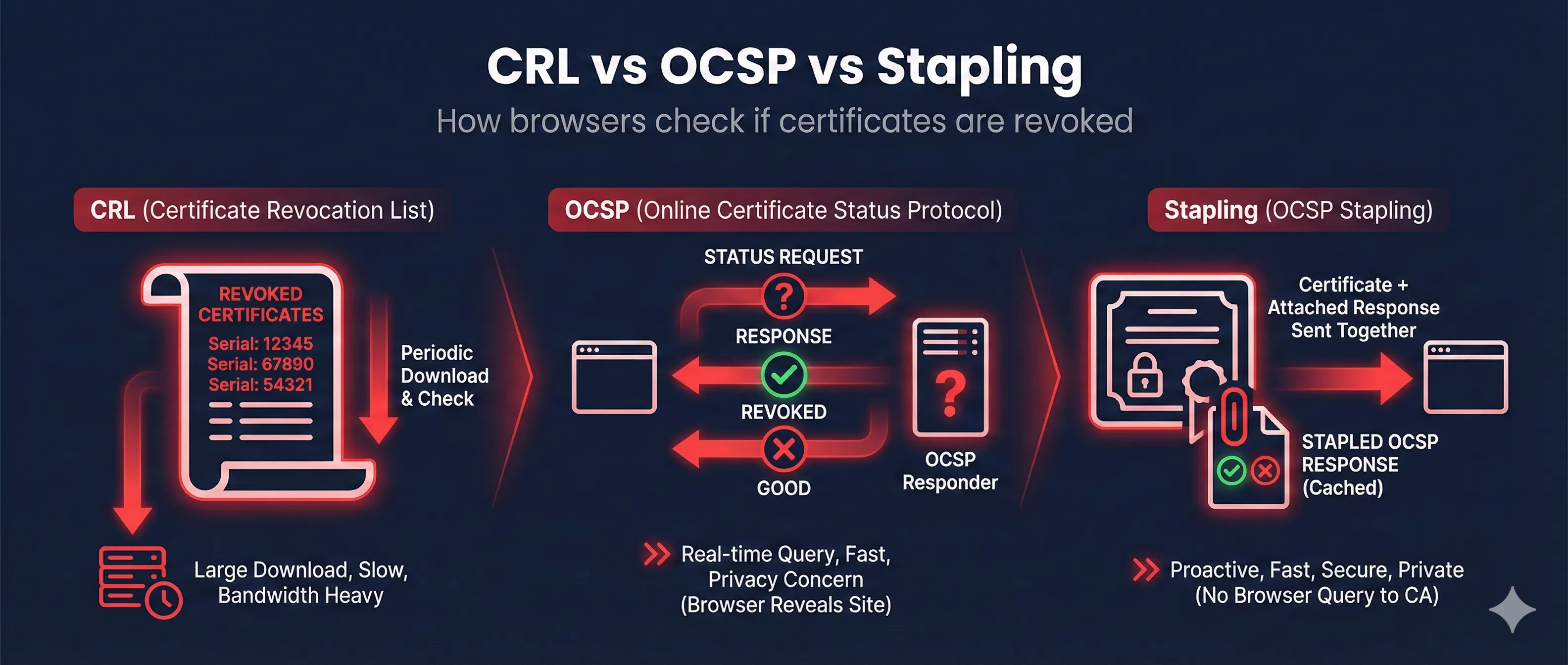
Quick Answer: CRL vs OCSP vs Stapling
Download a big list of all revoked certificates from the CA. Simple but inefficient.
Query the CA in real-time for a specific certificate's status. More efficient but privacy concerns.
Server fetches OCSP response and "staples" it to the TLS handshake. Best of both worlds!
Recommendation: Enable OCSP Stapling on your server. It's faster, more private, and more reliable than client-side revocation checking.
Why Certificate Revocation Matters
Certificates can become compromised before they expire. When private keys are leaked, certificates are mis-issued, or domain ownership changes, the certificate must be invalidated immediately.
Reasons Certificates Get Revoked
CRL (Certificate Revocation Lists)
CRLs are the original method for checking revocation. The CA publishes a signed list of all revoked certificate serial numbers, which clients download periodically.
How CRL Works
- 1. Certificate contains a "CRL Distribution Point" URL
- 2. Client downloads the CRL file from that URL
- 3. Client searches the list for the certificate's serial number
- 4. If found, the certificate is revoked
Check CRL Information
# Find CRL Distribution Point in certificate
openssl x509 -in cert.pem -noout -text | grep -A 4 "CRL Distribution"

# Download and examine a CRL
curl -O http://crl.example.com/example.crl
openssl crl -in example.crl -inform DER -text -noout
Pros
- • Simple to implement
- • Works offline once cached
- • No privacy concerns
Cons
- • Large file sizes (can be 10MB+)
- • Slow to update (hours/days)
- • Bandwidth intensive
OCSP (Online Certificate Status Protocol)
OCSP provides real-time revocation checking. Instead of downloading a huge list, the client asks the CA about a specific certificate.
How OCSP Works
- 1. Certificate contains an "Authority Information Access" OCSP URL
- 2. Client sends certificate serial number to OCSP responder
- 3. OCSP responder returns: good, revoked, or unknown
- 4. Response is signed by CA and includes validity period
Check OCSP Status
# Get OCSP responder URL from certificate
openssl x509 -in cert.pem -noout -ocsp_uri

# Check OCSP status
openssl ocsp -issuer issuer.pem -cert cert.pem \
  -url http://ocsp.example.com -resp_text
Pros
- • Real-time status
- • Small response size
- • Faster than CRL
Cons
- • Privacy leak (CA sees your browsing)
- • OCSP server can go down
- • Adds latency to connections
Privacy Concern
With standard OCSP, the CA knows every website you visit because your browser queries them for each site. This is why OCSP Stapling was created.
OCSP Stapling (The Modern Solution)
OCSP Stapling moves the OCSP check from client to server. The server periodically fetches the OCSP response and includes it in the TLS handshake.
How OCSP Stapling Works
- 1. Server fetches OCSP response from CA (cached for hours)
- 2. Server "staples" the signed response to TLS Certificate message
- 3. Client receives certificate + OCSP proof in one round trip
- 4. Client verifies the CA's signature on the OCSP response
Why Stapling is Best
- Faster: No extra round trip to OCSP server
- Private: CA doesn't see your browsing
- Reliable: Works even if OCSP server is down
- Reduces CA Load: Server caches response
Check if Stapling is Enabled
# Check for OCSP Stapling
openssl s_client -connect example.com:443 -status 2>/dev/null | \
  grep -A 20 "OCSP Response"

# If you see "OCSP Response Status: successful" - stapling is enabled
# If empty or "no response" - stapling not configured
Side-by-Side Comparison
| Feature | CRL | OCSP | Stapling |
|---|---|---|---|
| Latency | High (large download) | Medium (extra request) | None (included) |
| Privacy | Good | Poor (CA sees sites) | Good |
| Freshness | Hours/Days | Real-time | Hours (cached) |
| Reliability | Works offline | Fails if OCSP down | Graceful fallback |
| Server Load | Medium | High per request | Low (cached) |
Server Configuration
Enable OCSP Stapling on your web server for best performance and privacy.
Nginx
server {
    listen 443 ssl;

    ssl_certificate /path/to/fullchain.pem;
    ssl_certificate_key /path/to/privkey.pem;

    # Enable OCSP Stapling
    ssl_stapling on;
    ssl_stapling_verify on;

    # Trusted CA certificates for OCSP verification
    ssl_trusted_certificate /path/to/chain.pem;

    # DNS resolver for OCSP
    resolver 8.8.8.8 8.8.4.4 valid=300s;
    resolver_timeout 5s;
}
Apache
<VirtualHost *:443>
    SSLEngine on
    SSLCertificateFile /path/to/cert.pem
    SSLCertificateKeyFile /path/to/privkey.pem
    SSLCertificateChainFile /path/to/chain.pem

    # Enable OCSP Stapling
    SSLUseStapling on
    SSLStaplingCache shmcb:/tmp/stapling_cache(128000)
    SSLStaplingResponderTimeout 5
    SSLStaplingReturnResponderErrors off
</VirtualHost>
Browser Revocation Behavior
Different browsers handle revocation checking differently, often with "soft-fail" defaults.
Chrome
Uses CRLSets (Google-curated subset of revoked certs). Doesn't do live OCSP checks by default. Prioritizes performance over real-time revocation.
Firefox
Uses OCSP by default but soft-fails (allows connection if OCSP unreachable). Can enable hard-fail in settings for stricter security.
Safari
Aggressive OCSP checking with Apple's own OCSP infrastructure. May cause slowdowns but provides strong revocation checking.
The "Soft-Fail" Problem
Most browsers "soft-fail" - if they can't reach the OCSP server, they proceed anyway. An attacker who can block OCSP can use revoked certificates. This is why Certificate Transparency and OCSP Must-Staple extension were created.
Frequently Asked Questions
How long does it take for a revocation to propagate?
CRLs update every few hours to days. OCSP is near-instant, but responses are often cached for hours. With stapling, your server's cache determines freshness.
What is OCSP Must-Staple?
A certificate extension that tells browsers to require stapled OCSP. If the server doesn't provide it, the connection fails. Prevents soft-fail attacks but requires careful server configuration.
Can I revoke a Let's Encrypt certificate?
Yes! Use 'certbot revoke --cert-path /path/to/cert.pem'. You can also revoke via Let's Encrypt's website if you have the account key.
Why do some sites have slow HTTPS handshakes?
Often because of OCSP lookups. The browser is waiting for the CA's OCSP responder. OCSP Stapling eliminates this latency.
Is CRL still used?
Yes, as a fallback and for some enterprise/government scenarios. Most modern systems prefer OCSP or stapling for regular web traffic.
See Revocation in Action
Watch interactive demos of CRL, OCSP, and Stapling
Related Resources
Certificate Revocation Deep Dive
Advanced revocation concepts and incident response workflows
Certificate Transparency
How CT logs help detect mis-issued certificates
Certificate Lifecycle
Complete certificate journey from issuance to expiration
OCSP Stapling Demo
Interactive demonstration of OCSP stapling in action
CA Hierarchy
Understand root and intermediate CA relationships