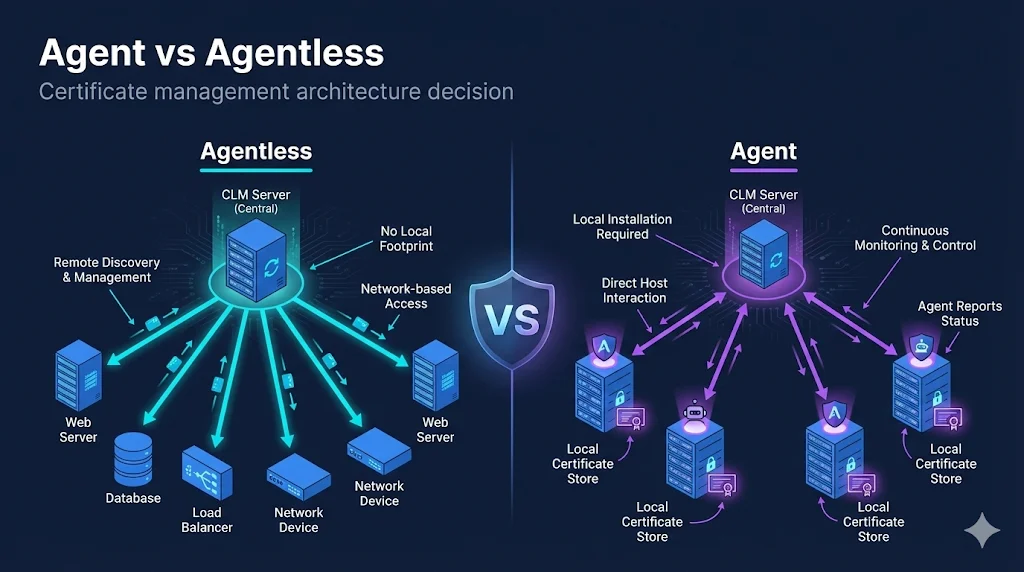
- • No software to install
- • Connect via SSH/API
- • Faster initial setup
- • Software on each server
- • Deep local visibility
- • Real-time monitoring
The Core Question
When deploying certificate lifecycle management (CLM), you'll face a fundamental architectural choice: agent-based or agentless management.
This decision affects:
The Short Answer
| You Likely Need... | If You Have... |
|---|---|
| Agentless | Standardized environments, similar configs, limited server access |
| Agent | Diverse environments, varying configs, need deep inspection |
| Both (Hybrid) | Large enterprises — most common approach |
Agentless Architecture
How It Works
Connection Methods:
Agentless Capabilities
| Capability | Support |
|---|---|
| Network discovery | ✅ Full |
| Certificate deployment | ✅ Full |
| Key generation (remote) | ⚠️ Requires crypto utilities |
| Local store access | ❌ Limited |
| Certificate validation | ✅ Network-level |
| Continuous monitoring | ⚠️ Scheduled scans |
Best For
- Load balancers (F5, Citrix, HAProxy)
- Web servers with standard configs
- Cloud instances with API access
- Network devices
- Standardized server fleets
Limitations
- Can't see local stores (CAPI, JKS)
- Can't discover certs not on network
- Requires credential management
- Firewall rules for every connection
Agent-Based Architecture
How It Works
Agents run as a service on target servers, accessing local certificate stores directly, monitoring for changes in real-time, and executing provisioning locally.
Agent Capabilities
| Capability | Support |
|---|---|
| Network discovery | ✅ Full |
| Local store discovery | ✅ Full (CAPI, JKS, PKCS#12, PEM) |
| Certificate deployment | ✅ Full |
| Key generation (local) | ✅ On-device |
| Certificate validation | ✅ Deep validation |
| Continuous monitoring | ✅ Real-time |
| Application restart | ✅ After provisioning |
Best For
- Windows servers with CAPI stores
- Java applications with keystores
- Servers behind firewalls
- Heterogeneous environments
- Apps requiring post-deploy actions
Limitations
- Agent deployment on every server
- Agent updates and maintenance
- Server resources consumed
- Security review for permissions
Feature Comparison
| Feature | Agentless | Agent-Based |
|---|---|---|
| Initial Setup | ||
| Deployment effort | Lower | Higher |
| Time to first discovery | Hours | Days-weeks |
| Discovery | ||
| Network certificates | ✅ Full | ✅ Full |
| Local stores (CAPI) | ❌ No | ✅ Yes |
| Java KeyStores | ❌ No | ✅ Yes |
| Real-time detection | ⚠️ Scheduled | ✅ Continuous |
| Provisioning | ||
| Key generation location | Remote (CLM server) | Local (target server) |
| Application restart | ⚠️ Via scripts | ✅ Native integration |
| Operations | ||
| Credential management | Required for each device | Agent trust only |
| Scalability | Limited by CLM server | Distributed across agents |
The Hybrid Reality
Most enterprises use both. Real environments have diverse infrastructure that benefits from different approaches:
Decision by Environment
| Environment | Recommended | Why |
|---|---|---|
| F5 BIG-IP | Agentless | Excellent API support |
| Windows Server IIS | Agent | CAPI store access |
| Java Tomcat | Agent | KeyStore access |
| AWS EC2 | Agentless | API + ephemeral instances |
| Kubernetes | Agentless | cert-manager integration |
| Network devices | Agentless | SSH/API only option |
| Legacy Unix | Agent | No standard API |
Security Considerations
Agentless Security
Credentials stored centrally
→ Use privileged access management (PAM)
Wide network access required
→ Segment CLM network, limit scope
SSH/WinRM exposure
→ Harden protocols, rotate keys
Agent Security
Agent runs with privileges
→ Least-privilege principle, audit
Agent binary integrity
→ Code signing, hash verification
Agent communication
→ Mutual TLS, certificate pinning
Key Security Questions
- What credentials does agentless require? How are they protected?
- What privileges does the agent need? Can we limit them?
- How is agent-to-server communication secured?
- What's the blast radius if either is compromised?
Operational Considerations
Agentless Operations
Daily:
- • Monitor scheduled scans
- • Review credential health
- • Check for failed connections
Weekly:
- • Rotate service account credentials
- • Review firewall rules
Agent Operations
Daily:
- • Monitor agent heartbeats
- • Review agent logs
- • Check agent versions
Weekly:
- • Plan agent updates
- • Review resource usage
Which Has More Overhead?
- Initial: Agent has higher upfront effort
- Ongoing: Roughly equivalent, different focus
- Scale: Agent distributes load better
- Troubleshooting: Agent provides more local visibility
Making the Decision
Choose Agentless If...
- Standardized infrastructure
- Similar server configurations
- Managing load balancers/network devices
- Want fastest time to value
- Can't install software on production
- Managing cloud-native workloads
Choose Agent If...
- Diverse, heterogeneous environments
- Need to discover local stores
- Servers behind firewalls
- Need real-time change detection
- Apps require post-deploy actions
- Managing Java apps with keystores
Choose Hybrid (Most Common) If...
- You have a mix of the above
- Different teams manage different infrastructure
- Migrating from manual processes
- Need complete certificate visibility
Implementation Tips
Starting with Agentless
- Begin with load balancers - Best API support, highest value
- Standardize credentials - Service accounts with limited scope
- Map firewall requirements - Document before deploying
- Start with discovery only - Prove visibility before provisioning
- Expand gradually - Add device types one at a time
Starting with Agents
- Pilot with non-production - Test agent behavior first
- Define agent policies - What can the agent do?
- Plan deployment method - SCCM, Ansible, manual?
- Monitor agent health - Dashboards from day one
- Document rollback - How to remove if needed
Common Mistakes
| Mistake | Consequence | Prevention |
|---|---|---|
| Deploying agents everywhere | Operational overhead explosion | Start targeted, expand based on need |
| Agentless with weak credentials | Security risk | PAM integration, rotation |
| No hybrid strategy | Coverage gaps | Plan for both from start |
| Ignoring firewall requirements | Failed deployments | Network team involvement early |
Frequently Asked Questions
Can I start with one approach and switch later?
Yes, and this is common. Many organizations start agentless for quick wins, then add agents for environments needing deeper inspection. The approaches complement each other.
Which approach is more secure?
Neither is inherently more secure — they have different risk profiles. Agentless centralizes credential risk; agent-based distributes it. Both require careful implementation and monitoring.
Do I need agents for cloud environments?
Usually not. Cloud providers offer APIs for certificate management, and ephemeral instances make agent deployment impractical. Agentless via cloud APIs is typically the right choice.
How do agents handle server reboots?
Agents are typically installed as system services that start automatically on boot. They reconnect to the central platform and resume normal operations. Configuration is usually persisted locally.
Learn More
FixMyCert Venafi Series:
Related FixMyCert Content:
Related Resources
The Venafi Series
Machine identity management explained — practical, vendor-neutral guides for enterprise CLM.
Certificate Discovery Explained
How enterprise platforms find every certificate in your environment — even the ones you forgot about.
Crypto Agility vs Certificate Agility
Understand the difference between crypto agility and certificate agility for enterprise PKI strategy.
Certificate Lifecycle Guide
From request to revocation — understand every stage of certificate management.