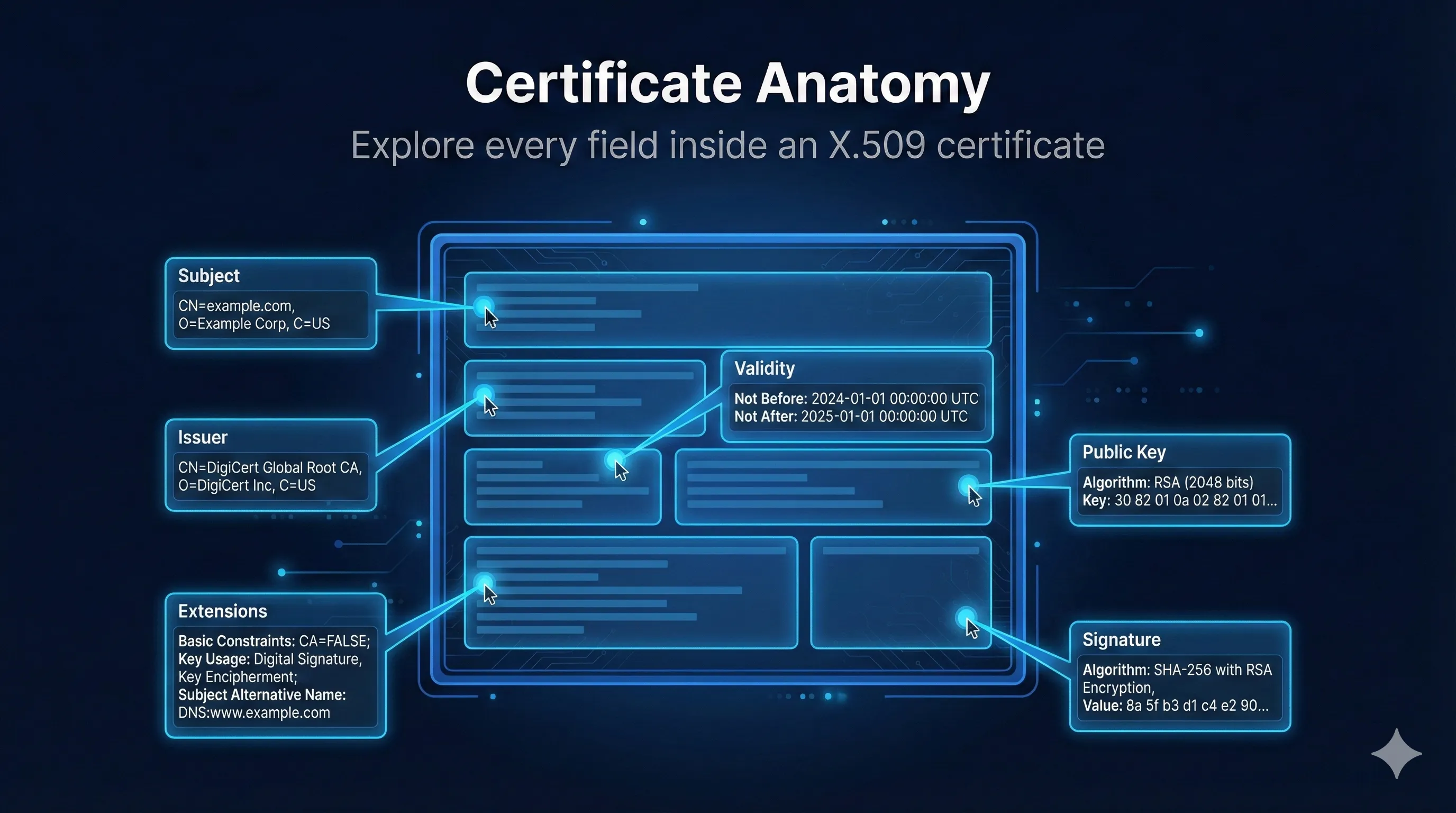
X.509 Certificate Structure
Quick Answer: What is an X.509 Certificate?
An X.509 certificate is a digital document that binds a public key to an identity. It's signed by a Certificate Authority (CA) to prove the binding is legitimate.
Think of it like a passport: It contains your identity, your photo (public key), an expiry date, and is stamped by a government (CA) to prove it's legitimate.
Subject and Issuer Fields
Every certificate has two key identities: the Subject (who the certificate is for) and the Issuer (who signed it).
Subject Fields
| Field | Abbreviation | Example |
|---|---|---|
| Common Name | CN | www.example.com |
| Organization | O | Example Corp |
| Organizational Unit | OU | IT Department |
| Locality | L | San Francisco |
| State/Province | ST | California |
| Country | C | US |
Common Name (CN) is Being Phased Out
Modern browsers now require the Subject Alternative Name (SAN) extension for domain validation. The CN field is still present but some CAs leave it empty. Always include domains in SAN, not just CN.
Issuer Fields
The Issuer uses the same fields as Subject, identifying the CA that signed the certificate. For self-signed certificates, Subject and Issuer are identical.
# View Subject and Issuer
openssl x509 -in certificate.pem -noout -subject -issuer

# Output example:
subject=CN = www.example.com, O = Example Corp, C = US
issuer=CN = DigiCert TLS RSA SHA256 2020 CA1, O = DigiCert Inc, C = US
Validity Period
The validity period defines the time window during which the certificate should be trusted. It consists of two timestamps: Not Before and Not After.
Major Change: 47-Day Certificates Are Coming
The CA/Browser Forum passed Ballot SC-081 in April 2025, reducing maximum TLS certificate validity to 47 days by March 2029. This is the biggest change to certificate management since the Web PKI began.
Phased Reduction Timeline:
What this means: Manual certificate management becomes impossible. You'll need automation (ACME, Venafi, etc.) to handle renewals every 30-45 days.
View complete timeline with live countdownsCurrent Validity Limits
| Certificate Type | Max Validity | Notes |
|---|---|---|
| Let's Encrypt | 90 days | Already requires automation |
| Commercial DV/OV/EV | 398 days | Now limited to 200 days |
| Code Signing | 1-3 years | Not affected by SC-081 |
| Root CA | 20-30 years | Pre-installed in trust stores |
What Happens When a Certificate Expires
Browsers display a security warning and block the connection. Users can't reach your site. This causes outages - certificate expiration is one of the most common causes of production incidents. Set up monitoring and auto-renewal!
Track Industry Deadlines
Certificate validity limits change as browser vendors update their requirements. Stay current with upcoming policy changes.
View PKI Compliance Hub with live countdownsPublic Key Information
The public key is the core of the certificate - it's the cryptographic key that clients will use to encrypt data to your server or verify signatures from it.
Common Key Types
RSA (2048-bit minimum)
The most common key type. 2048-bit is the minimum acceptable today. 4096-bit offers more security but is slower. RSA keys are larger and slower than ECDSA but have the widest compatibility.
ECDSA (P-256, P-384)
Elliptic Curve keys are smaller and faster than RSA. A 256-bit EC key provides equivalent security to a 3072-bit RSA key. Preferred for modern deployments.
Ed25519 (Emerging)
A modern elliptic curve offering even better performance and security. Support is growing but not yet universal in browsers and CAs.
# View public key details
openssl x509 -in certificate.pem -noout -text | grep -A 5 "Public Key"

# Output example:
Subject Public Key Info:
    Public Key Algorithm: rsaEncryption
        RSA Public-Key: (2048 bit)
        Modulus: 00:c1:4b:b3:49:52:...
        Exponent: 65537 (0x10001)
X.509v3 Extensions
Extensions add additional information and constraints to certificates. Some are critical (clients must understand them) while others are informational.
Common X.509v3 Extensions
Additional hostnames/IPs the cert is valid for
DNS:www.example.com, DNS:example.comWhat the key can be used for
Digital Signature, Key EnciphermentSpecific applications allowed
TLS Web Server, TLS Web ClientIs this a CA certificate?
CA:FALSELinks to issuer's public key
keyid:AB:CD:EF...Essential Extensions
| Extension | Purpose | Critical? |
|---|---|---|
| Basic Constraints | Is this a CA certificate? | Yes |
| Key Usage | What operations are allowed | Yes |
| Extended Key Usage | Which applications can use it | Sometimes |
| Subject Alt Name | Additional domain names | No |
| Authority Key ID | Identifies issuer's key | No |
| Subject Key ID | Identifies this key | No |
Subject Alternative Name (SAN)
The SAN extension lists all identities the certificate is valid for. This is how one certificate can cover multiple domains, subdomains, and even IP addresses.
Example SAN Values
Wildcard Certificates
A wildcard like *.example.com covers any subdomain at that level (www, api, mail) but NOT the root domain (example.com) or deeper subdomains (dev.api.example.com). Include both explicitly if needed.
Warning: Wildcard certificates are convenient but carry significant security risks.
Read: The Hidden Dangers of Wildcard Certificates# View SAN from a certificate
openssl x509 -in certificate.pem -noout -ext subjectAltName
# Output:
X509v3 Subject Alternative Name:
DNS:www.example.com, DNS:example.com, DNS:*.example.comKey Usage and Extended Key Usage
These extensions restrict what cryptographic operations the certificate can perform and which applications can use it.
Key Usage Values
| Value | Used For |
|---|---|
| digitalSignature | Signing data (TLS with ECDHE) |
| keyEncipherment | Encrypting keys (TLS with RSA key exchange) |
| keyCertSign | Signing other certificates (CA only) |
| cRLSign | Signing revocation lists (CA only) |
Extended Key Usage (EKU)
| OID Name | Application |
|---|---|
| serverAuth | TLS/HTTPS web server |
| clientAuth | mTLS client certificate |
| codeSigning | Software/driver signing |
| emailProtection | S/MIME email signing/encryption |
| timeStamping | Trusted timestamping service |
Important: ClientAuth EKU Sunset March 2027
Chrome is removing Client Authentication EKU from public TLS certificates. If you use public certs for mTLS or server-to-server authentication, you'll need to migrate to Private PKI before March 2027.
Read the complete EKU guideRevocation Information (CRL & OCSP)
Certificates include endpoints where clients can check if a certificate has been revoked before it expired.
CRL Distribution Points
URLs where the full Certificate Revocation List can be downloaded. CRLs can be large and are cached, so revocation may not be immediate.
OCSP Responder
Real-time revocation checking. Client asks "Is this certificate revoked?" and gets a signed response. Faster than CRLs but requires network call.
OCSP Stapling
Instead of clients querying OCSP (which reveals their browsing to the CA), the server periodically fetches its own OCSP response and "staples" it to the TLS handshake. Faster and more private.
Certificate Signature
The signature is the CA's "seal of approval." It proves that a trusted CA verified the identity and signed the certificate data.
Signature Algorithm
| Algorithm | Status | Notes |
|---|---|---|
| sha256WithRSAEncryption | Recommended | Most common today |
| sha384WithRSAEncryption | Recommended | Higher security |
| ecdsa-with-SHA256 | Recommended | ECDSA signatures |
| sha1WithRSAEncryption | Deprecated | Browser warnings |
| md5WithRSAEncryption | Broken | Collision attacks exist |
Viewing Certificates with OpenSSL
View Full Certificate
# View complete certificate
openssl x509 -in certificate.pem -noout -text

# View from a remote server
echo | openssl s_client -connect example.com:443 2>/dev/null | \
  openssl x509 -noout -text
View Specific Fields
# Subject only
openssl x509 -in cert.pem -noout -subject

# Issuer only
openssl x509 -in cert.pem -noout -issuer

# Validity dates
openssl x509 -in cert.pem -noout -dates

# Serial number
openssl x509 -in cert.pem -noout -serial

# All extensions
openssl x509 -in cert.pem -noout -ext subjectAltName,keyUsage,extendedKeyUsage

# Fingerprint
openssl x509 -in cert.pem -noout -fingerprint -sha256
Frequently Asked Questions
What's the difference between Subject and SAN?
Subject (specifically the CN field) was historically where the domain name was placed. SAN is the modern standard that allows multiple domains. Browsers now require SAN - they may ignore the CN entirely. Always put your domain in both CN and SAN for compatibility.
What does "critical" mean for an extension?
If an extension is marked "critical," clients MUST understand it or reject the certificate. This ensures that security-critical constraints (like Basic Constraints saying CA:FALSE) can't be ignored by old software.
Why is my certificate showing as untrusted?
Common causes: 1) Missing intermediate certificate in the chain, 2) Certificate has expired, 3) Domain name doesn't match the SAN, 4) The issuing CA isn't in the trust store, 5) Certificate was revoked. Use our demo to diagnose the specific issue.
Can I have multiple SANs with different types?
Yes! A single certificate can have DNS names, IP addresses, and email addresses all in the same SAN extension. This is common for internal services that need to work with both hostnames and IPs.
What's the Serial Number used for?
The serial number uniquely identifies each certificate issued by a CA. It's essential for revocation - when you revoke a certificate, the serial number is what gets added to the CRL. Serial numbers should be random and unpredictable (at least 64 bits of entropy).
Related Resources
Extended Key Usage (EKU) Guide
Understand what certificates are authorized to do and prepare for the ClientAuth EKU deadline. March 2027
The Hidden Dangers of Wildcard Certificates
Why wildcards are convenient but risky, and when to use multi-SAN certificates instead.
PKI Compliance Hub
Live countdowns for the 47-day certificate timeline and other industry deadlines.
Certificate Lifecycle Management
From issuance to renewal to revocation—manage certificates throughout their lifespan.
Subject Alternative Name (SAN) Deep Dive
Multi-domain certificates, wildcards, and IP SANs explained.
Certificate Revocation Deep Dive
CRL, OCSP, and OCSP Stapling—how browsers check if certificates are still valid.
Try the Interactive Demo
Explore a real X.509 certificate field by field. Click any field to see what it means, why it matters, and what can go wrong.
Launch Interactive Demo