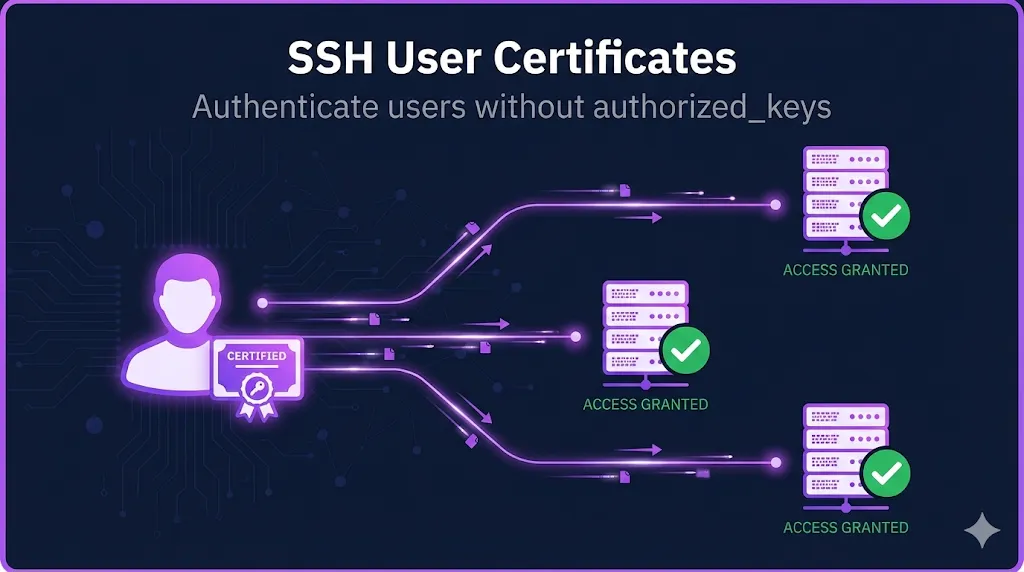
- • What they are: SSH keys signed by a Certificate Authority (CA) with expiration dates and identity metadata
- • What they fix: Key sprawl, manual revocation, TOFU prompts, and compliance nightmares
- • When to adopt: When managing 100+ servers, onboarding/offboarding frequently, or facing compliance requirements
The Problem with SSH Keys
SSH keys work great... until they don't.
Every server maintains its own ~/.ssh/authorized_keys file. When you have 10 servers, that's manageable. When you have 1,000 servers, you have:
Thousands of public keys scattered across your infrastructure
SSH keys never expire. That contractor from 2019? Their key still works.
Removing access means touching every server
Who added that key? When? Why?
- • Facebook managed millions of SSH keys before switching to certificates
- • Netflix, Uber, Lyft all use SSH certificates at scale
- • Organizations with 100+ servers typically face this problem
How SSH Certificates Work
SSH certificates flip the trust model.
Server trusts individual keys
Server trusts a Certificate Authority (CA)
The Concept
- 1You create a Certificate Authority (just a key pair used for signing)
- 2Servers are configured to trust that CA
- 3Users get their public key signed by the CA → that's their certificate
- 4When users connect, servers verify the CA's signature
- 5Valid signature + not expired + correct principal = access granted
SSH certificates don't replace SSH keys - they extend them. Your private key stays private. The certificate is just your public key with a CA signature attached. This means authentication requires both your private key and a valid certificate—defense in depth.
Two Types of SSH Certificates
SSH certificates come in two flavors:
User Certificates
Host Certificates
User vs Host Certificates Comparison
| Aspect | User Certificate | Host Certificate |
|---|---|---|
| Authenticates | User to server | Server to user |
| Signed key | User's public key | Server's host key |
| Principals contain | Usernames | Hostnames/IPs |
| Configured on | TrustedUserCAKeys | @cert-authority in known_hosts |
| Validity | Hours-days | Weeks-months |
| Eliminates | authorized_keys files | "Trust this fingerprint?" prompts |
Use BOTH. User certificates authenticate your people. Host certificates authenticate your servers. Together, you have mutual authentication with no TOFU (Trust On First Use).
SSH Certificates vs SSH Keys
This is the decision point: should your team switch from SSH keys to certificates? Here's how they compare across the dimensions that matter in production.
| Capability | SSH Keys | SSH Certificates |
|---|---|---|
| Setup complexity | Simple | Moderate (need CA) |
| Expiration | Never | Built-in validity period |
| Revocation | Manual (edit every server) | Centralized (KRL) |
| Access control | Per-server authorized_keys | Principals + AuthorizedPrincipalsFile |
| Audit | Check every server | Check CA signing logs |
| Scale | Painful at 100+ servers | Designed for scale |
| TOFU | Every new host | None (with host certs) |
| Onboarding | Add key everywhere | Issue certificate |
| Offboarding | Remove key everywhere | Revoke cert or let it expire |
- Small environment (< 50 servers)
- Stable team with low turnover
- No compliance requirements
- 100+ servers
- Frequent onboarding/offboarding
- Compliance requirements (SOC 2, PCI)
- Security concerns about permanent keys
SSH Certificates vs X.509/TLS Certificates
If you work with TLS certificates, SSH certificates will feel familiar - but they're NOT the same thing. Think of it this way: your SSH certificate authenticates you to the bastion host; your TLS certificate secures the HTTPS front door. Same concept, completely separate systems.
Key Differences
| Aspect | SSH Certificates | X.509/TLS Certificates |
|---|---|---|
| Format | OpenSSH proprietary | ASN.1/DER (standards-based) |
| Ecosystem | OpenSSH only | Universal (browsers, apps) |
| Identity | Principals | Subject + SANs |
| Revocation | KRL | CRL/OCSP |
| Chain depth | Single CA (no chaining) | Multi-level hierarchies |
| Interoperability | None with X.509 | None with SSH |
You cannot use a TLS certificate for SSH authentication, and you cannot use an SSH certificate for HTTPS. They solve the same problem (proving identity via a trusted CA) but are completely separate implementations.
Both are PKI. Just different PKI.
What's Inside an SSH Certificate
An SSH certificate contains:
Type: ssh-ed25519-cert-v01@openssh.com user certificate
Public key: ED25519-CERT SHA256:...
Signing CA: ED25519 SHA256:...
Key ID: "patrick@example.com"
Serial: 12345
Valid: from 2025-01-13T10:00:00 to 2025-01-14T10:00:00
Principals:
    patrick
    admin
Critical Options: (none)
Extensions:
    permit-pty
permit-port-forwardingIdentifier for logs (usually email or username)
Unique number for revocation
Who/what this certificate authorizes
Time window the certificate is usable
Restrictions (source IP, forced command)
Capabilities (PTY, port forwarding). Note: permit-pty and permit-port-forwarding are defaults that many high-security environments restrict.
Who Uses SSH Certificates?
SSH certificates aren't theoretical - they're used at massive scale:
Public Case Studies
- Facebook - Replaced millions of SSH keys with certificates
- Netflix - BLESS (open sourced their approach)
- Uber - Certificates with short validity
- Lyft - Similar pattern to Uber
- Intercom - Wrote about their migration publicly
Enterprise Solutions
- Venafi SSH Protect - Enterprise SSH certificate management
- HashiCorp Vault - SSH secrets engine with certificate signing
- Teleport - Open source SSH certificate platform
- Smallstep - Modern certificate authority
Getting Started
Ready to implement SSH certificates? Here's your learning path:
Interactive exploration of certificate structure, fields, and real-world examples
Step-by-step guide to creating your Certificate Authority
Signing commands, principals, extensions, and migration strategies
Eliminate TOFU with host certificate deployment
Frequently Asked Questions
Can I use my existing TLS CA for SSH certificates?
No. SSH certificates use a completely different format (OpenSSH proprietary) than X.509/TLS certificates. You'll need to create a separate SSH CA, which is just an ED25519 or RSA key pair used for signing.
Do SSH certificates require agents on servers?
No agents required. SSH certificate support is built into OpenSSH. You only need to configure TrustedUserCAKeys in sshd_config to point to your CA's public key.
What happens if my SSH CA key is compromised?
This is a serious incident. An attacker could sign certificates granting access to any server trusting that CA. You'd need to rotate the CA, distribute the new public key to all servers, and revoke any suspicious certificates. This is why many organizations use short-lived certificates (hours, not months) - even a compromised CA can only mint certs that expire quickly.
How do I revoke an SSH certificate before it expires?
OpenSSH supports Key Revocation Lists (KRL). You create a KRL file with ssh-keygen -kf and distribute it to servers. Configure RevokedKeys in sshd_config to check against this list.
Explore More SSH Guides
This is the first guide in our SSH certificate series. More guides on CA setup, user certificates, host certificates, and enterprise deployment are coming soon.
Browse All Demos