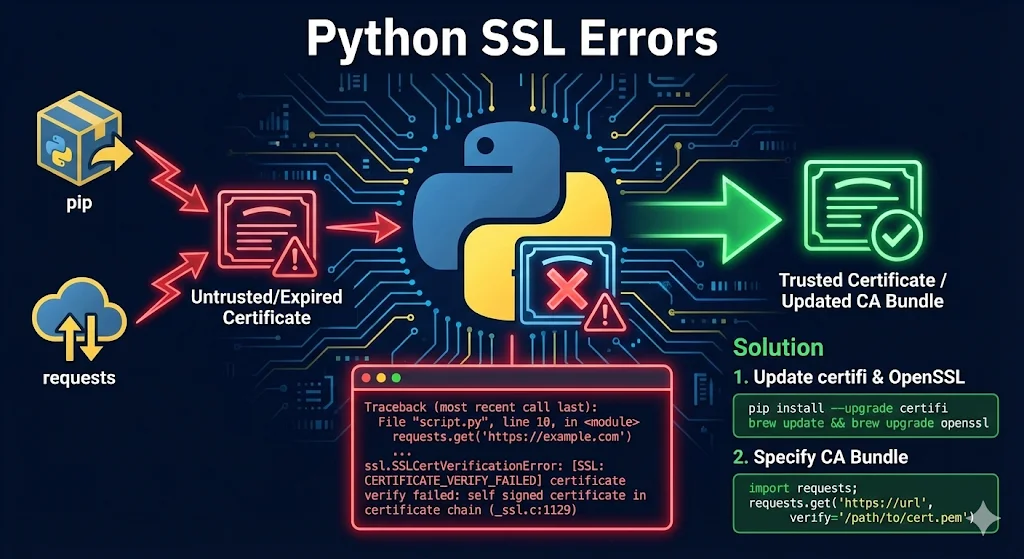
pip SSL error: certificate verify failed on pip install
The exact error text pip shows:
Could not fetch URL https://pypi.org/simple/...: There was a problem confirming the ssl certificate: ... SSL: CERTIFICATE_VERIFY_FAILEDThree causes, in order of likelihood:
- Corporate TLS-inspection proxy — your network device (Zscaler, Palo Alto, Bluecoat) intercepts the connection to pypi.org and re-signs it with a corporate root CA that Python's certifi bundle doesn't know about.
- Stale certifi bundle or old pip/Python build — a root CA was removed or rotated, and your locally installed certifi no longer includes it.
- macOS python.org installer — the "Install Certificates.command" step was never run after installation, so the interpreter has no CA bundle wired in at all.
First: upgrade pip (this alone often fixes it)
Modern pip (24.2 and later, on Python 3.10+) validates TLS against the operating system trust store by default via truststore. If your machine already trusts the corporate root — which it usually does after your IT team pushes it — upgrading pip fixes the error with no further configuration.
python -m pip install --upgrade pipCorporate proxy: point pip at the corp root CA
If upgrading pip doesn't resolve it, tell pip explicitly where your corporate CA bundle lives:
# Persist for all pip commands on this machine
pip config set global.cert /path/to/corp-bundle.pem

# Or one-off per install
pip install --cert /path/to/corp-bundle.pem <package>
The bundle must contain the full chain including public roots if the proxy only intercepts some traffic — the same full-bundle rule that applies to Git's sslCAInfo setting.
macOS: run Install Certificates.command
Python installers from python.org ship without CA certs wired to the macOS system keychain. Run the installer script that came with your Python version:
# Adjust the version number to match your Python install
open "/Applications/Python 3.12/Install Certificates.command"
This runs a one-time script that installs certifi for that interpreter and symlinks it correctly. After running it, pip installs should succeed without any cert flags.
What not to do
pip install --trusted-host pypi.org --trusted-host files.pythonhosted.org disables certificate verification for those hosts entirely. It carries the same risk profile as git config --global http.sslVerify false — acceptable only as a scoped, temporary escape hatch while you track down the real CA issue, and never something to commit into requirements docs or CI configuration.The same TLS-inspection root cause breaks Git clone and push in the same environments. SSL certificate problem in Git covers the equivalent diagnosis and fixes for Git.
Understanding Python SSL Errors
Why Python SSL errors happen:
- •Python has its own certificate bundle (certifi) - it doesn't use your system's trust store
- •Corporate proxies intercept HTTPS (MITM inspection) - the #1 cause in enterprise environments
- •Self-signed certificates in dev/test environments
- •Outdated Python/certifi with expired or removed root CAs
- •System clock wrong (rare but happens)
Common error messages you'll see:
ssl.SSLCertVerificationError: [SSL: CERTIFICATE_VERIFY_FAILED]
urllib3.exceptions.SSLError: HTTPSConnectionPool
requests.exceptions.SSLError: certificate verify failed
pip._vendor.urllib3.exceptions.SSLError
conda.exceptions.CondaSSLError
pip Install SSL Errors
The error:
pip install requests
WARNING: Retrying... after connection broken by 'SSLError(SSLCertVerificationError(1, '[SSL: CERTIFICATE_VERIFY_FAILED]...'))'
Fixes (in order of preference):
1. Upgrade pip and certifi first:
python -m pip install --upgrade pip certifi2. Corporate proxy? Add your company's root cert:
# Find where certifi stores certs
python -c "import certifi; print(certifi.where())"

# Append your corporate CA
cat corporate-root-ca.pem >> /path/to/certifi/cacert.pem
3. Temporary bypass (NOT for production):
pip install --trusted-host pypi.org --trusted-host pypi.python.org --trusted-host files.pythonhosted.org <package>4. Permanent config (pip.conf/pip.ini):
[global]
trusted-host = pypi.org
               pypi.python.org
files.pythonhosted.orgrequests Library SSL Errors
The error:
requests.get("https://internal-server.company.com")
# requests.exceptions.SSLError: HTTPSConnectionPool...
# (Caused by SSLError(SSLCertVerificationError(1, '[SSL: CERTIFICATE_VERIFY_FAILED]')))
Solutions:
1. Point to your CA bundle:
import requests
response = requests.get("https://internal-server.company.com", verify="/path/to/ca-bundle.crt")
2. Add cert to certifi permanently:
import certifi
print(certifi.where())  # Find the bundle
# Then append your CA cert to this file
3. Environment variable:
export REQUESTS_CA_BUNDLE=/path/to/ca-bundle.crt
# or
export SSL_CERT_FILE=/path/to/ca-bundle.crt
4. The "I just need it to work" approach:
import requests
response = requests.get("https://example.com", verify=False)

# Suppress warning
import urllib3
urllib3.disable_warnings(urllib3.exceptions.InsecureRequestWarning)conda SSL Errors
The error:
CondaSSLError: Encountered an SSL error. Most likely a certificate verification issue.Solutions:
1. Update conda:
conda update conda
conda update --all
2. Configure custom certs:
conda config --set ssl_verify /path/to/corporate-ca-bundle.crt3. Check .condarc:
ssl_verify: /path/to/corporate-ca-bundle.crt4. Corporate proxy:
conda config --set proxy_servers.http http://proxy.company.com:8080
conda config --set proxy_servers.https https://proxy.company.com:8080
Corporate Proxy / MITM Inspection (THE REAL PROBLEM)
This is the root cause for most enterprise users. If you're on a corporate network, start here.
What's happening:
Corporate networks use SSL inspection (Zscaler, Bluecoat, Palo Alto) that:
- Intercepts your HTTPS connection
- Decrypts with their CA
- Inspects the content
- Re-encrypts with corporate certificate
- Your apps see "untrusted" certificate because they don't know the corporate CA
The permanent fix:
# 1. Get corporate root CA from IT or export from browser
# Chrome: Settings > Security > Manage certificates > Export

# 2. Find Python's cert bundle
python -c "import certifi; print(certifi.where())"

# 3. Append your corporate CA
cat corporate-root-ca.pem >> /path/to/certifi/cacert.pem

# 4. Verify it works
python -c "import requests; requests.get('https://pypi.org')"Self-Signed Certificates (Dev/Test)
Option 1: Add to trust store (recommended)
import requests
response = requests.get("https://internal-server:8443", verify="/path/to/self-signed-cert.pem")
Option 2: Use mkcert for local dev
brew install mkcert
mkcert -install
mkcert localhost 127.0.0.1 ::1
mkcert creates locally-trusted certificates that work with Python automatically.
Hostname Mismatch
The error:
ssl.CertificateError: hostname 'wrong-name.com' doesn't match 'correct-name.com'Common causes:
- •Connecting by IP address when certificate has hostname
- •Certificate missing Subject Alternative Name (SAN)
- •Wrong hostname hardcoded in your application
Solutions:
- Use the exact hostname from the certificate
- Add IP to certificate's SAN field when generating
- Reissue certificate with correct names
Jupyter Notebook SSL Errors
# In notebook cell
import os
os.environ['REQUESTS_CA_BUNDLE'] = '/path/to/ca-bundle.crt'

# Or configure pip from notebook
!pip config set global.trusted-host "pypi.org pypi.python.org files.pythonhosted.org"
macOS-Specific Issues
The problem: Python installed from python.org on macOS doesn't use system certificates by default.
The fix:
# Run the certificate installer (adjust version number)
/Applications/Python\ 3.12/Install\ Certificates.command

# Or manually
pip install --upgrade certifi
Debugging SSL Errors
Enable debug logging:
import ssl
import logging
logging.basicConfig(level=logging.DEBUG)

import http.client
http.client.HTTPConnection.debuglevel = 1
Check certificate with Python:
import ssl
import socket

hostname = 'example.com'
context = ssl.create_default_context()

with socket.create_connection((hostname, 443)) as sock:
    with context.wrap_socket(sock, server_hostname=hostname) as ssock:
        print(ssock.getpeercert())
Use OpenSSL for detailed analysis:
openssl s_client -connect example.com:443 -showcertsSee our OpenSSL s_client guide for more debugging techniques.
Quick Reference Table
| Error | Likely Cause | Quick Fix |
|---|---|---|
| CERTIFICATE_VERIFY_FAILED | Corp proxy / self-signed | Add CA to certifi |
| pip SSL error | Corp proxy / old certifi | pip install --upgrade certifi |
| hostname mismatch | Wrong hostname | Use hostname from cert |
| certificate expired | Outdated certifi | Update certifi / check clock |
| unable to get local issuer | Missing intermediate | Get full chain |
The Right Way vs The Wrong Way
DON'T do this in production:
requests.get(url, verify=False)
urllib3.disable_warnings()
ssl._create_default_https_context = ssl._create_unverified_context
DO this instead:
import certifi
import requests
# Add your CA to certifi bundle, then:
response = requests.get(url, verify=certifi.where())
FAQ
Q: Why does Python use its own certificate store?
Python includes certifi for cross-platform consistency. System trust stores vary significantly between Windows, macOS, and Linux distributions.
Q: Is verify=False safe for internal APIs?
No. Internal networks can be compromised. Configure proper trust even for internal services.
Q: How do I find my corporate proxy's CA certificate?
Export from your browser (Chrome → Settings → Security → Manage Certificates) or ask your IT department.
Q: Why did SSL work yesterday but not today?
Common causes: certificate expired, certifi updated with removed roots, or system time changed.
Related Resources
Certificate Chain Builder
Understand and fix certificate chain issues.
OpenSSL Verify Chain Guide
Verify certificate chains from the command line.
Self-Signed Certificates Guide
Create and manage self-signed certificates properly.
OpenSSL s_client Guide
Debug what certificate the server sends.
SSL certificate problem in Git
Fix clone, push, pull failures and corporate proxy issues.
Certificate Error Decoder
Decode cryptic SSL/TLS errors with fixes.