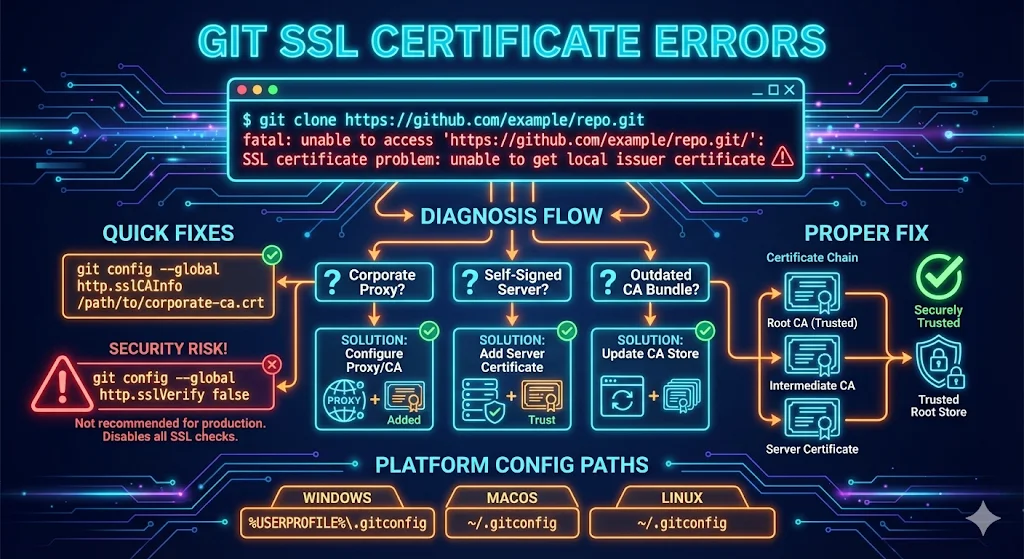
Watch: SSL Certificate Problem in Git — The 60-Second Diagnosis & Fix
The Git error "SSL certificate problem: unable to get local issuer certificate" means Git's HTTPS client (libcurl) can't chain the server's certificate to a root CA it trusts. In corporate environments the cause is almost always a TLS-inspection proxy (Zscaler, Netskope, Palo Alto) or an internal CA that isn't in the CA bundle Git reads. The fix: add that root CA to the bundle Git actually uses —
git config --global http.sslCAInfo /path/to/ca-bundle.pem
— or on Windows, switch Git to the OS trust store:
git config --global http.sslBackend schannel
Do not disable verification globally.
What the error actually means
Git delegates all TLS work to libcurl, which verifies the server's certificate chain against a CA bundle (OpenSSL verify error 20 is this exact failure). The bundle Git reads is frequently not the one the browser or OS uses — which is why the same site "works fine in Chrome" but fails with Git.
To see how certificate chains are assembled and where yours breaks, try the chain builder demo.
Step 1 — Diagnose in 60 seconds
Run this against the failing remote and read the issuer line:
openssl s_client -connect github.com:443 -servername github.com </dev/null 2>/dev/null | openssl x509 -noout -subject -issuer -dates
Issuer shows a security vendor name (Zscaler, Netskope, Palo Alto…)
→ TLS-inspection proxy. Get the proxy root CA from your security team and add it to the bundle Git reads.
Issuer shows a company CA name
→ Internal CA. Same fix — add that root to the bundle.
Issuer shows a public CA (DigiCert, Sectigo, Let's Encrypt…)
→ Git's CA bundle is stale or pointing at the wrong file. Update Git or point it at the system bundle.
To see exactly which CAfile Git loaded for a given request:
GIT_CURL_VERBOSE=1 git ls-remote <url>
See also: openssl s_client guide for a full breakdown of every output field.
Fix it by cause
Corporate TLS-inspection proxy
Get the proxy root CA from your security team, or export it from your browser (Chrome › Settings › Security › Manage certificates). Append it to a copy of the full Mozilla bundle — pointing http.sslCAInfo at a file that contains only the corp root breaks all public remotes.
cat /etc/ssl/certs/ca-certificates.crt corp-root.pem > ~/.certs/bundle-with-corp.pem
git config --global http.sslCAInfo ~/.certs/bundle-with-corp.pem
Internal Git server (GitLab / Bitbucket) with internal CA
Scope the CA to that host only (Git 1.8.5+) so it doesn't interfere with public remotes:
git config --global http.https://git.corp.example.com/.sslCAInfo ~/.certs/corp-root.pem
Windows
Git for Windows ships its own OpenSSL CA file, so GPO-deployed CAs are invisible to it. Switch to the native Windows certificate store:
git config --global http.sslBackend schannel
Linux
# Debian / Ubuntu
sudo cp corp-root.crt /usr/local/share/ca-certificates/
sudo update-ca-certificates

# RHEL / Fedora
sudo cp corp-root.pem /etc/pki/ca-trust/source/anchors/
sudo update-ca-trust
macOS
Apple's bundled Git trusts the System keychain — add the root CA in Keychain Access and mark it "Always Trust". Homebrew Git reads the ca-certificates formula bundle instead; append the corp root there or use http.sslCAInfo. See the OpenSSL installation guide if you need to install or upgrade OpenSSL on macOS first.
CI runners and containers
Bake the CA into the image using the Linux commands above in your Dockerfile, or set the environment variable in your pipeline config:
GIT_SSL_CAINFO=/certs/bundle.pem
What not to do
git config --global http.sslVerify false
This disables certificate validation for every remote, permanently. Any on-path device can serve a fake remote and silently read all pushed credentials. If you're stuck mid-incident and must unblock immediately, scope it to a single command — then revert:
git -c http.sslVerify=false clone https://git.corp.example.com/repo.git
The same TLS-inspection root cause that breaks Git also breaks pip and requests — see Python SSL certificate errors for those fixes.
Related Resources
OpenSSL s_client Guide
Debug what certificate the server sends.
Python SSL Certificate Errors
Same root cause, different tool.
Certificate Chain Builder
Understand and fix certificate chain issues.
OpenSSL Installation Guide
Install or upgrade OpenSSL on any platform.
Self-Signed Certificates
Create and manage self-signed certs properly.
Certificate Error Decoder
Decode cryptic SSL/TLS errors with fixes.