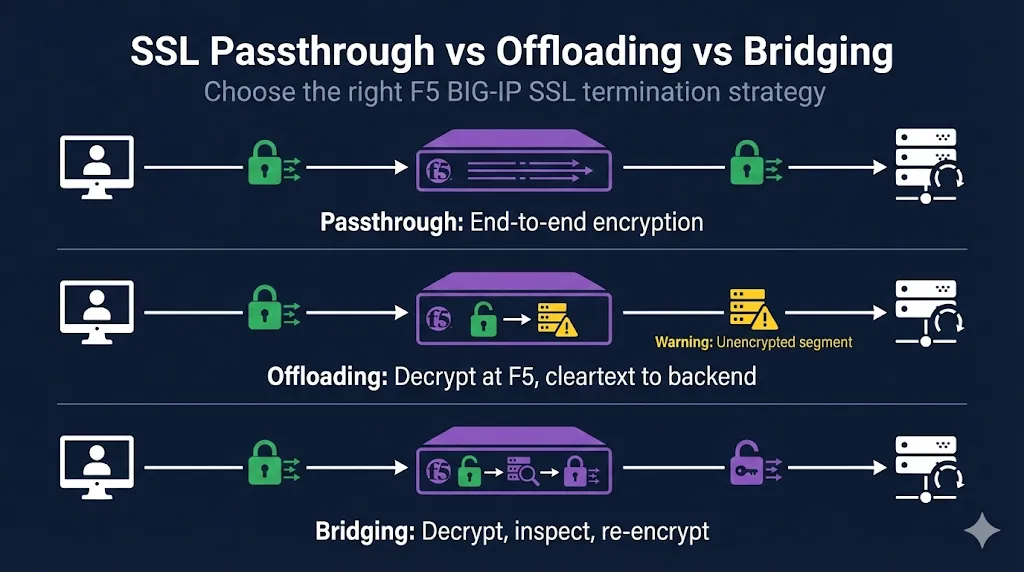
Quick Comparison
F5 BIG-IP offers three SSL termination strategies. Understanding the trade-offs helps you choose the right approach for your security requirements and performance needs.
| Method | F5 Decrypts? | Backend Traffic | L7 Features | WAF/ASM | Use Case |
|---|---|---|---|---|---|
| Passthrough | No | Encrypted (E2E) | None | No | Strict E2E encryption, no L7 needs |
| Offloading | Yes | Cleartext HTTP | Full | Yes | Max L7 features on trusted LAN |
| Bridging | Yes | Re-encrypted HTTPS | Full | Yes | Compliance-driven encrypted LAN + L7 |
SSL Passthrough
What It Is
- • F5 operates at Layer 4 (TCP) only
- • Encrypted traffic passes through untouched
- • SSL/TLS terminates at the backend server
- • F5 has no visibility into HTTP content
When to Use Passthrough
- End-to-end encryption requirements (PCI-DSS, HIPAA scenarios)
- Client certificate authentication that must reach the server
- Legacy apps that validate the SSL session
- Compliance requiring TLS termination only at application
Configuration Overview
GUI: Local Traffic → Virtual Servers → [your VS] → Resources → Profiles
Virtual Server Type: Standard or Performance (Layer 4)
HTTP Profile:       None
Client SSL Profile: None
Server SSL Profile: None
Pool:               Backend servers on port 443
Note: L4 protections still work with passthrough. TCP/UDP DDoS protections, connection limits, and basic load balancing function normally—you just lose HTTP-layer visibility.
Trade-offs
Advantages
- ✅ True end-to-end encryption
- ✅ Simplest certificate management
- ✅ Certificates only on servers
Disadvantages
- ❌ No HTTP inspection, iRules, or content switching
- ❌ No WAF/ASM protection
- ❌ No SSL offload performance benefit
- ❌ Cookie/header persistence unavailable
SSL Offloading (Termination)
What It Is
- • F5 terminates SSL/TLS from client
- • Decrypts traffic, inspects/manipulates as needed
- • Forwards cleartext HTTP to backend servers
- • Most common configuration
When to Use Offloading
- Maximum performance (offload crypto from servers)
- Full L7 features needed (iRules, content switching, compression)
- WAF/ASM inspection required
- Internal network is trusted/segmented
Configuration Overview
GUI: Local Traffic → Virtual Servers → [your VS] → Resources → Profiles
Virtual Server Type: Standard
HTTP Profile:       http (required for L7)
Client SSL Profile: Your certificate + key
Server SSL Profile: None
Pool:               Backend servers on port 80
Auditor concern? If compliance requires encryption in transit but you want F5 offloading, you can secure the backend segment with IPsec tunnels or a separate TLS terminator at the server—keeping the F5 in offload mode while satisfying encryption requirements.
Trade-offs
Advantages
- ✅ Full L7 inspection and manipulation
- ✅ WAF/ASM protection available
- ✅ Best performance (servers don't handle crypto)
- ✅ Centralized certificate management
Disadvantages
- ❌ Backend traffic unencrypted
- ❌ May not meet compliance for encrypted internal traffic
SSL Bridging (Re-encryption)
What It Is
- • F5 terminates client SSL
- • Decrypts, inspects, re-encrypts
- • New SSL session to backend servers
- • Best of both worlds (with overhead)
When to Use Bridging
- Compliance requires encryption on both segments
- Need L7 features AND encrypted backend
- Zero-trust network architecture
- PCI-DSS with internal encryption requirements
Configuration Overview
GUI: Local Traffic → Virtual Servers → [your VS] → Resources → Profiles
Virtual Server Type: Standard
HTTP Profile:       http
Client SSL Profile: Public certificate + key
Server SSL Profile: serverssl (or custom with backend CA)
Pool:               Backend servers on port 443
SNI/SAN alignment: When enabling server certificate validation on the F5 (Server SSL profile), ensure the backend cert's SAN/CN matches what F5 sends in the SNI. Mismatches cause "certificate verify failed" errors that can be tricky to diagnose.
Trade-offs
Advantages
- ✅ Full L7 inspection capability
- ✅ WAF/ASM protection available
- ✅ Encrypted on both segments
Disadvantages
- ❌ Double crypto overhead (performance impact)
- ❌ More complex certificate management
- ❌ Must configure server SSL profile trust
Decision Flowchart
Do you need L7 features?
(WAF/ASM, iRules, content switching, HTTP header/cookie persistence)
Is your backend network trusted/isolated?
Common Mistakes
1. Using passthrough but expecting persistence
Cookie persistence requires decryption. With passthrough, use source_addr persistence instead.
❌ Cookie persistence with passthrough will fail silently
2. Forgetting HTTP profile with offloading
Without the HTTP profile, no L7 features work. This is the common cause of "iRules not firing."
✅ Always add http profile when using Client SSL profile
3. Server SSL profile trust issues with bridging
Backend self-signed certs need their CA imported to the F5. Alternatively, you can disable server certificate verification—but this is not recommended for production.
4. Performance surprise with bridging
Double encryption means significant CPU overhead. Size your hardware accordingly or use SSL acceleration.
⚠️ Test performance before production deployment
Quick Reference Commands
Check Current Virtual Server SSL Configuration
tmsh list ltm virtual <vs_name> profiles
Convert Passthrough to Offloading
# Add HTTP profile
tmsh modify ltm virtual <vs_name> profiles add { http }

# Add Client SSL profile
tmsh modify ltm virtual <vs_name> profiles add { <clientssl_profile> { context clientside } }

# Change pool to port 80
tmsh modify ltm pool <pool_name> members modify { <node>:80 }Convert Offloading to Bridging
# Add Server SSL profile
tmsh modify ltm virtual <vs_name> profiles add { serverssl { context serverside } }

# Change pool back to port 443
tmsh modify ltm pool <pool_name> members modify { <node>:443 }Verify Your Configuration
# Check profiles on virtual server
tmsh list ltm virtual <vs_name> profiles

# Test from command line (replace VIP with your virtual server IP)
curl -vk https://<VIP>/

# Check SSL handshake details
openssl s_client -connect <VIP>:443 -servername <hostname>
Frequently Asked Questions
Related F5 Guides
F5 SSL Profiles Explained
Foundation concepts for understanding Client SSL and Server SSL profiles
Client SSL vs Server SSL
The complete explanation of which profile needs your certificate
F5 Certificate Installation
Step-by-step guide to importing certificates, keys, and chains
F5 SSL Troubleshooting
Symptom-based runbook for debugging F5 SSL issues