What is Error 526?
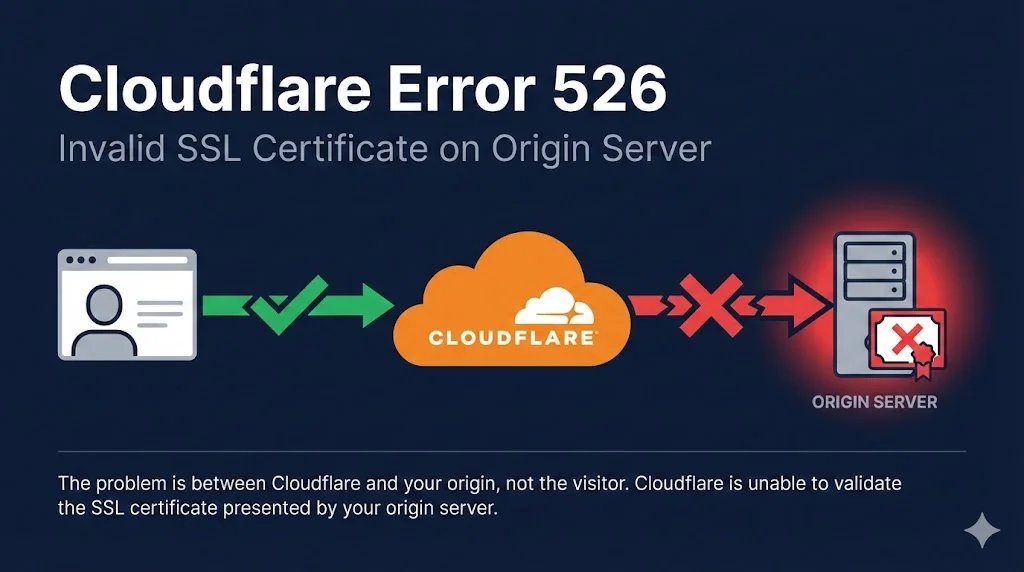
Error 526 occurs when Cloudflare attempts to connect to your origin server over HTTPS but cannot validate the SSL/TLS certificate presented by your server.
Key Point: This error happens between Cloudflare and your origin server, not between the visitor and Cloudflare. Your visitors see the error, but the problem is on the server side.
Understanding the Connection Flow
The connection from visitor to Cloudflare is fine. The problem is between Cloudflare and your origin.
Common Causes
SSL/TLS Modes Explained
Cloudflare offers different SSL/TLS encryption modes. Understanding these helps you choose the right setting and avoid Error 526.
| Mode | Encryption | Origin Cert Required? | Validates Cert? |
|---|---|---|---|
| Off | None | No | N/A |
| Flexible | Visitor↔CF only | No | N/A |
| Full | Both sides | Yes (any) | No |
| Full (Strict) | Both sides | Yes (valid) | Yes ✓ |
Avoid Flexible Mode
Flexible mode leaves traffic between Cloudflare and your origin unencrypted. This is a security risk and can cause redirect loops.
Recommended: Full (Strict)
Always use Full (Strict) with a valid certificate. Use Cloudflare Origin CA (free) if you don't want to pay for a certificate.
Step-by-Step Fixes
1Check Your Origin Certificate
First, verify what certificate your origin server is presenting. Replace your-origin-ip with your server's IP and yourdomain.com with your domain:
openssl s_client -connect your-origin-ip:443 -servername yourdomain.com 2>/dev/null | openssl x509 -noout -dates -subject
Look for:
- notAfter - Is the certificate expired?
- subject - Does it include your domain?
Verify certificate and private key match:
# Get certificate modulus
openssl x509 -noout -modulus -in origin.pem | openssl md5

# Get key modulus
openssl rsa -noout -modulus -in origin.key | openssl md5

# If both MD5 hashes match, the key and cert are a pair
If these don't match, you're using the wrong private key for your certificate.
2Install Cloudflare Origin CA Certificate
Cloudflare provides free Origin CA certificates valid for up to 15 years. These are trusted by Cloudflare but not browsers (which is fine since Cloudflare handles visitor connections).
- Go to Cloudflare Dashboard → SSL/TLS → Origin Server
- Click Create Certificate
- Choose PEM format and copy both certificate and private key
- Save as
origin.pem(cert) andorigin.key(key)
Nginx configuration:
server {
    listen 443 ssl;
    server_name yourdomain.com;

    ssl_certificate /etc/ssl/origin.pem;
    ssl_certificate_key /etc/ssl/origin.key;

    # ... rest of config
}
Apache configuration:
<VirtualHost *:443>
    ServerName yourdomain.com

    SSLEngine on
    SSLCertificateFile /etc/ssl/origin.pem
    SSLCertificateKeyFile /etc/ssl/origin.key

    # ... rest of config
</VirtualHost>3Alternative: Use Let's Encrypt
If you prefer publicly trusted certificates, Let's Encrypt is free and works with Full (Strict) mode.
Nginx:
sudo certbot --nginx -d yourdomain.com -d www.yourdomain.com
Apache:
sudo certbot --apache -d yourdomain.com -d www.yourdomain.com
4Temporary: Switch to Full Mode (Diagnostic Only)
If you need to quickly verify the issue is certificate validation, temporarily switch to "Full" mode:
- Go to Cloudflare Dashboard → SSL/TLS → Overview
- Change from "Full (Strict)" to "Full"
- Test your site
Warning: This is for diagnosis only. "Full" mode doesn't validate certificates, making you vulnerable to MITM attacks. Switch back to "Full (Strict)" after fixing the certificate.
Debugging Checklist
Work through this checklist to identify the issue:
Error 526 in Special Contexts
Zero Trust / Cloudflare Gateway
When using Cloudflare Gateway, Error 526 can occur if:
- Origin presents an untrusted certificate (unknown issuer, revoked, expired, CN mismatch)
- Certificate contains invalid characters like underscores (Gateway uses BoringSSL which is stricter than Chrome)
- Origin only offers insecure cipher suites (RC4, 3DES)
- Origin redirects all HTTPS to HTTP
Cloudflare Workers
Workers subrequests to external domains (not proxied by Cloudflare) always use Full (Strict) mode, regardless of your zone's SSL settings. Ensure any external APIs your Worker calls have valid certificates.
Frequently Asked Questions
Can I use a self-signed certificate with Cloudflare?
Yes, but only with "Full" mode (not "Full (Strict)"). For better security, use Cloudflare Origin CA certificates instead—they're free, valid for 15 years, and work with Full (Strict) mode.
Why does my site work without Cloudflare but show 526 with it?
When accessing your site directly, your browser may accept certificates that Cloudflare won't (like self-signed certs if you clicked through the warning). Cloudflare enforces stricter validation in Full (Strict) mode.
How do I check if my certificate chain is complete?
Use our Chain Builder demo or run:
openssl s_client -connect yourdomain.com:443 -showcerts
You should see multiple certificates (your leaf cert + intermediates). If you only see one, the chain is incomplete.
Does Cloudflare Origin CA work if I disable the proxy (grey cloud)?
No. Cloudflare Origin CA certificates are only trusted by Cloudflare. If you disable the proxy (DNS only), browsers will show certificate warnings. Use Let's Encrypt if you need a publicly trusted certificate.
How long are Cloudflare Origin CA certificates valid?
You can choose between 7 days, 30 days, 90 days, 1 year, 2 years, 3 years, or 15 years. The 15-year option is popular for "set and forget" deployments.
I get 526 but my certificate works when I access the server directly
When you access your server directly (bypassing Cloudflare), your browser may be more lenient—accepting self-signed certs after a warning click, or ignoring minor issues. Cloudflare's Full (Strict) mode enforces proper validation. Check that:
- Certificate is CA-signed (not self-signed) OR you're using Cloudflare Origin CA
- Certificate hasn't expired
- Hostname matches exactly
- Full chain is installed
Related Resources
AWS CloudFront SSL Errors
Fix ACM certificate issues and the us-east-1 requirement for CloudFront distributions.
Akamai SSL Certificate Errors
Edge vs origin certificates and Property Manager SSL configuration.
Chain Builder & Troubleshooting
Build complete certificate chains and diagnose chain validation failures.
How TLS Works
Understand the TLS handshake and certificate validation process.
Certificate Anatomy
Learn what's inside an X.509 certificate and how each field affects validation.
Certificate File Formats
PEM, DER, PKCS#12 - understand and convert between certificate formats.
Encrypted Client Hello (ECH)
How ECH encrypts the SNI field and what it means for TLS inspection and Cloudflare deployments.