Introduction
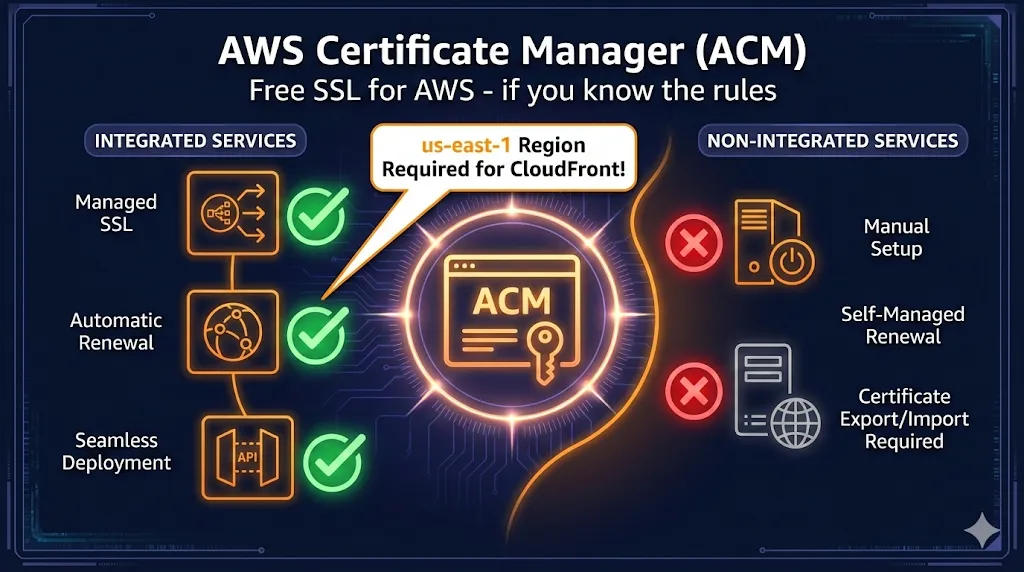
AWS Certificate Manager (ACM) is Amazon's managed service for provisioning, managing, and deploying SSL/TLS certificates. It's powerful, free for public certificates, and deeply integrated with AWS services—but it comes with rules that trip up even experienced engineers.
The 3-Point Summary
- Free public certificates for integrated AWS services (CloudFront, ALB, API Gateway)
- Automatic renewal (when DNS validation is configured correctly)
- The us-east-1 CloudFront trap everyone hits at least once
What ACM is NOT: A way to get certificates for EC2, on-premises servers, or any non-AWS infrastructure. Those require ACM Private CA ($400/mo) or external certificates.
ACM vs. the Alternatives
| Feature | ACM Public | ACM Private CA | Let's Encrypt | Commercial CA |
|---|---|---|---|---|
| Cost | Free | $400/mo + per-cert | Free | $10-$500/year |
| Certificate Validity | 13 months | Configurable | 90 days | 1-2 years |
| Auto-Renewal | Yes (DNS) | Yes | Yes (certbot) | Manual |
| Export Private Key | No | Yes | Yes | Yes |
| Use Outside AWS | No | Yes | Yes | Yes |
| Wildcard Certs | Yes | Yes | Yes | Yes |
| OV/EV Validation | No (DV only) | N/A (private) | No (DV only) | Yes |
Decision Tree
Is it on AWS (CloudFront, ALB, API Gateway)?
├─ YES → ACM Public (free, auto-renew)
└─ NO
   ├─ EC2 instance? → ALB in front → ACM Public
   │                  OR → Let's Encrypt on EC2
   ├─ On-premises? → ACM Private CA ($$)
   │                 OR → Let's Encrypt
   │                 OR → Commercial CA
   └─ Need OV/EV? → Commercial CA only
The us-east-1 Rule
CloudFront is a global service that reads certificates from us-east-1 only.
- • Certificates in other regions (eu-west-1, ap-southeast-1, etc.) are invisible to CloudFront
- • You cannot move ACM certificates between regions
- • You must request a new certificate in us-east-1
CloudFront (Global) vs Origin (Regional)
Other us-east-1 requirements: Lambda@Edge functions, WAF WebACLs for CloudFront, and CloudFront Functions must also be created in us-east-1.
DNS vs Email Validation
| Aspect | DNS Validation ✓ | Email Validation |
|---|---|---|
| Auto-Renewal | Yes (if CNAME remains) | No (requires click) |
| Setup | Add CNAME record once | Click link in email |
| Wildcards | Supported | Not supported |
| Route 53 | One-click setup | N/A |
| Recommendation | Use this | Legacy only |
DNS Validation Process
ACM generates a unique CNAME record for each domain. Add this to your DNS:
# Example CNAME record for DNS validation
Name:  _abc123def456ghi789.example.com
Type:  CNAME
Value: _xyz987wvu654.acm-validations.aws.
Route 53 Tip: If your domain is in Route 53, ACM shows a "Create record in Route 53" button. One click adds the CNAME automatically.
Why Your Certificate is Stuck on "Pending Validation"
72-Hour Timeout: ACM certificates expire from pending validation after 72 hours. If it times out, you'll need to request a new certificate.
Common Causes
- 1
CNAME not propagated yet
DNS changes can take 5-60 minutes. Check propagation:
bashdig _abc123def456.example.com CNAME +short
- 2
Wrong DNS zone
If validating api.example.com, the CNAME must be in the example.com zone, not a subdomain zone.
- 3
Typo in CNAME name or value
Copy-paste from ACM console. Don't type it manually.
- 4
CAA records blocking Amazon
Check for restrictive CAA records:
bashdig example.com CAA +short # Should include: 0 issue "amazon.com" # Or have no CAA records at all
Where ACM Certificates Work
Supported Services (Works)
| Service | Region Requirement | Notes |
|---|---|---|
| CloudFront | us-east-1 only | Global CDN |
| Application Load Balancer (ALB) | Same as ALB | Up to 25 certs per ALB |
| Network Load Balancer (NLB) | Same as NLB | TLS listeners only |
| API Gateway | Same as API | Custom domain names |
| Elastic Beanstalk | Same as EB | Via ALB |
| AWS App Runner | Same as App Runner | Custom domains |
Not Supported (Doesn't Work)
| Service | Why Not | Workaround |
|---|---|---|
| EC2 Instances | Can't export private key | ALB in front, or Let's Encrypt |
| ECS/EKS (direct) | Containers need key access | ALB/NLB in front |
| On-premises servers | Not AWS infrastructure | ACM Private CA or external |
| Other clouds (GCP, Azure) | Can't export | Let's Encrypt or commercial |
The EC2 Workaround
ALB terminates SSL. EC2 receives unencrypted traffic on port 80 within the VPC.
Auto-Renewal: When "Automatic" Isn't
ACM auto-renewal works differently for DNS vs Email validation:
DNS Validation ✓
Fully automatic if CNAME record still exists. ACM re-validates domain ownership and renews 60 days before expiration.
Email Validation ⚠
Requires human action. You must click a link in the renewal email. Miss it, and the certificate expires.
When Renewal Silently Fails
- CNAME record was deleted (someone "cleaned up" DNS)
- Domain transferred to different registrar/DNS
- CAA records added that block Amazon
- Domain expired or WHOIS info changed
- Certificate not associated with any AWS resource
Set Up CloudWatch Alarms
# Alert when certificate expires in less than 30 days
aws cloudwatch put-metric-alarm \
  --alarm-name "ACM-CertExpiring-example-com" \
  --metric-name DaysToExpiry \
  --namespace AWS/CertificateManager \
  --statistic Minimum \
  --period 86400 \
  --threshold 30 \
  --comparison-operator LessThanThreshold \
  --dimensions Name=CertificateArn,Value=arn:aws:acm:... \
  --evaluation-periods 1 \
  --alarm-actions arn:aws:sns:...
ACM Private CA
ACM Private CA lets you run your own Certificate Authority for internal use. It's powerful but expensive.
Cost Reality
$400/month per CA, plus per-certificate fees. Consider this for: large enterprises, IoT device certificates, internal mTLS, regulated industries.
Alternatives to ACM Private CA
| Option | Cost | Best For |
|---|---|---|
| Self-signed certs | Free | Dev/test environments |
| Let's Encrypt | Free | Public-facing services |
| HashiCorp Vault | OSS free / Enterprise $$ | Dynamic secrets, short-lived certs |
| step-ca (Smallstep) | OSS free | Internal PKI, ACME support |
| ACM Private CA | $400/mo+ | AWS-native, compliance, scale |
Common CLI Tasks
Request a New Certificate
# Request certificate with DNS validation
aws acm request-certificate \
  --domain-name example.com \
  --subject-alternative-names "*.example.com" \
  --validation-method DNS \
  --region us-east-1  # For CloudFront!
List All Certificates
# List certificates in a region
aws acm list-certificates --region us-east-1

# With details (status, domains)
aws acm list-certificates \
  --region us-east-1 \
  --includes keyTypes=RSA_2048,EC_prime256v1
Check Certificate Status
# Get certificate details
aws acm describe-certificate \
  --certificate-arn arn:aws:acm:us-east-1:123456789:certificate/abc-123 \
  --region us-east-1

# Check validation status specifically
aws acm describe-certificate \
  --certificate-arn arn:aws:acm:... \
  --query 'Certificate.DomainValidationOptions[*].ValidationStatus'
Delete a Certificate
# Delete (must not be in use)
aws acm delete-certificate \
  --certificate-arn arn:aws:acm:us-east-1:123456789:certificate/abc-123 \
  --region us-east-1
Troubleshooting Quick Reference
| Problem | Likely Cause | Fix |
|---|---|---|
| Cert not in CloudFront dropdown | Wrong region | Request in us-east-1 |
| Stuck on "Pending validation" | CNAME missing/wrong | Verify with dig, check DNS zone |
| Can't delete certificate | Still in use | Disassociate from all resources first |
| Renewal failed | CNAME deleted | Re-add CNAME or request new cert |
| CAA check failed | CAA blocks Amazon | Add: 0 issue "amazon.com" |
| Wildcard validation failing | Using email validation | Wildcards require DNS validation |
| SSL error on EC2 | Can't use ACM on EC2 | Put ALB in front, or use Let's Encrypt |
Frequently Asked Questions
Summary
ACM is the right choice when:
- ✓ You're deploying to CloudFront, ALB, API Gateway
- ✓ You want free, auto-renewing DV certificates
- ✓ You're comfortable with DNS validation
- ✓ You don't need to export the private key
- ✓ All your infrastructure is on AWS
ACM is the wrong choice when:
- ✗ You need certificates on EC2 directly
- ✗ You need OV or EV validation
- ✗ You need to use certs outside AWS
- ✗ You need exportable private keys
- ✗ You're running multi-cloud infrastructure
Remember: CloudFront needs us-east-1, DNS validation beats email, and leave your CNAME records alone.
Related Resources
AWS ACM Troubleshooting
Fix validation failures, stuck certificates, and renewal issues fast.
CloudFront SSL Certificate Errors
Troubleshoot ACM and origin certificate issues with CloudFront distributions.
Azure Key Vault Certificates
Managing certificates in Azure? Import, generate, and deploy certs with Key Vault.
Cloudflare Error 526
Fix Invalid SSL Certificate errors when using Cloudflare Full (Strict) mode.
Chain Builder & Troubleshooting
Build complete certificate chains and diagnose chain validation failures.
How TLS Works
Understand the TLS handshake and certificate validation process.
Certificate Anatomy
Learn what's inside an X.509 certificate and how each field affects validation.