Watch the Video
1. The Problem: SNI Leakage
Every TLS connection starts with a ClientHello message. This is the first thing the client (your browser, your app, your API client) sends to the server. It says: "Here's what TLS versions I support, here are my cipher suites, and here's the domain I'm trying to reach."
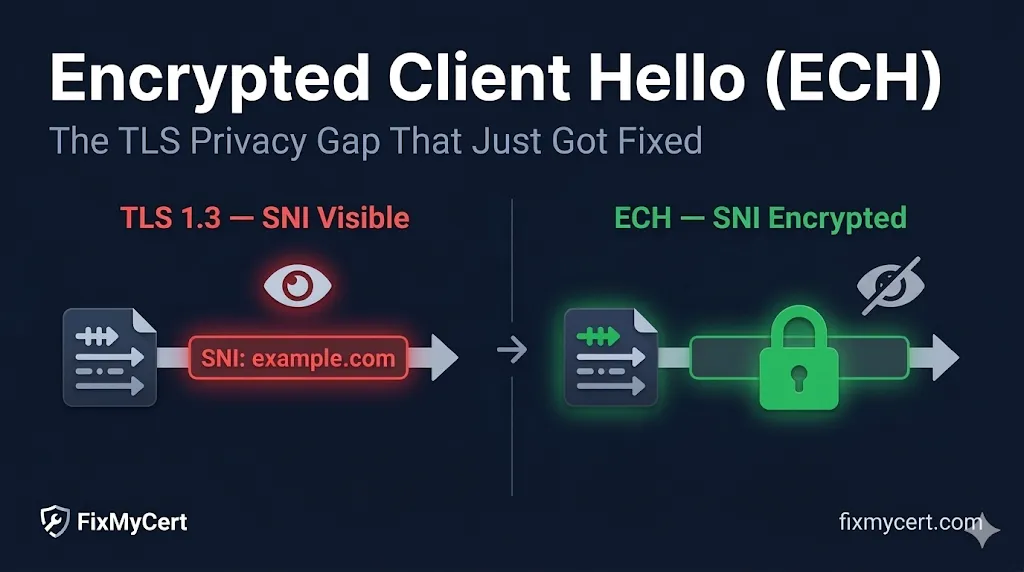
That last part — the domain name — is the Server Name Indication (SNI) field. And it's been sent in plaintext since TLS was invented.
What is SNI?
Server Name Indication (SNI) is a TLS extension that tells the server which hostname the client wants to connect to. It exists because a single IP address can host multiple domains (virtual hosting). Without SNI, the server wouldn't know which certificate to present. SNI was introduced in 2003 (RFC 3546) and has been required for modern HTTPS.
The Chicken-and-Egg Problem
Why can't we just encrypt the SNI? Because encryption requires a key exchange — and the key exchange hasn't happened yet when the ClientHello is sent. The server needs to know which domain you want before it can select the right certificate and begin the handshake. It's a classic chicken-and-egg problem:
What Observers See (Even with TLS 1.3)
TLS 1.3 was a massive improvement. It encrypted the certificate exchange, removed insecure cipher suites, and reduced the handshake to one round trip. But it didn't touch the ClientHello. An observer on the network — your ISP, a nation-state, a DPI appliance — can still see:
- The destination IP address
- The SNI field — the exact domain name you're connecting to
- The TLS version and cipher suites offered
- The certificate, HTTP request, and all application data (encrypted)
The ESNI Predecessor
Before ECH, there was Encrypted SNI (ESNI) — a simpler proposal that only encrypted the SNI extension. Cloudflare and Firefox deployed experimental ESNI support in 2018. But ESNI had limitations: it only protected one field, was vulnerable to certain traffic analysis attacks, and never advanced beyond draft status. The IETF concluded that encrypting the entire ClientHello was a better approach, leading to ECH.
2. How ECH Works
ECH's core insight is elegant: publish encryption keys in DNS before the connection starts. This breaks the chicken-and-egg problem by using a separate channel (DNS) to distribute the keys needed to encrypt the ClientHello.
DNS HTTPS/SVCB Records
ECH keys are published in HTTPS and SVCB DNS resource records (defined in RFC 9460). When a client wants to connect to example.com, it first queries DNS for the HTTPS record, which contains the ECH configuration — including the public key needed to encrypt the ClientHello.
# Query HTTPS DNS record for a domain
dig +short type65 example.com

# Example response (simplified):
# 1 . alpn="h2,h3" ech="AEX+DQB...base64..."
ClientHelloOuter vs. ClientHelloInner
With ECH, the client constructs two ClientHello messages:
ClientHelloOuter
Sent in plaintext
- • Contains a "cover" SNI — often the CDN's domain
- • Visible to network observers
- • Contains the encrypted inner ClientHello as an extension
- • Looks like a normal connection to the CDN
ClientHelloInner
Encrypted using the DNS key
- • Contains the real destination SNI
- • Hidden from network observers
- • Decrypted by the server using its ECH private key
- • Used for the actual TLS handshake
The Decryption Flow
From the observer's perspective, the connection looks like it's going to cdn.example.com. The real destination is completely hidden inside the encrypted extension.
3. GREASE ECH — The Part Everyone Misses
What is GREASE?
GREASE stands for Generate Random Extensions And Sustain Extensibility (RFC 8701). It's a TLS mechanism where clients deliberately send unknown or fake values in their ClientHello — random cipher suite IDs, fake extensions, etc. The goal: prevent middleboxes from ossifying around specific TLS features. If middleboxes learn to block unknown extensions, they'll break future TLS upgrades. GREASE keeps them honest.
Here's where ECH gets operationally interesting. Even when ECH isn't in use, modern browsers send a fake ECH extension in their ClientHello. This is GREASE ECH — and it's by design.
Why Send Fake ECH?
If middleboxes could distinguish "real ECH" from "no ECH," they could selectively block ECH connections. By making ECH-like extensions appear in every ClientHello — regardless of whether ECH is actually being used — GREASE prevents middleboxes from learning to block ECH.
The Operational Impact
- Your TLS inspection tools will see ECH-like traffic — even if nobody in your org uses ECH
- SIEM alerts may fire on "unknown TLS extension" if your rules aren't updated
- You cannot distinguish GREASE ECH from real ECH by inspecting the extension — that's the whole point
- This is not a bug — it's an intentional design choice to protect ECH adoption
4. The DNS Dependency
ECH's entire security model depends on DNS. The encryption keys for the ClientHello live in HTTPS/SVCB DNS records. If DNS isn't trustworthy, the ECH keys aren't trustworthy — and an attacker who can tamper with DNS can strip ECH entirely.
DNSSEC
DNSSEC cryptographically signs DNS records, protecting against tampering. In an ideal world, ECH would always be paired with DNSSEC. In practice, DNSSEC adoption remains low — most domains don't sign their zones, and many resolvers don't validate signatures.
Graceful Fallback
ECH is designed to be best-effort. If the HTTPS DNS record is missing, blocked, or stripped by a middlebox, the TLS connection still works — it just falls back to a normal handshake with the SNI visible in plaintext. This means:
- •ECH doesn't break connectivity when DNS is unreliable
- •But censors can disable ECH by blocking HTTPS DNS records
- •The fallback is silent — users may not know ECH isn't active
DNS over HTTPS (DoH)
This is why ECH and DNS over HTTPS (DoH) are frequently deployed together. DoH encrypts the DNS query itself, preventing network observers from seeing (or stripping) the HTTPS record that contains the ECH keys. Together, ECH + DoH provide end-to-end privacy from DNS query to TLS handshake.
CDN Considerations
If you use a CDN (especially Cloudflare), your CDN manages the HTTPS DNS records and ECH key rotation automatically. If you run your own origin directly, you'll need server software that supports ECH key generation and DNS publication — which is still limited as of March 2026.
5. What Breaks in Enterprise Environments
Enterprise Warning
ECH breaks a fundamental assumption many enterprise security architectures rely on: that SNI provides reliable visibility into where encrypted traffic is going. If your security controls depend on reading the SNI field from the ClientHello, ECH will blind them.
| What You Have | How ECH Affects It |
|---|---|
| TLS inspection / SSL proxy | Will not see the inner ClientHello; may see GREASE ECH and flag alerts |
| DPI appliances | SNI-based filtering will stop working for ECH-enabled traffic |
| Firewalls with domain-based rules | Rules based on SNI will miss ECH connections |
| Corporate proxy (explicit) | May be unaffected if traffic is proxied at L7 before ECH handshake |
| Parental controls / DNS filtering | DNS-level blocking still works; SNI-level inspection fails |
| Certificate pinning tools | ECH does not change the certificate itself — pinning still works |
The key distinction is between inline (L7 proxy) and passive (tap/mirror) inspection:
- •Passive inspection: Completely blinded by ECH. The SNI in the ClientHelloOuter is the cover domain, not the real destination.
- •Explicit L7 proxy: If your proxy terminates TLS and re-establishes a new connection, ECH between client and proxy doesn't affect the proxy-to-server connection. But the proxy itself needs to be ECH-aware.
6. Deployment Status (March 2026)
Browser Support
- Chrome: Full ECH support (client-side) since Chrome 117+
- Firefox: Full ECH support (client-side) since Firefox 118+
- Safari: Limited / in development
- Edge: Follows Chrome (Chromium-based) — supported
Server / CDN Support
- Cloudflare: Full server-side ECH support — enabled by default for proxied domains
- Other CDNs: Fastly, Akamai, AWS CloudFront — limited or no ECH support yet
- Self-hosted origins: ECH key management is not yet widely supported in common web servers (nginx, Apache, etc.)
Geopolitical Friction
- •Russia: Has actively blocked ECH-enabled connections
- •China: Monitors and interferes with ECH traffic
- •Some governments view ECH as a threat to national surveillance capabilities
Bottom line: If you're behind Cloudflare, ECH may already be active for your visitors. If you run your own origin without a CDN, ECH is not yet practically deployable for most environments.
7. What Should You Do Right Now?
Action Checklist
For most teams, ECH doesn't require immediate action — but awareness and preparation are critical.
Monitor your TLS inspection vendor's ECH roadmap
Contact your vendor (Palo Alto, Zscaler, F5, etc.) and ask specifically about ECH and GREASE ECH support. This is the single most important action for enterprise teams.
Check your CDN's ECH status
If you're on Cloudflare, verify whether ECH is enabled for your domains and ensure your TLS inspection strategy accounts for it.
Update firewall and proxy rules
Don't rely solely on SNI-based rules for security-critical filtering. Consider defense-in-depth approaches that combine DNS-level, IP-level, and L7 proxy controls.
Watch your SIEM alerts
GREASE ECH will generate false positives in environments not yet aware of it. Update your alert rules to recognize GREASE ECH as expected behavior.
Plan for a post-SNI world
Longer term, plan for a world where SNI is not a reliable signal for destination identity. This affects network security architecture, compliance monitoring, and threat detection.
# Check if a domain has ECH keys published in DNS
dig +short type65 example.com

# Test ECH with curl (requires curl 8.8+ with ECH support)
curl -v --ech true https://example.com 2>&1 | grep -i ech

# Check Cloudflare ECH status for your domain
dig +short type65 yourdomain.com | grep -i ech
Frequently Asked Questions
Does ECH hide the destination from my ISP?
Yes — that's the primary goal. With ECH enabled, the SNI field in the ClientHello is encrypted. An ISP or network observer on the path between you and the server cannot see which specific domain you're connecting to. They can still see the IP address you're connecting to, but if the server hosts many domains (like a CDN), the IP alone doesn't reveal the destination.
Is ESNI the same thing as ECH?
No. Encrypted SNI (ESNI) was an earlier draft that only encrypted the SNI extension. ECH is the successor that encrypts the entire ClientHello message, not just the SNI field. ESNI was never standardized — it was deprecated in favor of ECH, which provides stronger privacy guarantees and is more resistant to traffic analysis.
Will ECH break my corporate TLS inspection?
It depends on your architecture. If your proxy terminates TLS before the connection reaches the internet (explicit proxy at Layer 7), ECH may not affect you. But if you rely on passive inspection or SNI-based traffic routing, ECH will blind your tools to the actual destination. Check with your TLS inspection vendor for ECH-aware updates.
Do I need to do anything to enable ECH on my website?
If you're behind Cloudflare, ECH may already be active for your visitors — Cloudflare publishes ECH keys in DNS automatically. If you run your own origin server, you'll need CDN or server software that supports ECH key publication via HTTPS/SVCB DNS records. As of March 2026, self-hosted ECH support is still limited.
What happens if the ECH DNS record is missing or blocked?
ECH fails gracefully. The TLS connection still completes — it just falls back to a normal handshake with the SNI visible in plaintext. This is by design: ECH is a privacy enhancement, not a hard requirement for connectivity. However, in censorship environments, this fallback means blocking the HTTPS DNS record effectively disables ECH.
What is GREASE ECH and why am I seeing it in my logs?
GREASE ECH is a mechanism where browsers send a fake ECH extension in every ClientHello, even when ECH isn't actually being used. This prevents middleboxes from learning to block real ECH by making ECH-like traffic ubiquitous. If you're seeing ECH extensions in your TLS inspection logs, it's likely GREASE — not actual ECH usage.
Does ECH affect certificate validation or Certificate Transparency?
No. ECH only affects connection-level privacy (what's visible during the TLS handshake). The certificate itself is still validated normally, CT logs still record certificate issuance, and certificate pinning still works. ECH changes what observers see on the wire, not how certificates are issued or verified.
Can nation-states block ECH?
Yes, and some already do. Russia has blocked ECH-enabled connections, and China monitors and interferes with ECH traffic. Since ECH depends on DNS HTTPS records, blocking or stripping those records at the DNS level effectively disables ECH. This is one reason ECH is often paired with DNS over HTTPS (DoH) — to protect the DNS lookup itself.
Continue Learning
Explore related guides on TLS and network security