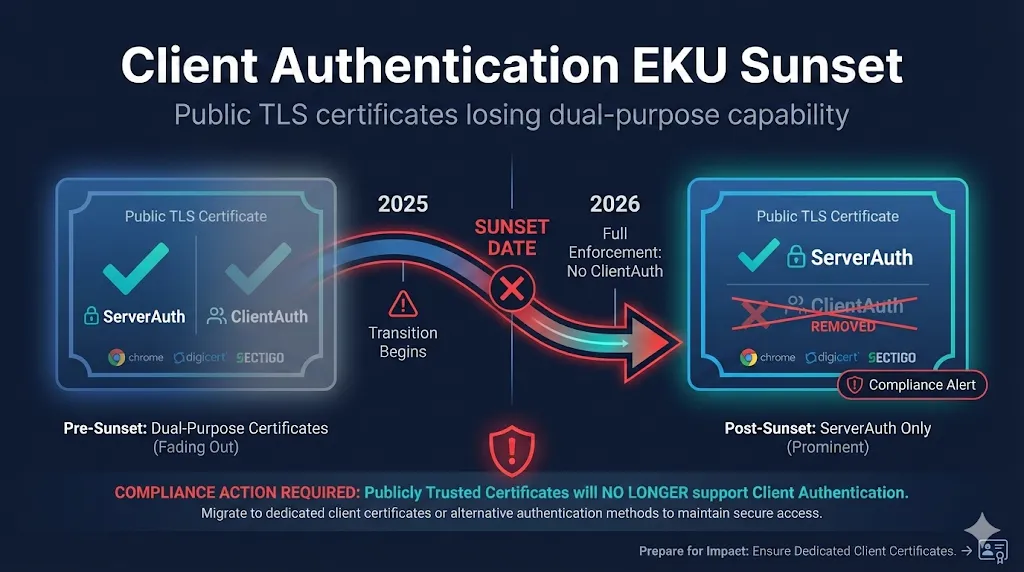
Watch: Client Authentication EKU Sunset — what's changing, who's affected, and your migration options
The TL;DR
Starting March 2027, Google Chrome will no longer trust public TLS certificates that contain the Client Authentication Extended Key Usage (EKU). If you're using public certificates for mutual TLS (mTLS), server-to-server authentication, or any client authentication scenario—your setup will break.
This isn't a recommendation. It's a hard enforcement date.
What's Changing?
The Old Way (Before 2026)
Public TLS certificates have traditionally included two Extended Key Usages:
| EKU | OID | Purpose |
|---|---|---|
| Server Authentication | 1.3.6.1.5.5.7.3.1 | Authenticate TLS servers (HTTPS) |
| Client Authentication | 1.3.6.1.5.5.7.3.2 | Authenticate clients to servers |
This dual-purpose design let organizations use a single certificate for both securing websites AND authenticating servers to each other (mTLS).
The New Way (After 2026)
Public TLS certificates will only contain Server Authentication. Period.
Why?
Browser vendors believe mixing EKUs in public certificates creates security risks:
- •Public CAs can't validate client authentication use cases
- •Dual-purpose certificates can be misused
- •Cleaner separation between public (browser) and private (enterprise) PKI
The Timeline
This is happening in phases. The deadlines are real.
CAs must restructure hierarchies
Must opt-in during enrollment
Must opt-in during enrollment
No exceptions, even if you ask
No exceptions
All public certs with ClientAuth EKU rejected
Note: Existing certificates issued before these dates remain valid until expiration. But you cannot renew, rekey, or reissue them with ClientAuth after the deadlines.
Who's Affected?
NOT Affected (No Action Needed)
- Standard HTTPS websites - You only need Server Authentication
- Let's Encrypt users - Already ServerAuth only
- Private/Internal PKI - Browser root programs don't apply
- Existing certificates - Valid until natural expiration
AFFECTED (Action Required)
- Mutual TLS (mTLS) using public certificates
- Server-to-server authentication with public certs
- API gateways authenticating with public TLS certs
- Financial services B2B authentication
Real-world examples that will break:
Your Options
Option 1: Private PKI (Most Common Solution)
Run your own Certificate Authority for internal/mTLS use cases.
Pros:
- • Full control over EKUs, validity, policies
- • No browser root program restrictions
- • Can issue any EKU combination
Cons:
- • Requires PKI expertise
- • Trust distribution challenges
- • Operational overhead
Good for: Internal mTLS, service meshes, machine-to-machine within your org
Option 2: PKI-as-a-Service
Use a managed private CA service (DigiCert, Sectigo, AWS Private CA, etc.)
Pros:
- • Expertise handled by vendor
- • Easier operations than DIY
- • Can include ClientAuth EKU
Cons:
- • Ongoing cost
- • Less control than self-hosted
- • Still need to distribute trust
Good for: Organizations without PKI expertise who need private certificates
Option 3: X9 PKI (Financial Services Focus)
A new dedicated PKI framework created by ASC X9 (financial standards body) and operated by DigiCert.
What is X9 PKI?
X9 PKI is a separate trust hierarchy independent of browser root programs. It's designed specifically for non-browser TLS authentication—exactly what's being deprecated in public CAs.
- • Governed by ASC X9, not CA/Browser Forum
- • Supports both ServerAuth AND ClientAuth EKUs
- • Common root of trust for cross-organizational authentication
- • No wildcard certificates - FQDNs and IPs only
- • Available in RSA and ECC
Pros:
- • Purpose-built for mTLS and B2B
- • Common root of trust
- • Meets financial compliance
Cons:
- • New infrastructure (launched June 2025)
- • Requires X9 root in trust stores
- • Won't work in browsers (by design)
Good for: Financial institutions, payment networks, B2B integrations requiring shared trust
Option 4: Separate Certificate Types
Use public TLS certificates for server authentication only, and separate client certificates from a private CA.
Pros:
- • Clean separation of concerns
- • Purpose-built for each role
- • Public server certs work in browsers
Cons:
- • More certificates to manage
- • Need private CA infrastructure
- • More complex configuration
Migration Checklist
Phase 1: Discovery (Do This Now)
- Inventory all certificates with ClientAuth EKU from public CAs
- Identify use cases - Where is ClientAuth actually being used?
- Document dependencies - What breaks if ClientAuth is removed?
- Check your CA's timeline - DigiCert, Sectigo, others may differ
How to check if a certificate has ClientAuth:
# Check a certificate file
openssl x509 -in cert.pem -text -noout | grep -A5 "Extended Key Usage"

# Check a live server
openssl s_client -connect example.com:443 </dev/null 2>/dev/null | \
  openssl x509 -text -noout | grep -A5 "Extended Key Usage"
Look for TLS Web Client Authentication or OID 1.3.6.1.5.5.7.3.2
Phase 2: Planning (Now through Q1 2026)
- Decide on solution - Private PKI, PKIaaS, X9 PKI, or separate certs
- Budget and procurement - Private CA software/hardware or service contracts
- Architecture design - How will new certs be issued and trusted?
- Test environment - Validate solution before production
Phase 3: Implementation (Q1-Q2 2026)
- Deploy new PKI infrastructure or configure service
- Issue replacement certificates with appropriate EKUs
- Update trust stores on all systems that need to trust new certs
- Test thoroughly - Especially mTLS and authentication flows
Phase 4: Cutover (Before March 2027)
- Replace public certs in mTLS configurations
- Verify no ClientAuth dependency on public cert renewals
- Monitor for failures - Some edge cases always slip through
- Document new architecture for operations team
F5 BIG-IP Specific Considerations
If you have F5 BIG-IP configured for mTLS (Client SSL profiles requiring client certificates), pay attention:
F5 will not accept client certificates that have the EKU extension but are missing the ClientAuth purpose.
This means:
- New public TLS certificates (ServerAuth only) cannot be used as client certificates on F5
- You must migrate to certificates from a private CA or X9 PKI for client authentication
- Test your Client SSL profiles after any certificate changes
Frequently Asked Questions
Will my existing certificates stop working immediately?
No. Certificates issued before the enforcement dates remain valid until they naturally expire. The changes only affect new certificates issued after the deadlines, renewals, and reissues.
What if I need both ServerAuth and ClientAuth after March 2027?
You have three options: Private PKI (issue your own certificates with both EKUs), PKI-as-a-Service (use a managed private CA), or X9 PKI (use the new financial services PKI framework). You cannot get both EKUs from a public CA after March 2027.
Does this affect S/MIME or code signing certificates?
This specific change is about TLS certificates only. However, the broader trend of separating certificate purposes applies across the industry. Check your specific CA's policies for other certificate types.
What about Mozilla, Apple, and Microsoft?
Currently, this is primarily a Chrome Root Program requirement. However, Mozilla has signaled alignment is likely, Apple has been pushing single-purpose hierarchies since 2024, and Microsoft typically follows industry trends. Plan for Chrome's deadline, but expect others to follow.
Is this related to the 47-day certificate validity change?
No, these are separate initiatives. The 47-day validity (March 2029) is about certificate lifecycle. The ClientAuth EKU removal is about certificate purpose. Both require planning, but they're independent changes.
My vendor says their certificates have ClientAuth—is that still safe?
Check when the certificate was issued and when it expires. Also check which CA issued it. Some smaller CAs may not have announced their timelines yet. When in doubt, contact your CA directly.
Related Resources
The Bottom Line
This isn't optional and it isn't going away. The dual-purpose public TLS certificate is being retired.
If you only use certificates for HTTPS websites: Relax. Nothing changes for you.
If you use public certs for mTLS or client auth: Start planning now. You have 0 days remaining.