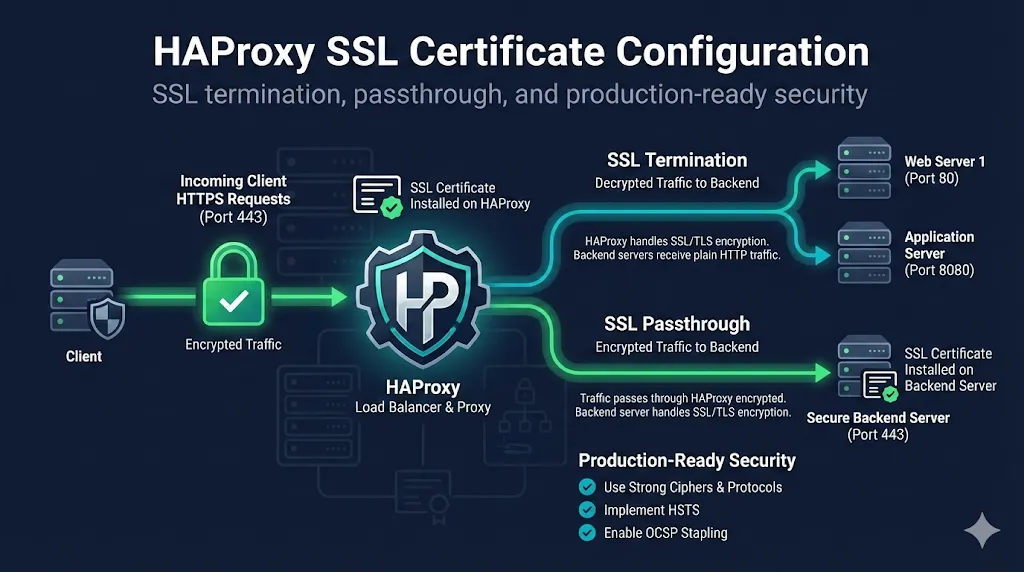
1. What is HAProxy?
HAProxy (High Availability Proxy) is one of the most popular open-source load balancers and reverse proxies, trusted by high-traffic websites like GitHub, Stack Overflow, Reddit, and Tumblr. Written in C for maximum performance, it can handle millions of concurrent connections with minimal resource usage.
Key Capabilities:
- Layer 4 (TCP) and Layer 7 (HTTP) load balancing
- SSL/TLS termination with high-performance crypto offloading
- Health checking with automatic backend failover
- Content-based routing via ACLs (Access Control Lists)
- Rate limiting and connection throttling
- Hot reload - update configuration without dropping connections
Official HAProxy Resources
This guide focuses specifically on SSL/TLS certificate configuration in HAProxy. For general HAProxy setup and load balancing concepts, refer to the official documentation linked above.
2. Version Requirements
This guide targets HAProxy 2.4+ (LTS). Some features require specific versions:
| Feature | Minimum Version | Notes |
|---|---|---|
| Basic SSL/TLS termination | 1.5+ | Native SSL support added |
| TLS 1.3 support | 1.8+ | Requires OpenSSL 1.1.1+ |
ssl-min-ver / ssl-max-ver | 1.8+ | Cleaner than force-* options |
ocsp-update on (automatic OCSP) | 2.4+ | Auto-fetches OCSP responses |
ssl-default-bind-ciphersuites | 1.8+ | TLS 1.3 cipher control (requires OpenSSL 1.1.1) |
HTTP/2 (alpn h2) | 1.6+ | ALPN negotiation |
Check your HAProxy version:
haproxy -v
# Example output: HAProxy version 2.8.3-1
Recommendation: Use HAProxy 2.4 LTS or 2.8 LTS for production. These versions receive long-term security updates and include all modern SSL features.
3. Quick Start: Minimal vs A+ Config
Choose based on your needs: Minimal for quick compatibility testing, A+ Strict for production security.
Minimal Starter (Compatibility)
Works with older clients, quick to deploy. Upgrade to A+ when stable.
frontend https_front
    bind *:443 ssl crt /etc/haproxy/certs/domain.pem
    default_backend web_servers

backend web_servers
server web1 192.168.1.10:80 check- • Uses system defaults (TLS 1.0-1.3)
- • Wide client compatibility
- • SSL Labs grade: B or C
A+ Strict (Production)
Maximum security. Modern clients only (TLS 1.2+).
global
    ssl-default-bind-ciphersuites TLS_AES_128_GCM_SHA256:TLS_AES_256_GCM_SHA384:TLS_CHACHA20_POLY1305_SHA256
    ssl-default-bind-ciphers ECDHE-ECDSA-AES128-GCM-SHA256:ECDHE-RSA-AES128-GCM-SHA256:ECDHE-ECDSA-AES256-GCM-SHA384:ECDHE-RSA-AES256-GCM-SHA384
    ssl-default-bind-options ssl-min-ver TLSv1.2 no-tls-tickets
    tune.ssl.default-dh-param 2048

frontend https_front
    bind *:443 ssl crt /etc/haproxy/certs/domain.pem alpn h2,http/1.1
    http-response set-header Strict-Transport-Security "max-age=63072000; includeSubDomains; preload"
    default_backend web_servers

backend web_servers
server web1 192.168.1.10:80 check- • TLS 1.2+ only, strong ciphers
- • HSTS enabled, HTTP/2 ready
- • SSL Labs grade: A+
When to use each:
- Minimal:Internal services, development environments, legacy client support, quick testing
- A+ Strict:Public-facing websites, APIs, compliance requirements (PCI DSS, HIPAA), security-conscious deployments
4. SSL/TLS Modes in HAProxy
HAProxy supports three SSL/TLS modes, each serving different use cases:
| Mode | Description | Use Case |
|---|---|---|
| SSL Termination | HAProxy decrypts traffic, sends plain HTTP to backend | Most common, offloads SSL from app servers |
| SSL Passthrough | HAProxy passes encrypted traffic through unchanged | End-to-end encryption required, can't inspect traffic |
| SSL Re-encryption | HAProxy decrypts, then re-encrypts to backend | Need to inspect traffic AND encrypt to backend |
Traffic Flow Diagram:
5. Certificate Format Requirements
Critical: HAProxy requires a specific PEM format
-----BEGIN CERTIFICATE-----
(Your server certificate)
-----END CERTIFICATE-----
-----BEGIN CERTIFICATE-----
(Intermediate certificate)
-----END CERTIFICATE-----
-----BEGIN PRIVATE KEY-----
(Your private key)
-----END PRIVATE KEY-----
Key Points:
- Single file containing cert + chain + key (concatenated)
- Order matters: server cert first, then intermediates, then key
- No root certificate needed (browsers have it)
- File permissions: 600 (owner read/write only)
Create combined PEM file:
cat domain.crt intermediate.crt domain.key > /etc/haproxy/certs/domain.pem
chmod 600 /etc/haproxy/certs/domain.pem
Don't include the root certificate. HAProxy will work, but it wastes bandwidth and some clients may reject chains that include the root.
6. Basic SSL Termination Configuration
Minimal working configuration to get HTTPS running:
global
    # SSL tuning
    ssl-default-bind-ciphersuites TLS_AES_128_GCM_SHA256:TLS_AES_256_GCM_SHA384:TLS_CHACHA20_POLY1305_SHA256
    ssl-default-bind-options ssl-min-ver TLSv1.2 no-tls-tickets

    # DH parameters (generate with: openssl dhparam -out /etc/haproxy/dhparam.pem 2048)
    tune.ssl.default-dh-param 2048

frontend https_front
    bind *:443 ssl crt /etc/haproxy/certs/domain.pem

    # Redirect HTTP to HTTPS
    http-request redirect scheme https unless { ssl_fc }

    default_backend web_servers

frontend http_front
    bind *:80
    http-request redirect scheme https code 301

backend web_servers
    balance roundrobin
    server web1 192.168.1.10:80 check
server web2 192.168.1.11:80 checkKey Directives Explained:
bind *:443 ssl crt- Listen on 443 with SSL, specify cert pathssl-min-ver TLSv1.2- Minimum TLS version (disable TLS 1.0/1.1)no-tls-tickets- Disable session tickets for forward secrecyhttp-request redirect scheme https- Force HTTPS
7. Multiple Certificates with SNI
For hosting multiple domains on the same IP address:
Directory-based (HAProxy auto-loads all .pem files):
frontend https_front
    bind *:443 ssl crt /etc/haproxy/certs/

    # HAProxy auto-loads all .pem files from directory
# Matches certificate to hostname via SNIFile Naming Convention:
/etc/haproxy/certs/
├── example.com.pem
├── api.example.com.pem
└── staging.example.com.pem
Or with explicit crt-list mapping:
bind *:443 ssl crt /etc/haproxy/certs/default.pem crt-list /etc/haproxy/certs/crt-list.txt

# crt-list.txt format:
# /path/to/cert.pem [sni filter] [options]
/etc/haproxy/certs/example.com.pem example.com
/etc/haproxy/certs/api.pem api.example.com
8. SSL Passthrough Configuration
When you can't or won't terminate SSL at HAProxy:
frontend https_passthrough
    bind *:443
    mode tcp

    # Use SNI to route to correct backend
    tcp-request inspect-delay 5s
    tcp-request content accept if { req_ssl_hello_type 1 }

    use_backend backend_api if { req_ssl_sni -i api.example.com }
    default_backend backend_web

backend backend_web
    mode tcp
    server web1 192.168.1.10:443 check

backend backend_api
    mode tcp
server api1 192.168.1.20:443 checkKey Points:
- Must use
mode tcp(not http) - Can still route based on SNI
- Cannot inspect or modify HTTP headers
- Backend servers handle SSL termination
9. SSL Re-encryption (Backend SSL)
Decrypt at HAProxy, re-encrypt to backend:
frontend https_front
    bind *:443 ssl crt /etc/haproxy/certs/frontend.pem
    default_backend secure_servers

backend secure_servers
    balance roundrobin

    # Enable SSL to backend
    server web1 192.168.1.10:443 ssl verify required ca-file /etc/haproxy/ca-bundle.crt check
server web2 192.168.1.11:443 ssl verify required ca-file /etc/haproxy/ca-bundle.crt check| Option | Description |
|---|---|
| ssl | Enable SSL to backend |
| verify none | Don't verify backend cert (NOT recommended) |
| verify required | Verify backend cert against CA |
| ca-file | CA bundle for verification |
| crt | Client cert for mTLS to backend |
Never use verify none in production. It defeats the purpose of SSL and enables MITM attacks between HAProxy and your backend.
10. Achieving SSL Labs A+ Grade
Production-ready configuration for maximum security rating:
global
    # Modern cipher configuration
    ssl-default-bind-ciphersuites TLS_AES_128_GCM_SHA256:TLS_AES_256_GCM_SHA384:TLS_CHACHA20_POLY1305_SHA256
    ssl-default-bind-ciphers ECDHE-ECDSA-AES128-GCM-SHA256:ECDHE-RSA-AES128-GCM-SHA256:ECDHE-ECDSA-AES256-GCM-SHA384:ECDHE-RSA-AES256-GCM-SHA384:ECDHE-ECDSA-CHACHA20-POLY1305:ECDHE-RSA-CHACHA20-POLY1305:DHE-RSA-AES128-GCM-SHA256:DHE-RSA-AES256-GCM-SHA384
    ssl-default-bind-options ssl-min-ver TLSv1.2 no-tls-tickets

    ssl-default-server-ciphersuites TLS_AES_128_GCM_SHA256:TLS_AES_256_GCM_SHA384:TLS_CHACHA20_POLY1305_SHA256
    ssl-default-server-ciphers ECDHE-ECDSA-AES128-GCM-SHA256:ECDHE-RSA-AES128-GCM-SHA256:ECDHE-ECDSA-AES256-GCM-SHA384:ECDHE-RSA-AES256-GCM-SHA384
    ssl-default-server-options ssl-min-ver TLSv1.2 no-tls-tickets

    tune.ssl.default-dh-param 2048

frontend https_front
    bind *:443 ssl crt /etc/haproxy/certs/domain.pem alpn h2,http/1.1

    # HSTS header (required for A+)
    http-response set-header Strict-Transport-Security "max-age=63072000; includeSubDomains; preload"

    # Additional security headers
    http-response set-header X-Frame-Options DENY
    http-response set-header X-Content-Type-Options nosniff
    http-response set-header X-XSS-Protection "1; mode=block"

default_backend web_serversA+ Requirements Checklist:
- TLS 1.2 minimum (TLS 1.3 preferred)
- Strong cipher suites only (no RC4, no 3DES, no CBC)
- Forward secrecy (ECDHE/DHE key exchange)
- HSTS header with long max-age
- No known vulnerabilities
- Valid certificate chain
11. OCSP Stapling
Improve handshake performance by stapling OCSP responses:
Automatic OCSP updates (HAProxy 2.4+):
frontend https_front
bind *:443 ssl crt /etc/haproxy/certs/domain.pem alpn h2,http/1.1 ocsp-update onOr with explicit OCSP response file:
# Generate OCSP response manually
openssl ocsp -issuer intermediate.crt -cert domain.crt -url http://ocsp.ca.com -respout domain.ocsp

# Reference in HAProxy
bind *:443 ssl crt /etc/haproxy/certs/domain.pem ocsp-response /etc/haproxy/certs/domain.ocsp
Note: HAProxy 2.4+ supports automatic OCSP updates with ocsp-update on
12. Client Certificate Authentication (mTLS)
Require client certificates for mutual TLS authentication:
frontend https_mtls
    bind *:443 ssl crt /etc/haproxy/certs/server.pem ca-file /etc/haproxy/certs/client-ca.crt verify required

    # Pass client cert info to backend
    http-request set-header X-SSL-Client-DN %{+Q}[ssl_c_s_dn]
    http-request set-header X-SSL-Client-CN %{+Q}[ssl_c_s_dn(cn)]
    http-request set-header X-SSL-Client-Verify %[ssl_c_verify]

    default_backend secure_api

backend secure_api
server api1 192.168.1.10:8080 check| Option | Description |
|---|---|
| verify none | Don't request client cert |
| verify optional | Request but don't require |
| verify required | Require valid client cert |
| ca-file | CA that signed client certs |
| crl-file | Certificate Revocation List |
Related: Complete mTLS Guide
13. Let's Encrypt / ACME Automation
Using certbot with HAProxy:
Obtain certificate (standalone mode):
# Install certbot
apt install certbot

# Obtain certificate (standalone mode - stops HAProxy briefly)
certbot certonly --standalone -d example.com -d www.example.com

# Combine for HAProxy format
cat /etc/letsencrypt/live/example.com/fullchain.pem /etc/letsencrypt/live/example.com/privkey.pem > /etc/haproxy/certs/example.com.pem

# Reload HAProxy
systemctl reload haproxy
Automated renewal script (/etc/letsencrypt/renewal-hooks/deploy/haproxy.sh):
#!/bin/bash
DOMAIN="example.com"
HAPROXY_CERT="/etc/haproxy/certs/${DOMAIN}.pem"

cat /etc/letsencrypt/live/${DOMAIN}/fullchain.pem /etc/letsencrypt/live/${DOMAIN}/privkey.pem > ${HAPROXY_CERT}

chmod 600 ${HAPROXY_CERT}
systemctl reload haproxyHTTP-01 Challenge through HAProxy:
frontend http_front
    bind *:80

    # Allow ACME challenges through
    acl is_acme path_beg /.well-known/acme-challenge/
    use_backend acme_backend if is_acme

    # Redirect everything else to HTTPS
    http-request redirect scheme https code 301 unless is_acme

backend acme_backend
server certbot 127.0.0.1:888814. Common Errors and Troubleshooting
"unable to load SSL certificate"
Causes:
- • Wrong file permissions (need 600)
- • Certificate and key don't match
- • Corrupt or malformed PEM file
- • Missing intermediate certificates
Debug - Check cert and key match:
openssl x509 -noout -modulus -in cert.pem | openssl md5
openssl rsa -noout -modulus -in key.pem | openssl md5
# Output should match
"SSL handshake failure"
Causes:
- • TLS version mismatch (client too old)
- • No common cipher suites
- • Certificate chain incomplete
Debug:
# Test connection with specific TLS version
openssl s_client -connect example.com:443 -tls1_2

# Check supported ciphers
openssl s_client -connect example.com:443 -cipher 'ALL'
"certificate verify failed"
Causes:
- • Missing intermediate certificate
- • Expired certificate
- • Wrong certificate for hostname
Debug:
# Check full chain
openssl s_client -connect example.com:443 -showcerts

# Verify chain locally
openssl verify -CAfile /etc/ssl/certs/ca-certificates.crt -untrusted intermediate.crt server.crt
"no shared cipher"
Causes:
- • HAProxy cipher config too restrictive for client
- • Client only supports deprecated ciphers
Fix: Check your cipher configuration against client requirements. Consider adding fallback ciphers for older clients if needed.
Related: OpenSSL s_client Guide • Chain Builder Demo
15. Configuration Validation
Before reloading:
# Check configuration syntax
haproxy -c -f /etc/haproxy/haproxy.cfg

# Test with verbose output
haproxy -c -V -f /etc/haproxy/haproxy.cfg
Runtime checks:
# Check socket stats
echo "show ssl cert" | socat stdio /var/run/haproxy/admin.sock

# Show certificate details
echo "show ssl cert /etc/haproxy/certs/domain.pem" | socat stdio /var/run/haproxy/admin.sock
16. Quick Reference: Essential Commands
| Task | Command |
|---|---|
| Check config syntax | haproxy -c -f /etc/haproxy/haproxy.cfg |
| Reload without downtime | systemctl reload haproxy |
| Check cert expiration | openssl x509 -enddate -noout -in cert.pem |
| Verify cert/key match | openssl x509 -noout -modulus -in cert.pem | openssl md5 |
| Test SSL connection | openssl s_client -connect host:443 |
| View cert chain | openssl s_client -connect host:443 -showcerts |
| Create combined PEM | cat cert.pem chain.pem key.pem > combined.pem |
17. Frequently Asked Questions
Related Resources
ERR_SSL_VERSION_OR_CIPHER_MISMATCH
Fix the browser error caused by ssl-default-bind-ciphers and TLS version settings.
Certificate Chain Builder
Build and verify certificate chains interactively.
OpenSSL s_client Guide
Master debugging SSL/TLS connections.
mTLS Complete Guide
Deep dive into mutual TLS authentication.
nginx SSL Certificate Guide
Compare with nginx SSL configuration.
Apache SSL Certificate Guide
mod_ssl configuration for Apache.
ACME Protocol Guide
Automated certificate management explained.
Emergency Certificate Replacement
Runbook for when things go wrong.