TL;DR
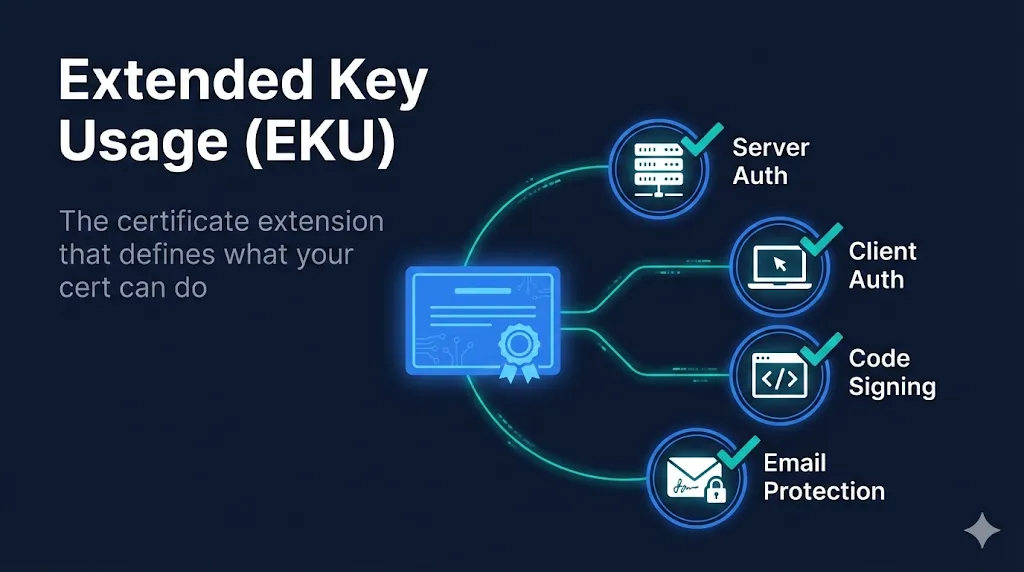
Extended Key Usage (EKU) is like a certificate's job description. It tells systems what the certificate is allowed to do:
If you try to use a certificate for something not in its EKU, the system will reject it. A code signing certificate cannot secure your website. A TLS certificate cannot sign your emails.
What is Extended Key Usage?
Extended Key Usage (EKU) is an X.509 certificate extension (OID 2.5.29.37) that restricts what applications a certificate can be used for. It's defined in RFC 5280 and is one of the most important extensions for security.
Common Extended Key Usages
| EKU Name | OID | Purpose |
|---|---|---|
| Server Authentication | 1.3.6.1.5.5.7.3.1 | TLS/SSL server certificates (HTTPS) |
| Client Authentication | 1.3.6.1.5.5.7.3.2 | Client certificates for mTLS |
| Code Signing | 1.3.6.1.5.5.7.3.3 | Sign executables and scripts |
| Email Protection | 1.3.6.1.5.5.7.3.4 | S/MIME email signing and encryption |
| Time Stamping | 1.3.6.1.5.5.7.3.8 | Trusted timestamp authorities |
| OCSP Signing | 1.3.6.1.5.5.7.3.9 | Sign OCSP responses |
anyExtendedKeyUsage
OID 2.5.29.37.0 is a special EKU that means "this certificate can be used for any purpose." It's rarely used in production and often indicates a misconfigured certificate or test environment.
The OID System Explained
OIDs (Object Identifiers) are globally unique numeric identifiers used throughout PKI. Let's break down the Server Authentication OID:
The base path 1.3.6.1.5.5.7.3 is the EKU arc. All standard EKUs start with this prefix, followed by their unique number.
Why EKU Matters
Security Boundaries
EKU prevents a certificate from being misused. A compromised code signing certificate cannot be used to impersonate a web server.
Validation Requirements
CAs validate identity differently based on certificate purpose. Code signing requires stricter identity verification than DV TLS.
System Enforcement
Operating systems, browsers, and applications check EKU before accepting a certificate for a specific purpose.
Real-World Impact
In 2011, a Comodo affiliate was compromised and issued fraudulent certificates. Because the attacker got certificates with the Server Authentication EKU, they could impersonate Google, Yahoo, and other major sites. EKU enforcement is a critical layer in limiting the blast radius of such compromises.
How to Check a Certificate's EKU
Using OpenSSL
The easiest way to view a certificate's EKU is with OpenSSL:
# View EKU from a certificate file
openssl x509 -in certificate.pem -noout -text | grep -A 3 "Extended Key Usage"

# Check EKU from a live server
openssl s_client -connect example.com:443 2>/dev/null | \
  openssl x509 -noout -text | grep -A 3 "Extended Key Usage"
Example output:
X509v3 Extended Key Usage:
    TLS Web Server Authentication, TLS Web Client Authentication
Using Your Browser
- 1Click the padlock icon in your browser's address bar
- 2Click "Connection is secure" → "Certificate is valid"
- 3Navigate to the "Details" tab
- 4Look for "Extended Key Usage" in the extensions list
EKU in Different Certificate Types
TLS Server Certificates
Required EKU: serverAuth (1.3.6.1.5.5.7.3.1)
Used for HTTPS websites. Most public TLS certificates also include clientAuth, but this is being removed by March 2027.
Code Signing Certificates
Required EKU: codeSigning (1.3.6.1.5.5.7.3.3)
Sign executables, scripts, drivers, and applications. Windows, macOS, and package managers verify this EKU before trusting signed code.
S/MIME Certificates
Required EKU: emailProtection (1.3.6.1.5.5.7.3.4)
Sign and encrypt email messages. Email clients like Outlook, Apple Mail, and Thunderbird check this EKU for email security features.
Client Authentication Certificates
Required EKU: clientAuth (1.3.6.1.5.5.7.3.2)
Used in mTLS (mutual TLS) to authenticate clients to servers. VPNs, APIs, and enterprise applications use these for machine-to-machine authentication.
The ClientAuth EKU Sunset (2026)
Major Industry Change
Starting March 2027, Google Chrome will no longer trust public TLS certificates that contain the Client Authentication EKU. DigiCert, Sectigo, and other major CAs are removing this EKU from their public TLS certificates.
If you're using public certificates for mTLS, server-to-server authentication, or any client authentication scenario, your setup will break.
What You Should Do Now
- Audit your certificates for ClientAuth EKU usage
- Identify systems that rely on public certificates for mTLS
- Plan migration to private PKI or X9 PKI for client authentication
Critical vs Non-Critical EKU
X.509 extensions can be marked as critical or non-critical. This affects how systems handle them.
Critical EKU
- •System MUST understand and enforce it
- •If system doesn't recognize the extension, certificate is rejected
- •Provides strongest security guarantee
- •May cause compatibility issues with old systems
Non-Critical EKU
- •System SHOULD enforce it if understood
- •Unknown extensions can be safely ignored
- •Better backward compatibility
- •Default for most public CA certificates
Most public CAs issue certificates with non-critical EKU to maximize compatibility. For high-security private PKI deployments, marking EKU as critical is recommended.
EKU vs Key Usage (KU) Comparison
Don't confuse Extended Key Usage (EKU) with Key Usage (KU). They work together but control different things:
| Aspect | Key Usage (KU) | Extended Key Usage (EKU) |
|---|---|---|
| OID | 2.5.29.15 | 2.5.29.37 |
| Level | Low-level cryptographic operations | High-level application purposes |
| Examples | digitalSignature, keyEncipherment, keyCertSign | serverAuth, codeSigning, emailProtection |
| Question Answered | "What can this key do cryptographically?" | "What applications can use this certificate?" |
| Typically Critical? | Usually yes | Usually no (for public certs) |
Both Must Match
For a TLS server certificate to work, it needs both the correct KU (e.g., digitalSignature, keyEncipherment) and the correct EKU (serverAuth). Missing either will cause validation failures.
Common EKU Problems
"Certificate is not valid for the intended use"
Cause: The certificate's EKU doesn't include the purpose you're trying to use it for.
Fix: Request a new certificate with the correct EKU from your CA. For TLS, you need serverAuth. For code signing, you need codeSigning.
Wrong certificate type ordered
Cause: Ordered a TLS certificate but needed code signing, or vice versa.
Fix: Contact your CA to exchange for the correct certificate type. EKU cannot be changed after issuance.
mTLS failing after certificate renewal
Cause: New certificate may be missing clientAuth EKU due to the 2026 sunset.
Fix: Switch to private PKI for client authentication or use X9 PKI if you're in financial services.
Intermediate CA certificate with wrong EKU
Cause: The issuing CA's EKU restricts what types of certificates it can issue.
Fix: Use an intermediate CA with appropriate EKUs for your use case. This is increasingly important as Chrome enforces the June 2025 deadline for separating intermediates by EKU purpose.
Frequently Asked Questions
Can a certificate have multiple EKUs?
Yes, certificates commonly include multiple EKUs. For example, a TLS certificate might have both Server Authentication (1.3.6.1.5.5.7.3.1) and Client Authentication (1.3.6.1.5.5.7.3.2), though this is being phased out for public certificates by 2026.
What happens if I use a certificate for the wrong purpose?
The system will reject it. If you try to use a code signing certificate for a TLS server, the TLS handshake will fail. If you try to use a server authentication certificate for S/MIME email signing, email clients will reject the signature.
Should EKU be marked as critical?
It depends on your security requirements. Marking EKU as critical means systems MUST enforce it. For public TLS certificates, EKU is typically non-critical. For high-security environments, marking it critical prevents certificates from being misused if the validation system doesn't understand EKU.
What's the difference between EKU and Key Usage (KU)?
Key Usage (KU) defines low-level cryptographic operations the key can perform (digitalSignature, keyEncipherment). Extended Key Usage (EKU) defines high-level application purposes (serverAuth, codeSigning). Both must be satisfied for a certificate to be valid for a specific use.
Related Resources
Certificate Anatomy Demo
Interactive exploration of every field in an X.509 certificate, including EKU.
Mutual TLS (mTLS) Guide
Learn how client authentication certificates work in mTLS deployments.
ClientAuth EKU Sunset Guide
Complete guide to the 2026 deadline and migration options for mTLS users.
ClientAuth EKU Migration Checklist
Step-by-step checklist for migrating away from public certificate client authentication.
External References
- RFC 5280 - Extended Key Usage— Official IETF specification
- Chrome Root Program Policy— Google's requirements for CAs