Already know PKI? Here's the summary:
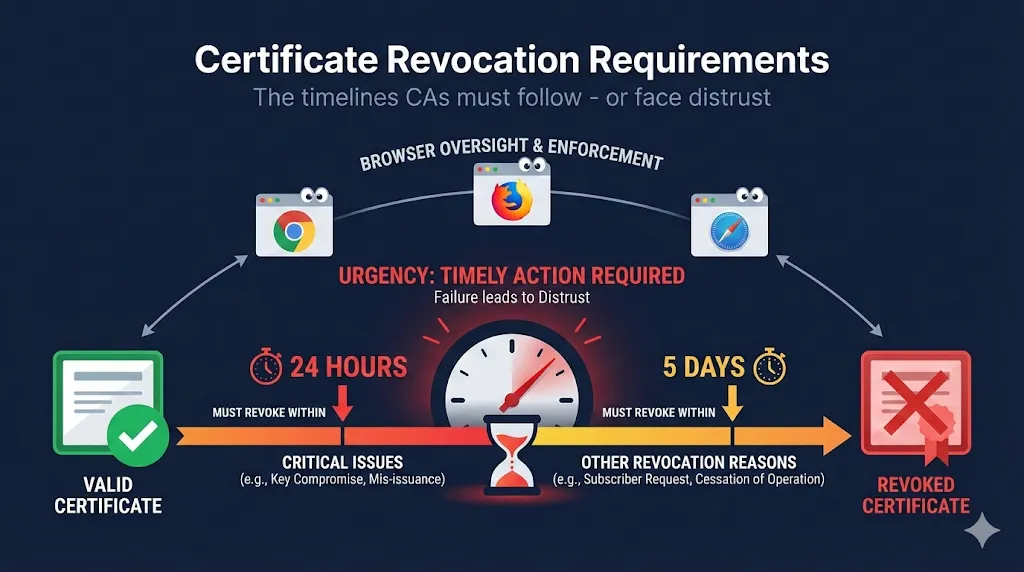
- 1.24h/5d tiers - Key compromise = 24h MUST; BR violations = 24h SHOULD, 5d MAX (BR 4.9.1.1)
- 2.OCSP/CRL lag - Tune maxAge/nextUpdate; default 4-24h caching delays effective revocation
- 3.Mass revocation - CAs must have documented plans per SC088/SC089 direction
- 4.CA selection - Check CCADB incident history; multi-CA strategy mitigates distrust risk
- 5.Migration prep - Pre-establish backup CA relationships; test issuance quarterly
Why Revocation Timelines Matter
When a certificate needs to be revoked, every hour counts. A compromised certificate in the wild means attackers can impersonate your website, man-in-the-middle attacks become possible, and your users' data is at risk.
The CA/Browser Forum Baseline Requirements establish strict timelines for when Certificate Authorities must revoke certificates. These aren't suggestions - they're requirements that CAs agree to follow as a condition of being trusted by browsers.
In 2024, Entrust was distrusted by Chrome, Safari, and Firefox. One of the key issues? They refused to revoke certificates within the required timeframe, arguing the rules were wrong. The browsers disagreed.
Entrust is now effectively dead for public TLS.
Read the full Entrust case studyThe Two-Tier Timeline
Tier 1MUST Revoke Within 24 Hours(BR 4.9.1.1)
These situations require immediate action. The CA has no discretion.
| Scenario | Why It's Urgent | CRL Reason Code |
|---|---|---|
| Subscriber requests revocation | Owner wants it dead | unspecified (0) |
| Private key compromise confirmed | Attackers may have the key | keyCompromise (1) |
| Private key compromise suspected | Can't take the risk | keyCompromise (1) |
| Certificate obtained through fraud | Never should have been issued | affiliationChanged (3) |
| Domain validation no longer reliable | CA can't verify ownership | affiliationChanged (3) |
| Certificate used for malware/phishing | Active harm to users | affiliationChanged (3) |
| CA's private key compromised | All certs from that CA affected | cACompromise (2) |
| Certificate contains false information | Mis-issuance | affiliationChanged (3) |
"Suspected" compromise triggers the same 24-hour requirement as confirmed compromise. CAs can't wait for proof.
What Counts as "Suspected Compromise"?
- HSM audit anomaly - Unexpected key access patterns or failed authentications in logs
- Server breach in scope - Attacker accessed a server where the private key existed, even if key access isn't proven
- Key exfiltration confirmed - Clear evidence the key was copied off-system (treat as confirmed, not suspected)
The difference matters for your incident report, but both trigger the 24-hour clock.
If Tier 1 applies: Follow the Key Compromise Response Runbook
Tier 2SHOULD Revoke in 24h, MUST Within 5 Days(BR 4.9.5)
These situations allow slightly more time, but 5 days is the absolute maximum.
| Scenario | Why 5 Days Max | CRL Reason Code |
|---|---|---|
| Material breach of subscriber agreement | Subscriber violated terms | affiliationChanged (3) |
| Certificate doesn't comply with Baseline Requirements | Technical non-compliance | unspecified (0) |
| Domain name no longer legally permitted | Legal/regulatory issue | affiliationChanged (3) |
| Wildcard used for fraudulent purposes | Abuse of wildcard scope | affiliationChanged (3) |
| Material change in certificate information | Info no longer accurate | affiliationChanged (3) |
| CA determines certificate wasn't properly issued | Process failure | unspecified (0) |
This is where Entrust got into trouble. When 26,000+ EV certificates were mis-issued, the 5-day rule meant they all needed to be revoked quickly. Entrust argued this was unreasonable for their customers. The browsers said rules are rules.
If Tier 2 applies: Follow the CA Migration Runbook if your CA is non-compliant, or the PKI Compliance Checklist for internal audit.
What "Revocation" Actually Means
Revocation isn't just flipping a switch. It's a process with multiple components:
The CA updates their internal database to flag the certificate.
The Certificate Revocation List must be updated. Per Baseline Requirements, CRLs must be updated at least every 7 days. For urgent revocations, CAs should update immediately. CRL entries include the revocation date and reason code.
Online Certificate Status Protocol responders must return "revoked" status. OCSP responses are typically cached. The nextUpdate field determines how long the "good" status is cached. Maximum OCSP response validity is 10 days.
Even after revocation:
- • Browsers may have cached a "good" OCSP response
- • CDNs may have cached the OCSP response
- • OCSP stapling means servers may serve stale responses
This is why prevention beats revocation - once a certificate is compromised, damage may occur during the revocation propagation window.
OCSP/CRL Cache Tuning Recommendations
| Setting | Typical Default | Recommendation |
|---|---|---|
| OCSP maxAge | 4-24 hours | 4 hours or less for high-security |
| OCSP nextUpdate | 1-7 days | 24 hours max |
| CRL cache lifetime | 7 days | 24-48 hours for leaf certs |
| OCSP staple refresh | At cert renewal | Every 4-12 hours |
Note: Some public CAs still default to long CRL lifetimes (7+ days). Check your CA's CPS for their actual values.
Your Obligations as a Subscriber
Certificate holders have responsibilities too. When you get a certificate, you agree to report compromise immediately.
You must notify your CA within 24 hours if:
- • Your private key is compromised or suspected compromised
- • Information in the certificate is no longer accurate
- • The certificate is being misused
How to Report to Major CAs
| CA | Revocation Method | Response Time |
|---|---|---|
| DigiCert | Portal or support@digicert.com | Usually < 1 hour |
| Sectigo | Portal or revoke@sectigo.com | Usually < 4 hours |
| Let's Encrypt | ACME revoke endpoint or certbot | Immediate (automated) |
| GlobalSign | Portal or support | Usually < 2 hours |
Know your CA's revocation process BEFORE you need it. During an incident is not the time to figure out how to contact them.
What to Include in a Revocation Request
- 1.Certificate serial number
- 2.Domain name(s) on the certificate
- 3.Reason for revocation
- 4.Your authorization (account login or challenge)
When CAs Can Delay Revocation
The Baseline Requirements do allow CAs to delay revocation in limited circumstances.
- Ongoing investigation - CA may delay up to 24 hours to investigate validity of report
- Coordination with law enforcement - In cases involving active criminal investigation
- Preventing greater harm - If immediate revocation would cause disproportionate harm (rarely accepted)
Mozilla's framing: Delays are only acceptable for "exceptional circumstances" where there would be "significant harm" - and browsers still expect documented, time-bounded plans, not open-ended delays.
- "Our customer needs more time"
- "It's a holiday weekend"
- "We disagree with the rule"
- "The impact would be too large"
- "We're too busy"
This is exactly where Entrust went wrong. They prioritized customer convenience over compliance. Browsers made clear: the rules apply equally to everyone.
The Compliance Enforcement Chain
The CA/Browser Forum has no direct enforcement power. It's the browser root programs that actually enforce compliance by threatening (and executing) distrust.
Recent Enforcement Actions
| CA | Year | Issue | Consequence |
|---|---|---|---|
| Entrust | 2024 | Pattern of compliance failures including revocation delays | Distrusted by Chrome, Safari, Firefox |
| Symantec | 2017 | Mass mis-issuance, compliance failures | Sold to DigiCert, gradual distrust |
| WoSign/StartCom | 2016 | Backdating certificates, lying to browsers | Fully distrusted |
| DigiNotar | 2011 | Hacked, issued fraudulent Google certs | Bankrupt within weeks |
Practical Implications for PKI Teams
1Choose Your CA Wisely
PKI/InfraCheck your CA's compliance history by:
- • Reviewing CCADB incident reports
- • Looking for patterns of delayed revocations
- • Monitoring browser security blogs for warnings
2Build Revocation into Your Incident Response
Security OpsYour incident response plan should include:
- • CA contact information (not behind a support queue)
- • Certificate serial numbers for all production certs
- • Pre-authorized contacts who can request revocation
- • Replacement certificate procurement process
- • Deployment runbook for emergency replacement
3Understand Your Exposure
App TeamsIf your CA gets distrusted (like Entrust):
- • Existing certificates may continue working until expiry
- • New certificates won't be trusted
- • Any renewal/rekey creates a distrusted certificate
- • You need to migrate to a new CA
4Consider Multi-CA Strategy
PKI/InfraDon't put all your certificates in one basket:
- • Use different CAs for different environments
- • Have backup CA relationships established
- • Test certificate issuance from backup CA periodically
5Plan for Mass Revocation Events
Security OpsPer CA/Browser Forum direction (SC088/SC089), CAs must have documented mass-revocation plans:
- • Know your CA's mass-revocation communication process
- • Ensure your cert management can handle bulk replacements
- • Test automation scripts at scale (not just single-cert renewals)
- • Have monitoring for revocation status of all certs
The Regulatory Landscape
Revocation requirements come from multiple sources:
CA/Browser Forum Baseline Requirements
The primary source. Section 4.9 covers revocation in detail.
- • 24-hour revocation for critical issues
- • 5-day maximum for other issues
- • CRL/OCSP update requirements
Browser Root Program Requirements
Each browser can add additional requirements:
- • Chrome Root Program: Additional transparency requirements
- • Mozilla Root Program: Public incident reporting required
- • Apple Root Program: Specific OCSP requirements
- • Microsoft Root Program: Additional auditing requirements
Industry Standards
- • WebTrust for CAs: Audit requirements include revocation procedures
- • ETSI EN 319 411: European requirements for qualified certificates
- • PCI DSS: May require revocation capability for payment systems
Everything in this guide applies to publicly-trusted CAs bound by browser root programs. Internal enterprise CAs operate under different rules:
- • Must follow BR timelines
- • Subject to browser enforcement
- • Audited by WebTrust/ETSI
- • Governed by org policy
- • Can be stricter or looser
- • Internal audit only
Best practice: Adopt BR-like timelines for private CAs too. Consistency reduces confusion during incidents.
Frequently Asked Questions
Can I revoke my own certificate without going through the CA?
No. Only the CA can add a certificate to the CRL or update OCSP responses. You can request revocation, but the CA must execute it.
What if my CA refuses to revoke my certificate?
This would be a serious compliance violation. Document everything and report to the browser root programs. In practice, reputable CAs always honor subscriber revocation requests.
How do I verify a certificate has been revoked?
Use OpenSSL to check OCSP:
openssl ocsp -issuer chain.pem -cert certificate.pem \
  -url http://ocsp.example.com -resp_text
Or check the CRL:
openssl crl -in crl.pem -text -noout | grep "Serial Number"
Does revocation affect other certificates?
No. Each certificate is independent. Revoking one certificate doesn't affect others, even from the same CA.
What's the difference between revocation and expiration?
Expiration is the natural end of certificate validity (planned). Revocation is premature termination of trust (unplanned). Both result in the certificate no longer being trusted, but revocation implies something went wrong.
Are there any certificates that can't be revoked?
Technically, self-signed root certificates in trust stores can't be "revoked" in the traditional sense - they must be removed from trust stores directly. This is why root key compromise is catastrophic.
How do mass revocation events work?
When a CA must revoke thousands of certificates (like Entrust's EV mis-issuance), the same timelines apply. CAs are expected to have documented mass-revocation plans that can handle volume. They typically batch-notify affected subscribers and stagger issuance of replacements, but the 5-day deadline is non-negotiable. Recent CA/Browser Forum discussions (SC088/SC089) emphasize CAs must demonstrate mass-revocation readiness during audits.
What if only some SANs on my certificate are affected?
The entire certificate must be revoked. Certificates are atomic - you can't selectively revoke individual Subject Alternative Names (SANs). If one domain on a multi-SAN certificate is compromised or no longer under your control, the whole certificate must go. This is why some organizations prefer single-domain certificates for critical services despite the management overhead.
Do these rules apply to internal/private CAs?
Not directly. The Baseline Requirements only bind publicly-trusted CAs that are in browser root programs. Internal enterprise CAs (like those run on Microsoft AD CS or HashiCorp Vault) are governed by your organization's policies, which can be stricter or more lenient. However, best practice is to adopt similar timelines - if 24 hours is good enough for the internet, it should be good enough for internal systems. See AWS Private CA revocation docs for an example private CA approach.
Key Takeaways
- 124 hours - Time limit for revoking compromised or fraudulently-obtained certificates
- 25 days - Maximum time for all other revocation scenarios
- 3No exceptions - CAs that don't comply face distrust (see: Entrust)
- 4Your responsibility - Report compromises within 24 hours
- 5Revocation propagates - CRL/OCSP updates take time; prevention beats cure
- 6Monitor your CA - Their compliance history affects your certificates