Scope: This guide focuses on OpenSSL 3.x provider-based FIPS implementation with the upstream OpenSSL FIPS module. If you're using vendor-supplied FIPS OpenSSL (e.g., RHEL/CentOS in FIPS mode, SUSE, or Ubuntu Pro FIPS), cross-reference your vendor's documentation—they may have their own validated modules and configuration requirements.
FIPS Capable vs FIPS Compliant
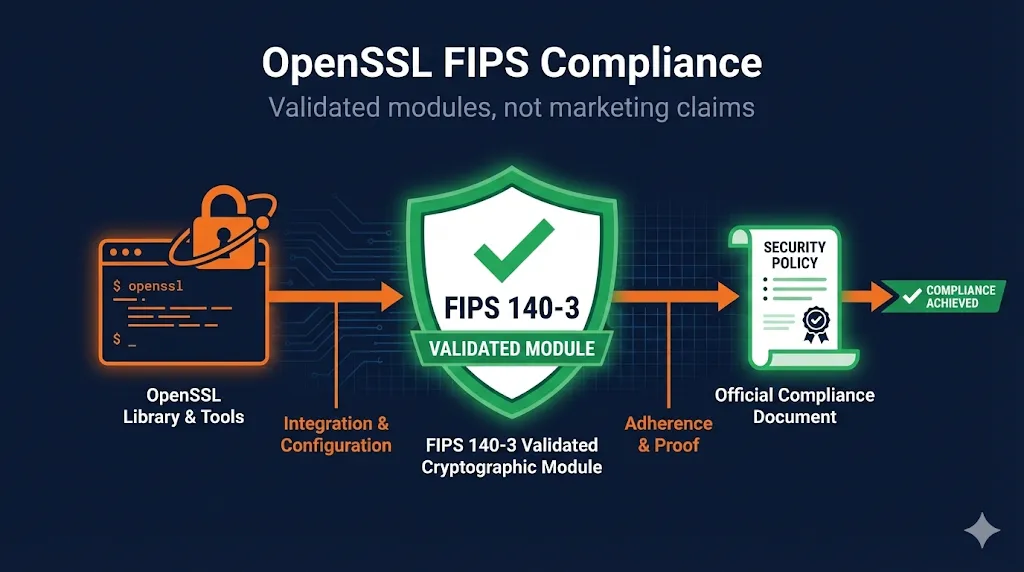
This is the single most important distinction in FIPS compliance—and the one most organizations get wrong. "FIPS capable" is a marketing term. "FIPS compliant" is a legal and audit-defensible claim.
Compliance Reality Check
Telling an auditor "we use OpenSSL" is not the same as demonstrating FIPS compliance.
You must:
- Use a specific NIST-validated FIPS module
- Follow that module's Security Policy exactly
- Document your implementation boundaries
- Prove you stayed within approved parameters
| Aspect | FIPS Capable | FIPS Compliant |
|---|---|---|
| Definition | OpenSSL build that CAN load FIPS provider | Using a NIST-validated module correctly |
| Audit status | Marketing checkbox | Audit-defensible claim |
| Certificate | No certificate number | Specific CMVP cert (e.g., #4282) |
| Configuration | "Should work" | Documented Security Policy adherence |
| Platform | Any configuration | Specific OS/platform/build constraints |
FIPS 140-2 vs FIPS 140-3: Which Applies to You?
FIPS 140-3 is the current standard for all new cryptographic module validations. Understanding where your organization falls in the transition timeline is essential for compliance planning. For a full breakdown of what changed between the two standards and the September 21, 2026 Historical List deadline, see our FIPS 140-2 vs 140-3 and the September 2026 deadline guide.
FIPS 140 Timeline
- FIPS 140-2: No new validations accepted after September 2021 for most vendors (an extension was available for labs already under contract); April 1, 2022 was the hard cutoff after which CMVP accepted no new FIPS 140-2 submissions at all
- FIPS 140-3: Current standard for all new submissions
- For new implementations: Target FIPS 140-3
- For existing systems: 140-2 certs valid until sunset date on certificate
- Historical status: Many 140-2 validations remain "active" or "historical"—check CMVP for your module's specific sunset date
Practical Guidance
- Check your contract/requirement language—does it specify 140-2 or just "FIPS 140"?
- FedRAMP, DoD, and most federal contracts now expect 140-3 for new systems
- If you have legacy 140-2 modules, plan a migration timeline before certificate expiration
How OpenSSL 3.x Implements FIPS
OpenSSL 3.x introduced a modular "provider" architecture that fundamentally changed how FIPS support works. The FIPS provider is a separate module containing only NIST-approved algorithms.
Provider Architecture
┌─────────────────────────────────────────────────────────┐
│                    Your Application                      │
└─────────────────────────────────────────────────────────┘
                            │
                            ▼
┌─────────────────────────────────────────────────────────┐
│                   OpenSSL 3.x Library                    │
│  ┌─────────────┐  ┌─────────────┐  ┌─────────────┐     │
│  │   Default   │  │    FIPS     │  │   Legacy    │     │
│  │  Provider   │  │  Provider   │  │  Provider   │     │
│  │             │  │             │  │             │     │
│  │ All algos   │  │ Approved    │  │ Deprecated  │     │
│  │ (including  │  │ algos only  │  │ algos       │     │
│  │ non-FIPS)   │  │ ✓ Validated │  │             │     │
│  └─────────────┘  └─────────────┘  └─────────────┘     │
└─────────────────────────────────────────────────────────┘

For FIPS compliance: Load FIPS provider, disable Default provider
Current NIST-Validated Modules
| Module | FIPS Version | CMVP Certificate | Security Policy |
|---|---|---|---|
| OpenSSL 3.0.x FIPS Provider | 140-3 | #4282 | NIST |
| OpenSSL 3.1.x FIPS Provider | 140-3 | #4985 | NIST |
Always verify: Check the NIST CMVP database for the latest validated modules and their current status before implementation.
Vendor FIPS note: Some distributions (RHEL, SLES, Ubuntu Pro) integrate their own FIPS story with OS-level configuration (e.g., fips-mode-setup). If you're using OS-supplied OpenSSL rather than building from source, check your vendor's FIPS documentation—they may have different certificate numbers and configuration requirements.
Implementing OpenSSL FIPS Correctly
Loading the FIPS Provider via Configuration
The recommended approach is to configure FIPS mode via openssl.cnf:
# /etc/ssl/openssl.cnf (or custom location)

openssl_conf = openssl_init

[openssl_init]
providers = provider_sect
alg_section = algorithm_sect

[provider_sect]
fips = fips_sect
base = base_sect
# NOTE: default provider intentionally omitted for FIPS-only mode

[fips_sect]
activate = 1
# Path to FIPS module - verify this matches your installation
module = /usr/lib64/ossl-modules/fips.so

[base_sect]
activate = 1
# Base provider needed for encoders/decoders, not crypto

[algorithm_sect]
default_properties = fips=yes
Programmatic Loading (C)
For applications that need explicit control over provider loading:
#include <stdio.h>
#include <openssl/provider.h>
#include <openssl/evp.h>

int enable_fips_mode(void) {
    OSSL_PROVIDER *fips = NULL;
    OSSL_PROVIDER *base = NULL;
    int ok = 0;

    /* Load FIPS provider */
    fips = OSSL_PROVIDER_load(NULL, "fips");
    if (fips == NULL) {
        fprintf(stderr, "Failed to load FIPS provider\n");
        goto cleanup;
    }

    /* Load base provider (for encoding, not crypto) */
    base = OSSL_PROVIDER_load(NULL, "base");
    if (base == NULL) {
        fprintf(stderr, "Failed to load base provider\n");
        goto cleanup;
    }

    /* Set FIPS as the default property for all algorithms */
    if (!EVP_default_properties_enable_fips(NULL, 1)) {
        fprintf(stderr, "Failed to enable FIPS properties\n");
        goto cleanup;
    }

    /* Verify FIPS provider is active */
    if (!EVP_default_properties_is_fips_enabled(NULL)) {
        fprintf(stderr, "FIPS mode not enabled\n");
        goto cleanup;
    }

    printf("FIPS mode enabled successfully\n");
    ok = 1;

cleanup:
    if (!ok) {
        if (base) OSSL_PROVIDER_unload(base);
        if (fips) OSSL_PROVIDER_unload(fips);
    }
    return ok;
}
Verifying FIPS Mode is Active
# Check if FIPS provider is available
openssl list -providers

# Expected output for FIPS-enabled system:
# Providers:
#   fips
#     name: OpenSSL FIPS Provider
#     version: 3.0.8
#     status: active
#   base
#     name: OpenSSL Base Provider
#     version: 3.0.8
#     status: active
# Test that non-FIPS algorithms fail
openssl md5 /dev/null
# Should fail with: "digital envelope routines:unsupported"

# Test that FIPS algorithms work
openssl sha256 /dev/null
# Should succeed
FIPS Module Self-Tests
Self-Test Behavior
- First load after installation: Full self-test suite runs (~1-2 seconds)
- Subsequent loads: Integrity check only (fast)
- Log variations: Exact self-test output varies by distro/packaging—look for "self test" or "selftest" in logs, not specific wording
If you see "FIPS self-test failed" errors, the module file may be corrupted, you may have the wrong version for your OpenSSL, or the module was compiled with different options than documented.
What's Allowed (and Blocked) in FIPS Mode
FIPS mode restricts you to NIST-approved algorithms. Many common algorithms are NOT approved, and some approved algorithms have minimum key size requirements.
| Category | ✅ FIPS Approved | ❌ NOT Approved |
|---|---|---|
| Hash | SHA-256, SHA-384, SHA-512, SHA-3 | MD5, SHA-1 (for signatures) |
| Symmetric | AES-128/192/256 (GCM, CBC, CTR) | DES, 3DES, RC4, Blowfish |
| Asymmetric | RSA ≥2048-bit, ECDSA (P-256, P-384, P-521) | RSA <2048-bit, non-NIST curves |
| Key Exchange | ECDH (approved curves), DH ≥2048-bit | DH <2048-bit |
| MAC | HMAC-SHA-256/384/512, CMAC | HMAC-MD5 |
| RNG | DRBG (CTR_DRBG, Hash_DRBG) | /dev/random direct, RDRAND alone |
Algorithms That Surprise People
- MD5: Blocked - breaks some legacy protocols
- SHA-1: Blocked for signatures (allowed for HMAC in some cases)
- RSA-1024: Blocked - still common in legacy systems
- secp256k1: Blocked - that's Bitcoin's curve, not NIST P-256
- ChaCha20-Poly1305: Not approved (even though it's modern and secure)
Staying Within Your Security Policy
The Security Policy document is legally binding for your FIPS claim. It specifies exact OS versions, platforms, and build configurations. Deviation means you're no longer FIPS compliant.
| Boundary | Example Constraints |
|---|---|
| Operating Systems | RHEL 8.x/9.x, Ubuntu 20.04/22.04, specific versions only |
| CPU Architectures | x86_64, aarch64 (specific list in Security Policy) |
| Build Flags | Must be compiled with specific compiler flags |
| Installation | Specific file paths, permissions |
| Runtime | Environment variables, config file locations |
For Your Auditors
Maintain documentation showing:
- Which FIPS module version you're using (certificate number)
- That your platform matches the Security Policy
- Your openssl.cnf or equivalent configuration
- Evidence FIPS mode is active (logs, test output)
- That you're only using approved algorithms
FIPS Compliance Pitfalls
Mistake 1: Thinking "FIPS Capable" = Compliant
❌ WRONG:
"We compiled OpenSSL with FIPS support, so we're compliant"
✅ RIGHT:
"We use FIPS module certificate #4282, configured per its Security Policy, with non-FIPS providers disabled"
Mistake 2: Mixing Providers
❌ WRONG:
[provider_sect]
default = default_sect  # Includes non-FIPS!
fips = fips_sect
✅ RIGHT:
[provider_sect]
fips = fips_sect
base = base_sect
# default intentionally omitted
Mistake 3: Version Drift
❌ WRONG:
Dev: 3.0.8, CI: 3.1.2, Prod: 3.0.2
✅ RIGHT:
All environments: 3.0.8 pinned in Dockerfiles and manifests
Mistake 4: Assuming Container Images Are Compliant
❌ WRONG:
FROM alpine:3.19
RUN apk add openssl
# "We're FIPS compliant"
✅ RIGHT:
Use FIPS-validated base image or install validated module per Security Policy, document platform match
Mistake 5: Forgetting Application Dependencies
❌ WRONG:
"Our app uses FIPS OpenSSL... but we also use libcurl/Python/Node that might have their own OpenSSL"
✅ RIGHT:
Audit ALL crypto usage in your stack. Ensure all components use the FIPS provider or document them as out of scope.
Mistake 6: Multiple TLS Stacks Bypassing FIPS
❌ WRONG:
App links against FIPS OpenSSL, but a sidecar/agent uses BoringSSL, Go crypto, or a bundled OpenSSL—bypassing your FIPS configuration entirely
✅ RIGHT:
Inventory all TLS/crypto libraries in your deployment. Ensure they all use FIPS-validated crypto, or document as "out of cryptographic boundary" with compensating controls.
Patterns for Large-Scale FIPS Deployment
Pattern 1: Centralized Configuration Management
# Deploy standardized openssl.cnf via config management
# Ansible example:
- name: Deploy FIPS OpenSSL configuration
  template:
    src: openssl-fips.cnf.j2
    dest: /etc/ssl/openssl.cnf
    mode: '0644'
  notify: Verify FIPS mode

- name: Verify FIPS mode
  command: openssl list -providers
  register: fips_check
  failed_when: "'fips' not in fips_check.stdout"
Pattern 2: FIPS Verification in CI/CD
# GitHub Actions example
- name: Verify FIPS Mode
  run: |
    # Verify FIPS provider is loaded
    openssl list -providers | grep -q "fips" || exit 1

    # Verify non-FIPS algorithms fail
    if openssl md5 /dev/null 2>/dev/null; then
      echo "ERROR: MD5 should be blocked in FIPS mode"
      exit 1
    fi

    echo "FIPS mode verified"
The MD5 check here is reliable because it invokes the openssl command-line tool directly, which routes through the system's loaded FIPS provider — unlike a language runtime's own crypto library, which may bypass it entirely. That distinction is why Pattern 3 uses a different verification approach for Python.
Pattern 3: Application Startup Verification
# Python example - verify FIPS at startup by inspecting loaded providers
import subprocess
import sys

def verify_fips_mode():
    """Verify FIPS mode by checking which OpenSSL providers are loaded."""
    try:
        result = subprocess.run(
            ["openssl", "list", "-providers"],
            capture_output=True, text=True, check=True
        )
        if "fips" in result.stdout.lower():
            print("FIPS provider is loaded and active")
            return True
        print("WARNING: FIPS provider not found in loaded providers")
        return False
    except (subprocess.CalledProcessError, FileNotFoundError) as e:
        print(f"Failed to query OpenSSL providers: {e}")
        return False

if __name__ == "__main__":
    if not verify_fips_mode():
        sys.exit(1)
Inferring FIPS status from algorithm failures — for example, testing whether MD5 raises an exception — is not reliable: modern Python permits MD5 when the call is explicitly marked usedforsecurity=False, and depending on how the interpreter was built, Python's hashlib may not route through the OpenSSL FIPS provider at all. Either condition allows a non-FIPS system to pass the check. Querying the provider list directly tests what is actually loaded.
Pattern 4: Audit Logging
# Log FIPS status at application startup for audit trail
import logging
import ssl

logger = logging.getLogger(__name__)

def log_fips_status():
    """Log FIPS compliance status for audit purposes."""
    openssl_version = ssl.OPENSSL_VERSION

    # Log for audit trail
    logger.info(f"OpenSSL Version: {openssl_version}")
    logger.info(f"FIPS Mode: Active")  # After verification
    logger.info(f"FIPS Module: Certificate #XXXX")  # Your cert
    logger.info(f"Configuration: /etc/ssl/openssl.cnf")
Pattern 5: Container/Kubernetes Version Pinning
# Dockerfile - pin OpenSSL and FIPS module versions
FROM ubuntu:22.04

# Pin exact OpenSSL version for FIPS compliance
ARG OPENSSL_VERSION=3.0.8
ARG FIPS_MODULE_VERSION=3.0.8

# Document for change management
LABEL fips.certificate="4282" \
      fips.openssl.version="${OPENSSL_VERSION}" \
      fips.module.version="${FIPS_MODULE_VERSION}"

# Install pinned version
RUN apt-get update && apt-get install -y \
    openssl=${OPENSSL_VERSION}-* \
    && rm -rf /var/lib/apt/lists/*

# Verify FIPS at build time
RUN openssl list -providers | grep -q fips
Document version pinning decisions in your change management system. When upgrading, verify the new version's CMVP certificate status.
What Auditors Will Ask For
FIPS Module Identification
- □ CMVP Certificate Number: _______
- □ Module Name and Version: _______
- □ Security Policy Document: [Link/Location]
Platform Compliance
- □ Operating System: _______ (matches Security Policy? Y/N)
- □ CPU Architecture: _______ (matches Security Policy? Y/N)
- □ OpenSSL Version: _______ (compatible per Security Policy? Y/N)
Configuration Evidence
- □ openssl.cnf location: _______
- □ FIPS provider activation: Documented
- □ Non-FIPS providers: Disabled/Not loaded
Runtime Verification
- □ FIPS mode active: Verified via
openssl list -providers - □ Non-approved algorithms blocked: Tested
- □ Self-tests passing: Verified at startup
Operational Documentation
- □ Crypto boundary defined: [Document link]
- □ Algorithm inventory: [Document link]
- □ Change control for crypto components: [Process link]
Out-of-Scope Crypto (if applicable)
- □ Third-party agents/sidecars using non-FIPS crypto: Documented
- □ Compensating controls for out-of-boundary components: [Document link]
- □ Risk acceptance for non-FIPS components: Signed by ______
Related Resources
OpenSSL Installation
Base installation before FIPS configuration
OpenSSL s_client
Test FIPS-mode connections and debug handshakes
Key Generation
Generate FIPS-compliant RSA and ECDSA keys
NIST Certificate Management
Broader NIST compliance context for PKI
CNSA 2.0 Guide
Algorithm transition requirements for federal systems
HSM Guide
Hardware-backed FIPS validation for key protection
Post-Quantum Cryptography
Future FIPS algorithm additions for quantum resistance