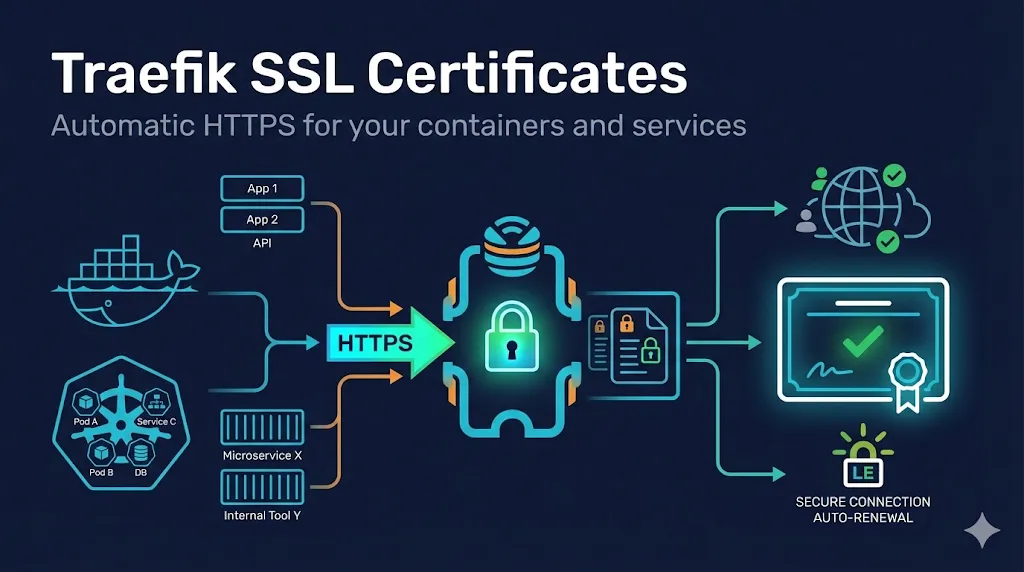
Version note: This guide covers Traefik v3.x syntax. If you're using Traefik v2.x, some configuration keys differ (e.g., certificatesResolvers was certResolvers in some contexts). Check the v2 to v3 migration guide if upgrading.
What makes Traefik different:
- Automatic discovery - Traefik detects services via Docker labels, Kubernetes annotations, or config files
- Built-in ACME - Native Let's Encrypt integration with automatic renewal
- Dynamic configuration - Add or remove certificates without restarts
- Multiple providers - Works with Docker, Kubernetes, file-based config, and more
1. Traefik TLS Architecture
Understanding how Traefik handles TLS helps you configure it correctly.
Key Concepts
| Concept | Purpose |
|---|---|
| Entrypoints | Where Traefik listens (ports 80, 443) |
| Routers | Match requests to services, decide HTTP vs HTTPS |
| Certificate Resolvers | How certificates are obtained (ACME, files) |
| TLS Stores | Where certificates are stored and managed |
Traffic Flow
Client → Entrypoint (443, TLS termination) → Router (routing decision) → Service (HTTP internally)
TLS termination happens at the entrypoint level—Traefik decrypts incoming HTTPS traffic there. Routers then make routing decisions based on rules (Host, Path, Headers). Your backend services typically run unencrypted on the internal network—Traefik handles the HTTPS complexity.
Static vs Dynamic Configuration:
- Static config - Entrypoints, ACME resolvers, providers (set at startup)
- Dynamic config - Routers, services, certificates, middlewares (can change at runtime)
2. Automatic Certificates with Let's Encrypt
This is Traefik's superpower—automatic, free SSL certificates with zero manual intervention.
Basic ACME Configuration
Static configuration (traefik.yml):
entryPoints:
  web:
    address: ":80"
  websecure:
    address: ":443"

certificatesResolvers:
  letsencrypt:
    acme:
      email: admin@example.com
      storage: /letsencrypt/acme.json
      httpChallenge:
entryPoint: web| Setting | Purpose |
|---|---|
| Let's Encrypt notifications (expiration warnings) | |
| storage | File where certificates are stored (persist this!) |
| httpChallenge.entryPoint | Which entrypoint handles ACME HTTP-01 challenges |
Docker Compose Example
version: "3.9"

services:
  traefik:
    image: traefik:v3.0
    command:
      - "--providers.docker=true"
      - "--providers.docker.exposedbydefault=false"
      - "--entrypoints.web.address=:80"
      - "--entrypoints.websecure.address=:443"
      - "--certificatesresolvers.letsencrypt.acme.httpchallenge=true"
      - "--certificatesresolvers.letsencrypt.acme.httpchallenge.entrypoint=web"
      - "--certificatesresolvers.letsencrypt.acme.email=admin@example.com"
      - "--certificatesresolvers.letsencrypt.acme.storage=/letsencrypt/acme.json"
    ports:
      - "80:80"
      - "443:443"
    volumes:
      - "./letsencrypt:/letsencrypt"
      - "/var/run/docker.sock:/var/run/docker.sock:ro"

  myapp:
    image: nginx:alpine
    labels:
      - "traefik.enable=true"
      - "traefik.http.routers.myapp.rule=Host(`app.example.com`)"
      - "traefik.http.routers.myapp.entrypoints=websecure"
- "traefik.http.routers.myapp.tls.certresolver=letsencrypt"Critical:
The letsencrypt volume must persist. If you lose acme.json, Traefik requests new certificates—and you might hit Let's Encrypt rate limits.
Set proper permissions (contains private keys!):
# Create the file if it doesn't exist
touch ./letsencrypt/acme.json

# Set restrictive permissions
chmod 600 ./letsencrypt/acme.json
Challenge Types
Let's Encrypt needs to verify you control the domain. Traefik supports three methods:
| Challenge | How It Works | When to Use |
|---|---|---|
| HTTP-01 | Requests /.well-known/acme-challenge/ on port 80 | Most common, simple setup |
| TLS-ALPN-01 | Verification over TLS on port 443 | When port 80 is blocked |
| DNS-01 | Create a DNS TXT record | Wildcards, internal servers |
DNS Challenge for Wildcards
certificatesResolvers:
  letsencrypt:
    acme:
      email: admin@example.com
      storage: /letsencrypt/acme.json
      dnsChallenge:
        provider: cloudflare
        resolvers:
          - "1.1.1.1:53"
- "8.8.8.8:53"DNS providers require API credentials via environment variables:
Docker Compose example with Cloudflare:
services:
  traefik:
    environment:
      - CF_API_EMAIL=your-cloudflare-email@example.com
      - CF_API_KEY=your-cloudflare-global-api-key
      # Or use scoped API token:
# - CF_DNS_API_TOKEN=your-cloudflare-dns-tokenEach DNS provider has different env vars. See Traefik's DNS provider documentation for your provider's requirements.
HTTP to HTTPS Redirect
Force all traffic to HTTPS:
Global redirect (static config):
entryPoints:
  web:
    address: ":80"
    http:
      redirections:
        entryPoint:
          to: websecure
          scheme: https
  websecure:
address: ":443"Per-service redirect (Docker labels):
labels:
  - "traefik.http.routers.myapp-http.rule=Host(`app.example.com`)"
  - "traefik.http.routers.myapp-http.entrypoints=web"
  - "traefik.http.routers.myapp-http.middlewares=redirect-to-https"
  - "traefik.http.middlewares.redirect-to-https.redirectscheme.scheme=https"
  - "traefik.http.middlewares.redirect-to-https.redirectscheme.permanent=true"
3. Manual Certificate Configuration
When you can't use Let's Encrypt—internal services, enterprise PKI, or wildcard certificates from commercial CAs.
File-Based Certificates
Dynamic configuration (certs.yml):
tls:
  certificates:
    - certFile: /certs/example.com.crt
      keyFile: /certs/example.com.key
    - certFile: /certs/wildcard.example.com.crt
keyFile: /certs/wildcard.example.com.keyStatic configuration to load dynamic config:
providers:
  file:
    filename: /etc/traefik/certs.yml
watch: trueThe watch: true setting means Traefik reloads certificates when the file changes—no restart required.
Docker Compose with Manual Certificates
version: "3.9"

services:
  traefik:
    image: traefik:v3.0
    command:
      - "--providers.docker=true"
      - "--providers.file.filename=/etc/traefik/dynamic.yml"
      - "--providers.file.watch=true"
      - "--entrypoints.web.address=:80"
      - "--entrypoints.websecure.address=:443"
    ports:
      - "80:80"
      - "443:443"
    volumes:
      - "/var/run/docker.sock:/var/run/docker.sock:ro"
      - "./certs:/certs:ro"
      - "./dynamic.yml:/etc/traefik/dynamic.yml:ro"

  myapp:
    image: nginx:alpine
    labels:
      - "traefik.enable=true"
      - "traefik.http.routers.myapp.rule=Host(`app.example.com`)"
      - "traefik.http.routers.myapp.entrypoints=websecure"
- "traefik.http.routers.myapp.tls=true"Note: With manual certificates, use tls=true instead of tls.certresolver.
Default Certificate
Set a fallback certificate for requests without SNI or unmatched domains:
tls:
  stores:
    default:
      defaultCertificate:
        certFile: /certs/default.crt
keyFile: /certs/default.key4. Kubernetes TLS Configuration
Traefik integrates with Kubernetes via IngressRoute CRDs or standard Ingress resources.
IngressRoute with Let's Encrypt
Traefik Helm values (values.yaml):
additionalArguments:
  - "--certificatesresolvers.letsencrypt.acme.email=admin@example.com"
  - "--certificatesresolvers.letsencrypt.acme.storage=/data/acme.json"
  - "--certificatesresolvers.letsencrypt.acme.httpchallenge.entrypoint=web"

persistence:
  enabled: true
  size: 128Mi
IngressRoute:
apiVersion: traefik.io/v1alpha1
kind: IngressRoute
metadata:
  name: myapp
  namespace: default
spec:
  entryPoints:
    - websecure
  routes:
    - match: Host(`app.example.com`)
      kind: Rule
      services:
        - name: myapp
          port: 80
  tls:
certResolver: letsencryptIngressRoute with Kubernetes Secrets
Use certificates stored as Kubernetes Secrets:
Create the secret:
kubectl create secret tls myapp-tls \
  --cert=app.example.com.crt \
  --key=app.example.com.key
IngressRoute:
apiVersion: traefik.io/v1alpha1
kind: IngressRoute
metadata:
  name: myapp
spec:
  entryPoints:
    - websecure
  routes:
    - match: Host(`app.example.com`)
      kind: Rule
      services:
        - name: myapp
          port: 80
  tls:
secretName: myapp-tlsStandard Kubernetes Ingress
apiVersion: networking.k8s.io/v1
kind: Ingress
metadata:
  name: myapp
  annotations:
    traefik.ingress.kubernetes.io/router.entrypoints: websecure
    traefik.ingress.kubernetes.io/router.tls: "true"
spec:
  tls:
    - hosts:
        - app.example.com
      secretName: myapp-tls
  rules:
    - host: app.example.com
      http:
        paths:
          - path: /
            pathType: Prefix
            backend:
              service:
                name: myapp
                port:
number: 805. TLS Options and Security
Configure TLS versions, cipher suites, and other security settings.
Minimum TLS Version
tls:
  options:
    default:
      minVersion: VersionTLS12

    strict:
minVersion: VersionTLS13Apply options to a router:
# Docker label
- "traefik.http.routers.myapp.tls.options=strict@file"

# IngressRoute
tls:
  options:
name: strictCustom Cipher Suites
tls:
  options:
    modern:
      minVersion: VersionTLS12
      cipherSuites:
        - TLS_ECDHE_ECDSA_WITH_AES_256_GCM_SHA384
        - TLS_ECDHE_RSA_WITH_AES_256_GCM_SHA384
        - TLS_ECDHE_ECDSA_WITH_CHACHA20_POLY1305
- TLS_ECDHE_RSA_WITH_CHACHA20_POLY1305HSTS Headers
http:
  middlewares:
    hsts:
      headers:
        stsSeconds: 31536000
        stsIncludeSubdomains: true
stsPreload: trueApply to router:
- "traefik.http.routers.myapp.middlewares=hsts@file"
→ See our HSTS guide for more on Strict Transport Security.
6. Certificate Renewal and Monitoring
Automatic Renewal
Let's Encrypt certificates are valid for 90 days. Traefik automatically renews them 30 days before expiration. No action required—just ensure:
- The
acme.jsonfile persists across container restarts - The ACME challenge endpoint remains accessible
- Your email is valid for expiration warnings
Checking Certificate Status
Via command line:
# Check certificate from Traefik
openssl s_client -connect app.example.com:443 -servername app.example.com </dev/null 2>/dev/null | openssl x509 -noout -dates

# Check acme.json contents (careful—contains private keys!)
cat acme.json | jq '.letsencrypt.Certificates[].domain'
Rate Limit Awareness
Let's Encrypt has rate limits:
- 50 certificates per domain per week
- 5 duplicate certificates per week
- 5 failed validations per hour
For testing, use the staging environment:
certificatesResolvers:
  letsencrypt:
    acme:
      caServer: https://acme-staging-v02.api.letsencrypt.org/directory
# ... rest of configStaging certificates aren't trusted by browsers but don't count against rate limits.
7. Troubleshooting
Certificate Not Loading
Symptoms: Browser shows default Traefik certificate or "connection refused"
Check:
- Router has
tls=trueortls.certresolverset - Certificate files exist and are readable
- Certificate matches the requested hostname
- No syntax errors in dynamic config
# Verify Traefik can read cert files
docker exec traefik cat /certs/example.com.crt | openssl x509 -noout -subject

# Check Traefik logs
docker logs traefik 2>&1 | grep -i "certificate\|tls\|error"
ACME Challenge Failing
Symptoms: Let's Encrypt returns "unauthorized" or "connection refused"
| Issue | Solution |
|---|---|
| Port 80 blocked | Ensure firewall/cloud security allows port 80 inbound |
| Wrong entrypoint | HTTP challenge needs web entrypoint (port 80) |
| DNS not pointing | Verify domain resolves to Traefik's IP |
| Cloudflare proxy | Use "Full (strict)" SSL mode or DNS challenge |
Debug ACME:
# Enable ACME debug logging
log:
  level: DEBUG

# Test HTTP challenge manually
curl -v http://app.example.com/.well-known/acme-challenge/test
Chain Issues
Symptoms: Certificate works in browser but fails in curl/API clients
Solution - ensure your certificate file includes the full chain:
# Certificate file should contain (in order):
# 1. Your certificate
# 2. Intermediate certificate(s)
# 3. (Optional) Root certificate

cat server.crt intermediate.crt > fullchain.crt
→ See our Certificate Chain guide for more on chain ordering.
503 Service Unavailable
Symptoms: HTTPS works but returns 503 error
| Cause | Solution |
|---|---|
| Service not found | Verify traefik.http.services.*.loadbalancer.server.port is set |
| Backend not running | Check container health with docker ps |
| Network isolation | Ensure Traefik and backend share a Docker network |
Mixed Content Warnings
Symptoms: Page loads but shows security warnings, some assets blocked
This happens when your HTML references HTTP resources on an HTTPS page. Fix by:
- Using protocol-relative URLs (
//cdn.example.com/asset.js) - Forcing HTTPS URLs in your application code
- Adding the
upgrade-insecure-requestsCSP header
8. Best Practices
Production Checklist
| Practice | Why |
|---|---|
| Persist acme.json | Losing it means re-requesting all certificates |
| Set proper file permissions | chmod 600 acme.json - contains private keys |
| Use DNS challenge for wildcards | HTTP challenge can't validate wildcards |
| Monitor certificate expiration | Even with auto-renewal, things can fail |
| Test with staging first | Avoid rate limits during development |
| Enable HSTS | Prevent downgrade attacks |
| Disable TLS 1.0/1.1 | Use TLS 1.2+ minimum |
Security Configuration
tls:
  options:
    default:
      minVersion: VersionTLS12
      sniStrict: true

http:
  middlewares:
    security-headers:
      headers:
        stsSeconds: 31536000
        stsIncludeSubdomains: true
        contentTypeNosniff: true
browserXssFilter: trueHigh Availability Considerations
For multi-instance Traefik deployments:
- Use distributed ACME storage (Consul, etcd, Redis)
- Or use a single Traefik instance for certificate management
- Consider cert-manager in Kubernetes environments
certificatesResolvers:
  letsencrypt:
    acme:
storage: consul://localhost:8500/traefik/acme/account9. Frequently Asked Questions
Quick Reference
Docker Labels Cheat Sheet
# Enable Traefik for container
- "traefik.enable=true"

# Basic HTTPS router
- "traefik.http.routers.myapp.rule=Host(`app.example.com`)"
- "traefik.http.routers.myapp.entrypoints=websecure"
- "traefik.http.routers.myapp.tls.certresolver=letsencrypt"

# Manual certificate (from file)
- "traefik.http.routers.myapp.tls=true"

# HTTP to HTTPS redirect
- "traefik.http.routers.myapp-http.rule=Host(`app.example.com`)"
- "traefik.http.routers.myapp-http.entrypoints=web"
- "traefik.http.routers.myapp-http.middlewares=redirect-https"
- "traefik.http.middlewares.redirect-https.redirectscheme.scheme=https"

# Specify service port (if not default)
- "traefik.http.services.myapp.loadbalancer.server.port=8080"

# TLS options
- "traefik.http.routers.myapp.tls.options=modern@file"
Minimal Let's Encrypt Setup
# traefik.yml
entryPoints:
  web:
    address: ":80"
    http:
      redirections:
        entryPoint:
          to: websecure
  websecure:
    address: ":443"

certificatesResolvers:
  letsencrypt:
    acme:
      email: admin@example.com
      storage: /letsencrypt/acme.json
      httpChallenge:
        entryPoint: web

providers:
  docker:
    exposedByDefault: false